Loops infinitely for me. Until I explicitly cancel it using KM.
I'm assuming that you are forced to use File > Quit Engine.
If you add the following action before the Switch/Case in the macro, trigger it, then cancel it, I'd be curious to see what you see in the Engine.log (Help > Open Logs Folder).
Log.kmactions (425 B)

Here's what I see with a typical test:
( expand / collapse )
2026-11-02 17:03:02 Execute macro “Pause while idle - @_jims” from trigger Editor
2026-11-02 17:03:02 Log: local_Last []; local_Idle [0.69]
2026-11-02 17:03:03 Execute macro “Pause while idle - @_jims” from trigger Execute Macro
2026-11-02 17:03:03 Log: local_Last [0.69]; local_Idle [1.82]
2026-11-02 17:03:04 Execute macro “Pause while idle - @_jims” from trigger Execute Macro
2026-11-02 17:03:04 Log: local_Last [1.82]; local_Idle [2.13]
2026-11-02 17:03:04 Execute macro “Pause while idle - @_jims” from trigger Execute Macro
2026-11-02 17:03:04 Log: local_Last [2.13]; local_Idle [2.44]
2026-11-02 17:03:04 Execute macro “Pause while idle - @_jims” from trigger Execute Macro
2026-11-02 17:03:04 Log: local_Last [2.44]; local_Idle [2.74]
2026-11-02 17:03:05 Execute macro “Pause while idle - @_jims” from trigger Execute Macro
2026-11-02 17:03:05 Log: local_Last [2.74]; local_Idle [0.54]
During my test, the movement of the mouse generated local_Idle < local_Last which caused the macro to fall through the Switch/Case to the Display text large.
BTW, once the logic is worked out, I'd recommend moving the check within an Until action. The calling itself approach is useful during testing, but when running at a high frequency, obviously clutters the Engine.log.
At its simplest (and bearing in mind the differences between this and IDLE() mentioned above), all you need to do is save HIDIdleTime and then pause until a re-evaluation gives a lower value (pause until user interacts), or evaluate until greater than n for a "pause until idle for n".
So:
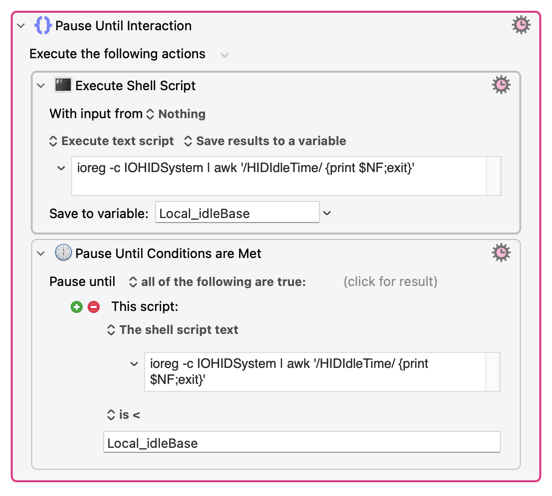
...or:

With the new version, it terminates.
As I said, the new version terminates on mouse movement.
But, please explain how I turn what you wrote into an IDLE() replacement?
By new version, I'm assuming you are referring to the macro using JXA.
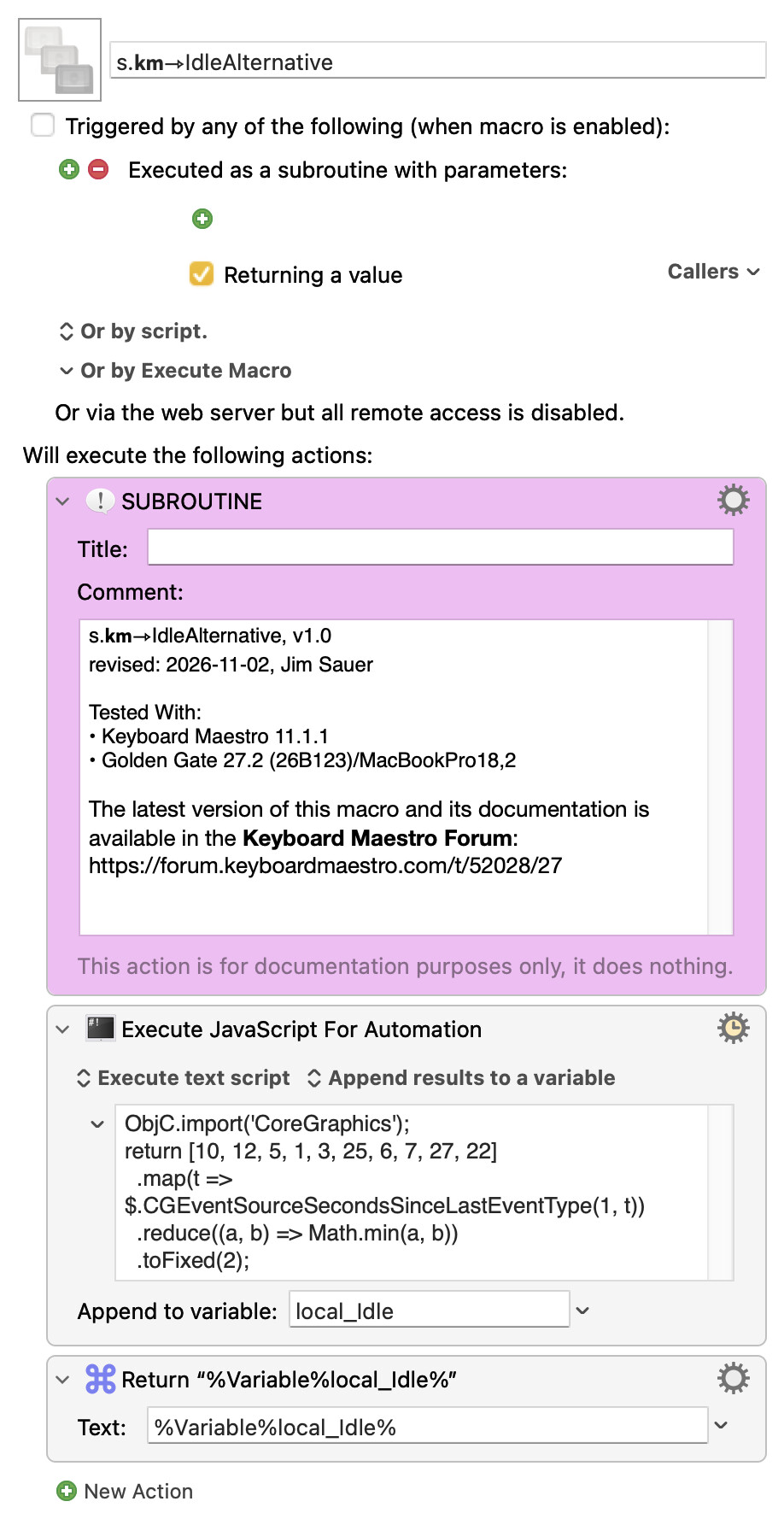
ObjC.import('CoreGraphics');
return [10, 12, 5, 1, 3, 25, 6, 7, 27, 22]
  .map(t => $.CGEventSourceSecondsSinceLastEventType(1, t))
  .reduce((a, b) => Math.min(a, b))
  .toFixed(2);
You can put the JXA in a subroutine like this...
Download: s.𝗸𝗺⇾IdleAlternative.kmmacros (4.7 KB)
Macro-Notes
- Macros are always disabled when imported into the Keyboard Maestro Editor.
- The user must ensure the macro is enabled.
- The user must also ensure the macro's parent macro-group is enabled.
System Information
- macOS 27.2 (26B123)
- Keyboard Maestro v11.1.1
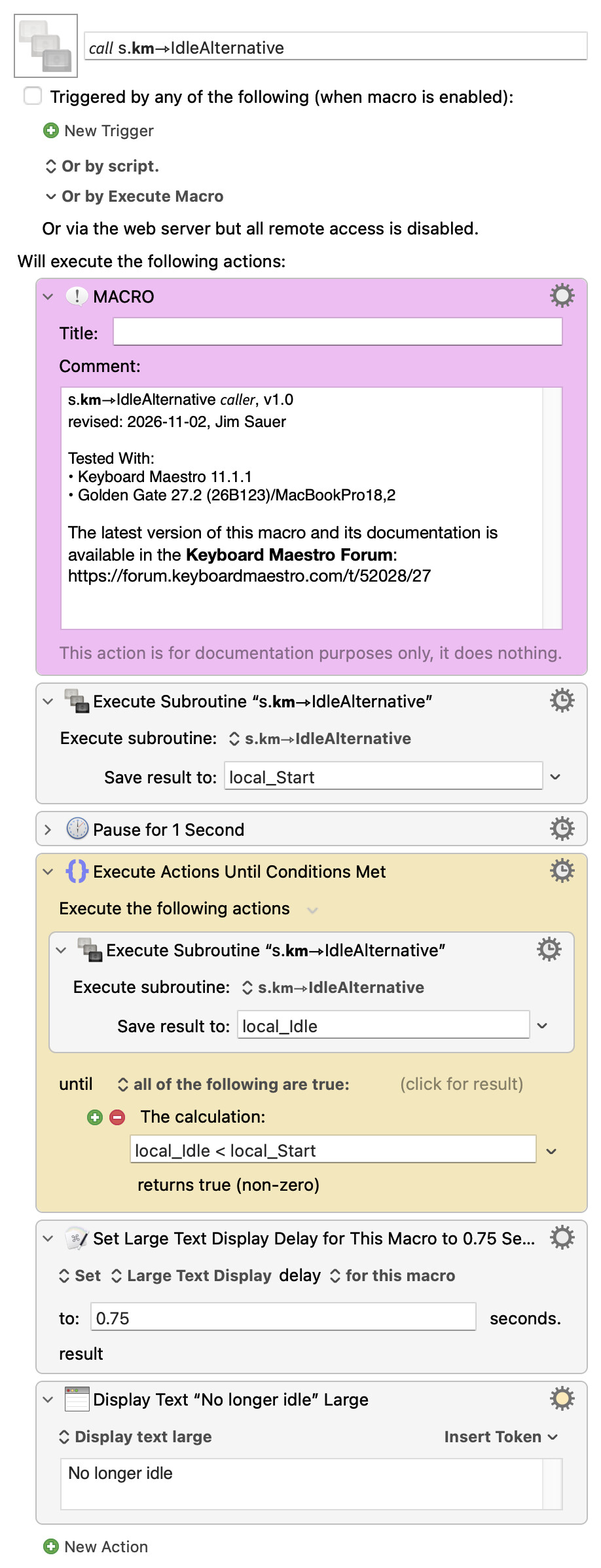
And then call it like this...
Download: 𝘤𝘢𝘭𝘭 s.𝗸𝗺⇾IdleAlternative.kmmacros (6.0 KB)
Macro-Notes
- Macros are always disabled when imported into the Keyboard Maestro Editor.
- The user must ensure the macro is enabled.
- The user must also ensure the macro's parent macro-group is enabled.
System Information
- macOS 27.2 (26B123)
- Keyboard Maestro v11.1.1
So if you open the Value Inspector, add a calculation of IDLE(), and then take your hands off the input devices, the IDLE() function does not return increasing values?
If so there is likely some sort of HID event that the system is detecting on a regular basis that is reseting the IDLE time - try unplugging your USB devices and see if that resolves the issue.
Peter should be the one to fix IDLE().
I’m going to stop working on it now since I already invested too much time on it. Sorry.
The value inspector returns increasing values.
So I'm unclear on how the IDLE() function is not working other than being a little less accurate?
Does it return a small number after you move the mouse or type a key?
Does it increase in value if you stop moving the mouse and typing keys?
Hi, @peternlewis. I obviously can't speak for @ikenassi, but for me something is often resetting IDLE() a few seconds after I stop using the trackpad, etc. I don't see this every time I stop using the trackpad, but almost always (usually between 2 and 5 seconds). Also, interestingly, once it gets inexplicably reset it continues to count up without a second reset.
If I interact with the trackpad, the cycle repeats. I have no connected peripherals.
I'm using:
• Keyboard Maestro 11.1.1
• Golden Gate 27.2 (26B123)/MacBookPro18,2
Yes, but as mentioned above, it also often returns to a small number a few seconds later.
Yes.
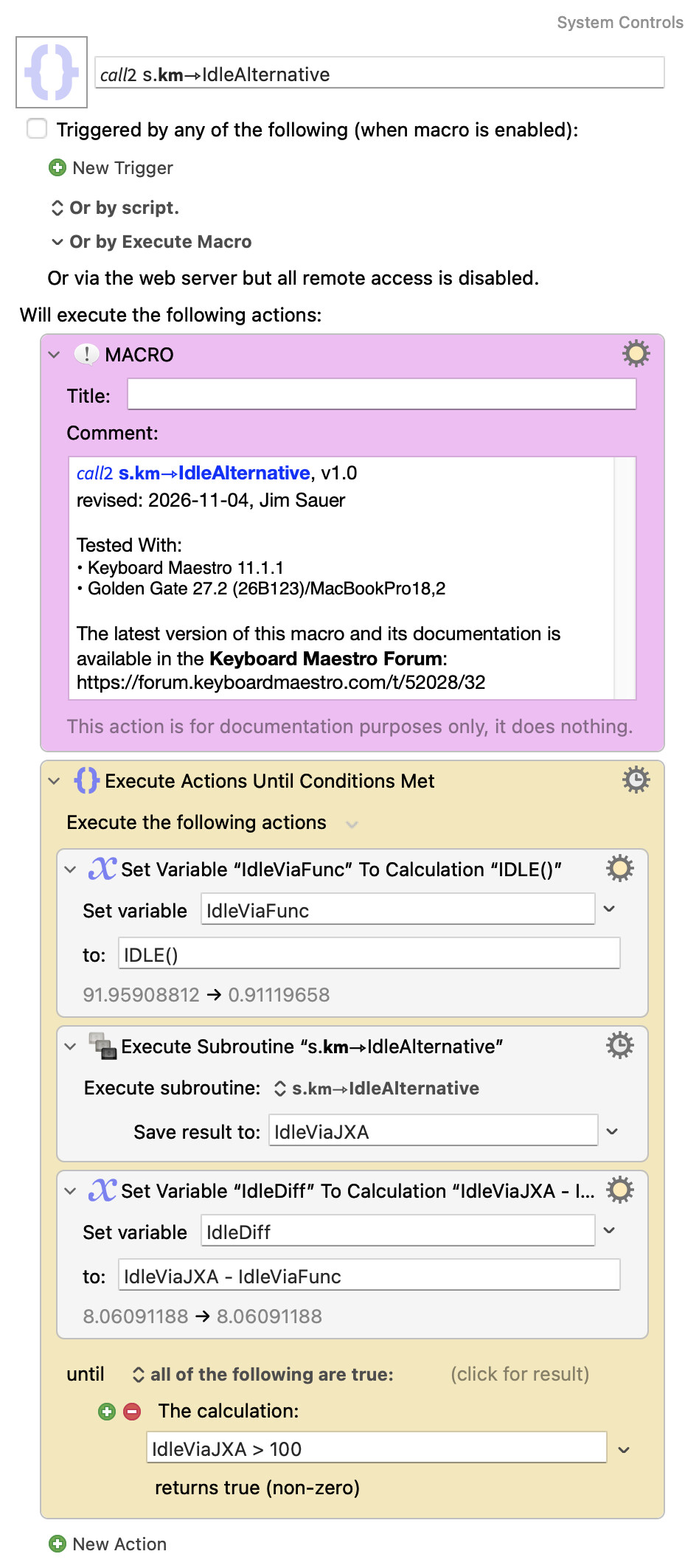
Here's my test macro. It calls the subroutine macro I shared above.
Download: 𝘤𝘢𝘭𝘭𝟤 s.𝗸𝗺⇾IdleAlternative.kmmacros (5.8 KB)
Macro-Notes
- Macros are always disabled when imported into the Keyboard Maestro Editor.
- The user must ensure the macro is enabled.
- The user must also ensure the macro's parent macro-group is enabled.
System Information
- macOS 27.2 (26B123)
- Keyboard Maestro v11.1.1
And the Value Inspector ...
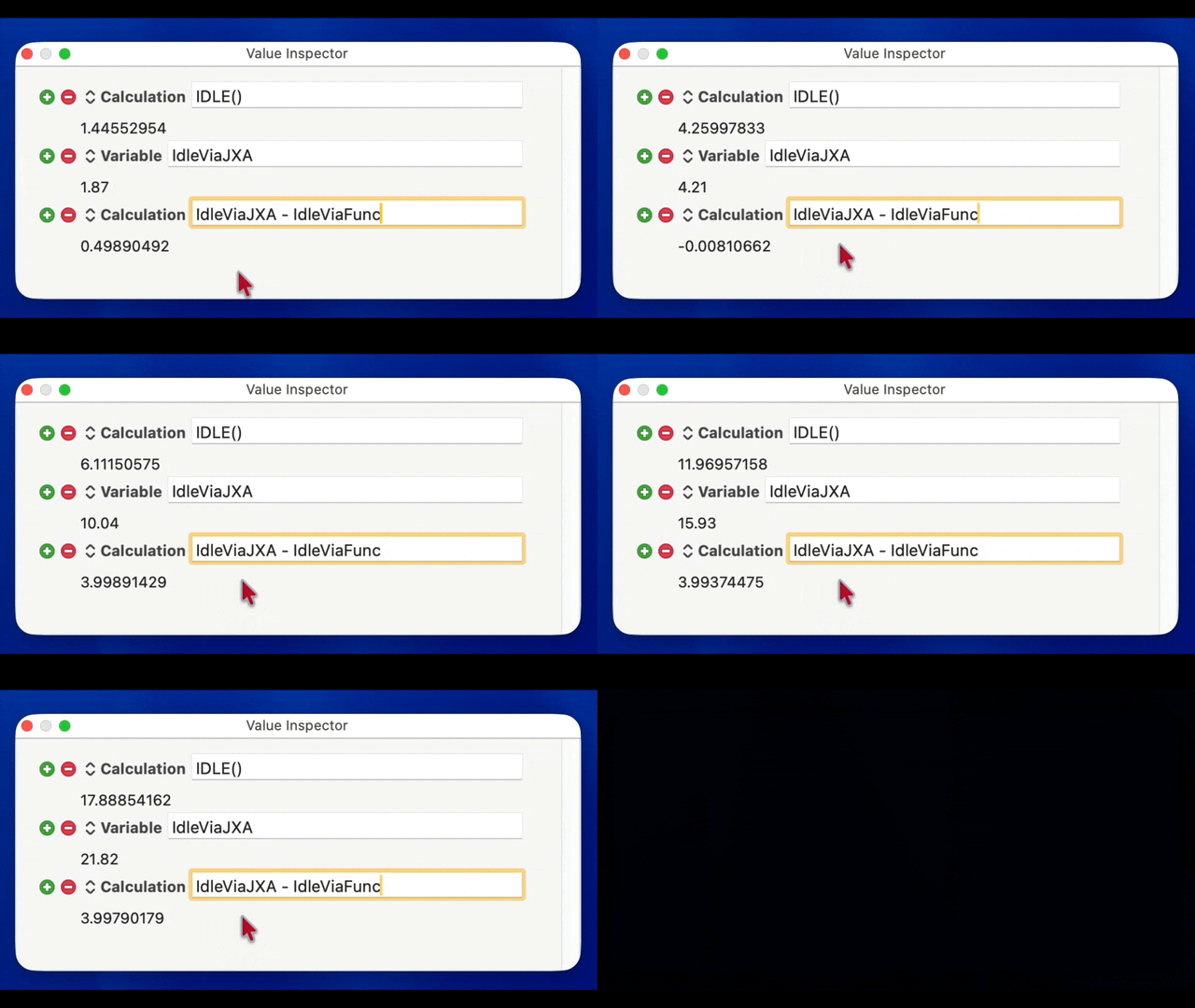
So it sounds like it is more or less behaving properly, but after some events (maybe just trackpad) it occasionally gets an extra event a few seconds later that resets the IDLE time.
That seems like an Apple issue, and not something I need to worry to much about resolving sicne the primary behaviour remains fine.
Please give me a reliable way to kick off a macro X when the system has been idle for a specified period of time (several minutes, for example), and under one of more conditions: C1, C2, and C3. Every attempt at using the standard IDLE() has been unreliable. (E.G. set Old_Idle to IDLE(), and then triggering when IDLE() < Old_Idle. I've been using a cron job that runs every 5 minutes. It used to work reliably before Taho 27.2.
It seems like you could continue to use the cron trigger and then do an early cancel this macro if IDLE() < specified period. (I'm not following the C1, C2 and C3 portion of the requirement.)
If that's not the case, if you shared your current macro, I suspect someone on the forum could help you address your requirement even if the IDLE() function has changed a bit since Tahoe 27.2.
If you want a macro to trigger after your Mac has been idle for a while, use the "Idle trigger". Then test for C1, 2, and 3, then proceed accordingly.
That looks... wrong (and it certainly doesn't do what you are asking for). It'll only be true when your Mac has been idle for less than the previously-stored idle time. And, because of the evaluation delay demonstrated earlier, if you manage to store a low idle time in Old_Idle you could have trouble getting a value less than that.
IDLE() should be "reliable" over longer periods -- just not very precise. So the trigger may fire after 5 minutes idle or 5 minutes and 10 seconds, but it should still fire. Unless, of course, something is resetting your idle counter.
That last is easily tested -- what's the output of the following?
IDLE Check.kmmacros (3.2 KB)
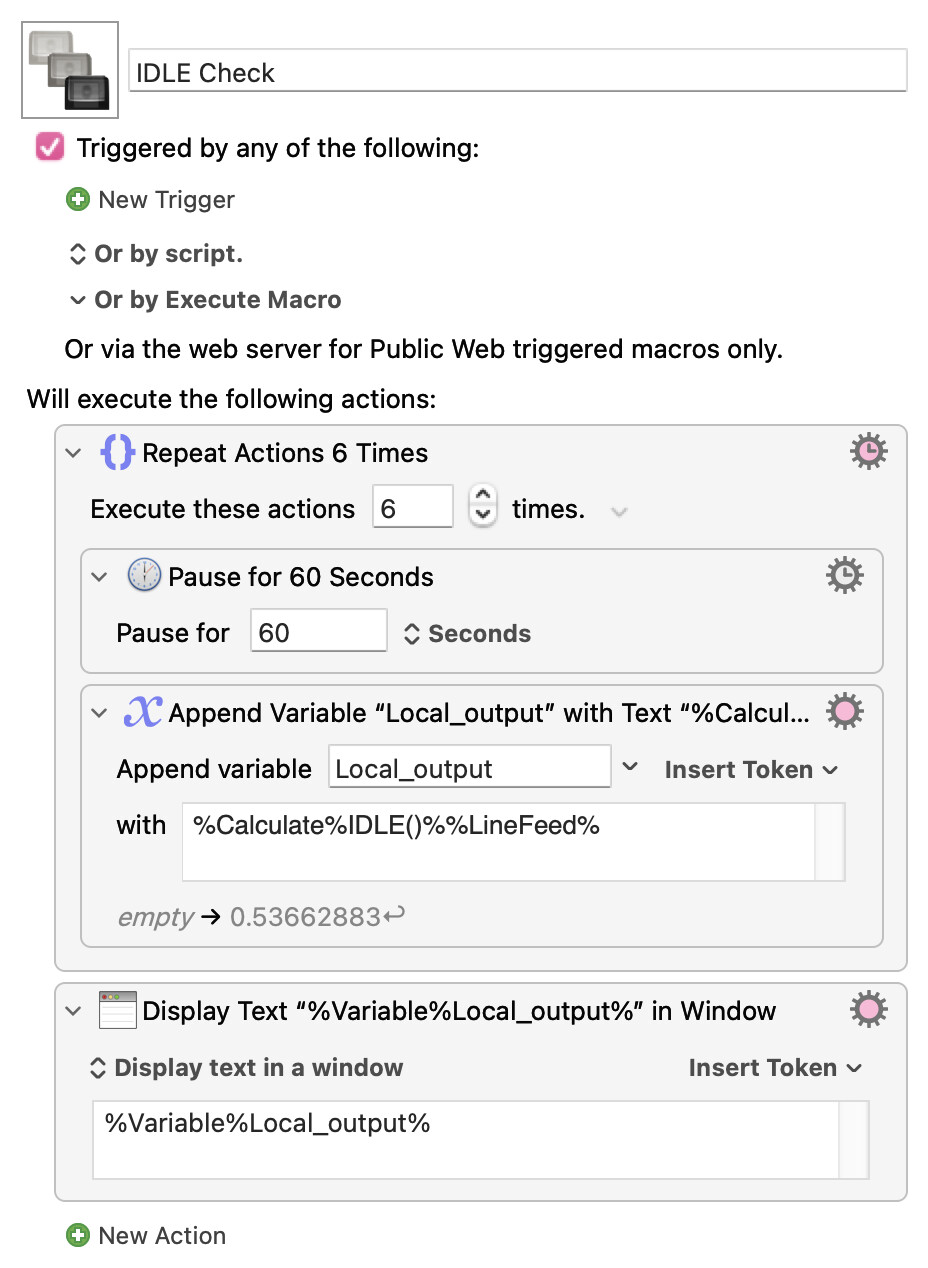
Make sure that any periodic macros that might reset the timer are disabled, hit "Run", come back after 6 minutes.
The only way to have conditions on triggers is via the macro group that contains them. And in that case you put C1, C2, C3 in the macro group configuration, and use the Idle trigger.
I don't really know what you are trying to do, but here is a potential way to do it:
Macro 1, IDLE trigger after 1 minute, not repeating every minute.
- Set Variable “Macro Is Live” to 1
Macro 2, IDLE trigger after 5 (or whatever) minutes, repeating every minute.
- If Variable “Macro Is Live” is 1
- If C1, C2, C3
- Set Variable “Macro Is Live” to 0
- Do stuff
- If C1, C2, C3
That should happen once when the system is sufficiently IDLE, and the conditions are met, and then not again until the system is not idle (though changing of the conditions will not result in an additional execution).
I'm testing, but it MAY be the case that the bug in macOS introduced in 27.2 is fixed in 27.2.1. At least my initial test in which I reverted to my old code seems to be working.
1 Like
I suspect what’s happening is this:
As I cycle through each space on each screen, the IDLE trigger gets reset with this AppleScript KM macro:
tell application "System Events"
-- see Complete list of AppleScript key codes.pdf
-- ^-right-arrow
    key code 124 using {control down}
end tell
I have not found a way around this. I don’t know of another way of cycling through spaces that doesn’t reset the IDLE() time.
OK, if you are simulating keystrokes then I'm not overly surprised that the Mac thinks it is no longer idle.
1 Like
WhichSpace has been mentioned before. I bring it up now because the docs say it is AppleScriptable:
# Switch one Space to the left or right
osascript -e 'tell application "WhichSpace" to switch left'
osascript -e 'tell application "WhichSpace" to switch right'
...which suggests you'll be able to switch Spaces without simulating keys and so without resetting IDLE().
2 Likes