I'm sorry, I didn't know English wasn't your first language.
It is no matter
Ok, I get it. Maybe I need to learn what “throw" means.
Sorry, I have another question
If none of them are true, what should I do if I want to perform another action?
In programming you can "throw" an error which is then "caught" by something else.
Consider the following:
Will Abort.kmmacros (2.5 KB)
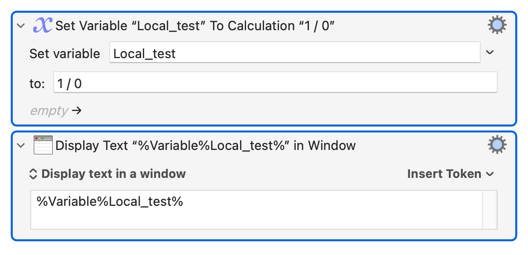
The second action won't usually* happen because the macro aborts with a "Can't divide by zero" error.
* Yes, you can turn off "Failure aborts macro" for that action...
You can handle the error yourself using the "Try/Catch" action, making it more user-friendly:
Try to Divide by Zero.kmmacros (4.7 KB)
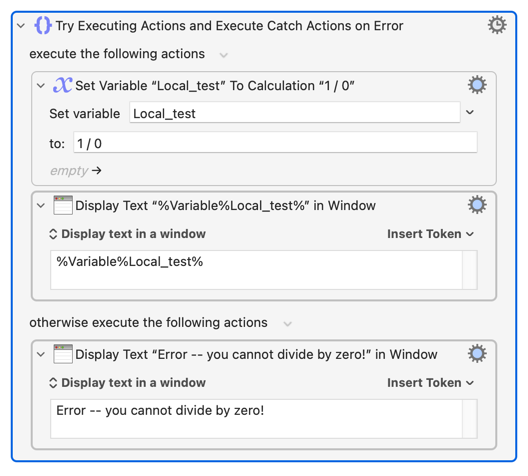
So the general form is:
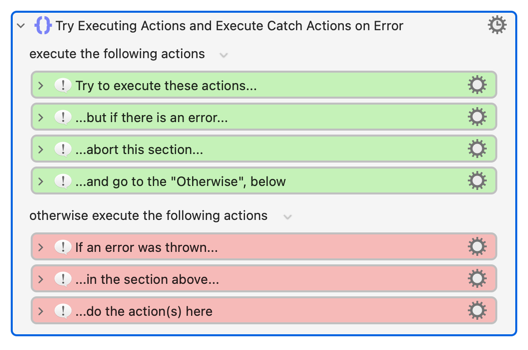
@Airy's method plays on this by deliberately throwing errors (using the "Throw" action) when Conditions are true. Going back to the pseudo-code from above:
try
   execute
      --- start of the green actions
      if (condition1 and condition2)
         throw an error
      end if
      if (condition3 and condition4)
         throw an error
      end if
      -- end of the green actions
   otherwise -- only executes on error
      -- start of the red actions
      perform_action_a()
      -- end of the red actions
end try
This is some next-level stuff and I'm probably not explaining it very well. Have a play around and include some "Display text" actions so you see how the execution branches. You should be able to follow the flow of control, and then you'll be able to answer:
1 Like
If you place an action directly after the two IF actions, that action will be performed if none of them is true. I do this all the time, and it works well.
1 Like
Thank you for explaining it in such detail. I get it.
1 Like
Thank you very much. I get it.
1 Like