Lunar shows iPad Air connected by cable as „Sidecar”, shows serial number and prefix each section by number, but I don’t know does it have any sense.
Interesting is that Shortcut „Find display” shows iPad as „Built-in Retina display”.
Lunar shows iPad Air connected by cable as „Sidecar”, shows serial number and prefix each section by number, but I don’t know does it have any sense.
Interesting is that Shortcut „Find display” shows iPad as „Built-in Retina display”.
I just got back from a meeting and need to complete a few things by end of day so it may spill over to tomorrow but I will certainly attend to it, sorry for any delay!
I always have my main secondary display to my left so it is always '1' . I will test with the third display in different positions and let you know.
I may also ask the Lunar developer who has an active Discord channel and responds rather quickly. If you want to beat me to it, the url is Discord
I cannot help here as I don't have an iPad.
That still seems complicated. Since you were using system_profiler before:
#!/bin/bash

sn="PCK0070201Q"

if [ $( system_profiler SPDisplaysDataType | grep -Eic ": ${sn}\s*$" ) -ge 1 ];then echo 1; else echo 0;fi
(Change sn to suit, obvs.)
But all this is beside the point -- detecting whether a particular screen is or isn't connected is irrelevant to the problem at hand. To summarise the OP:
Easy cases first...
If the iPad is always added to the left, or always to the right, of the "normal" displays then we can access screens by constant index -- regardless of whether the iPad is connected or not. Can you see why?
If the iPad is always inserted between the same two displays we just test the number of screens -- if 3 then the normal arrangement applies, if 4 then we adjust for the presence of the iPad. And it is always the same adjustment.
But the most interesting case is when there's no consistency where in the arrangement the iPad is inserted. I still can't see a way of getting the iPad's index from system_profiler or Lunar -- but we don't have to. iPads have obviously-different resolutions, both actual and nominal, to "normal" screens so we can use that.
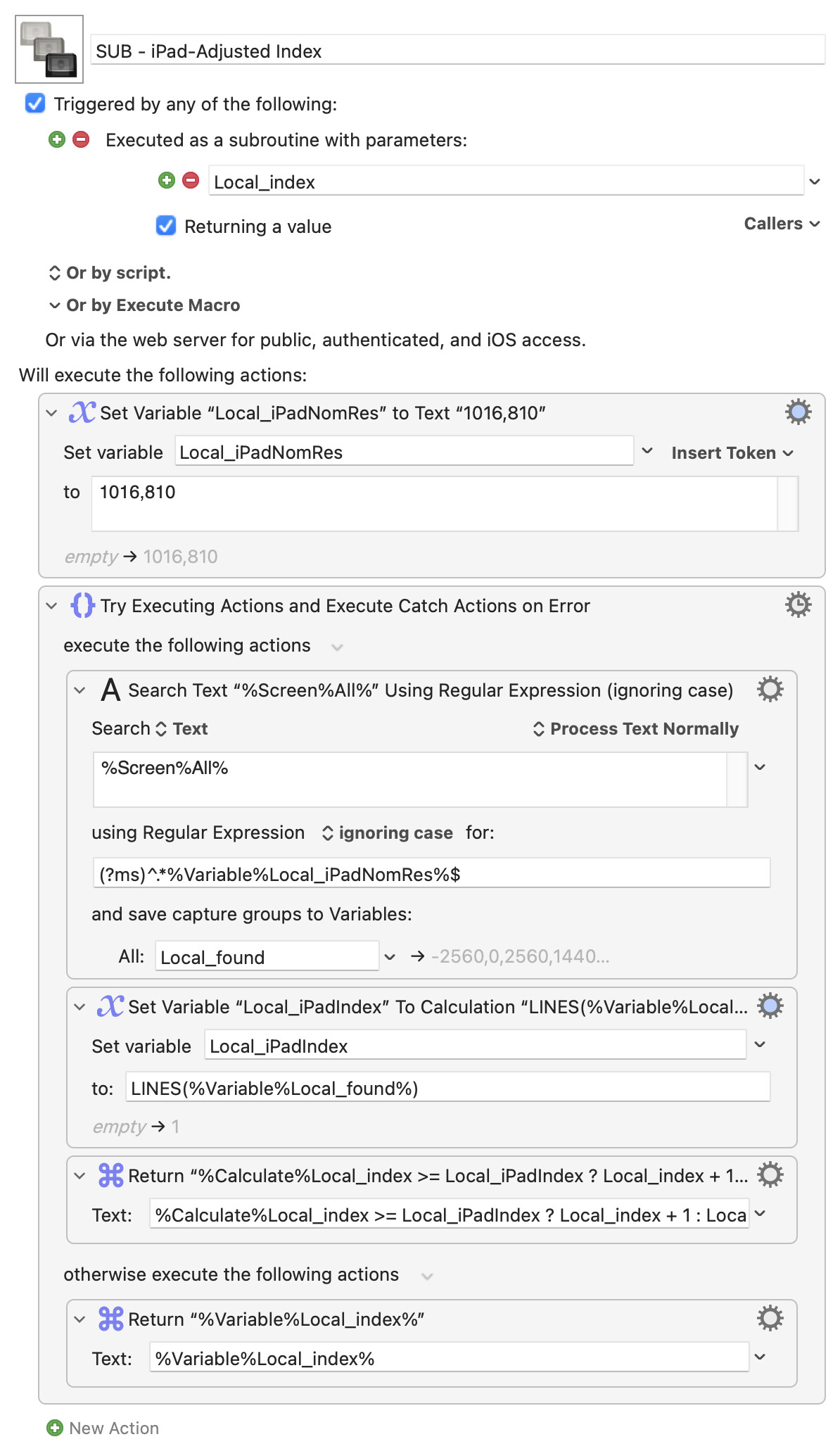
%Screens%All% gives us a linefeed-delimited list of all connected screens, in index order, with a screen's nominal resolution at the end of each line. We can use the iPad's position in the list to get all the indexes -- the iPad's index is the line number it was found in, the screens before the iPad in the list have their "normal" indexes, the ones after are normalIndex + 1.
Which you can put together in a subroutine, something like this:
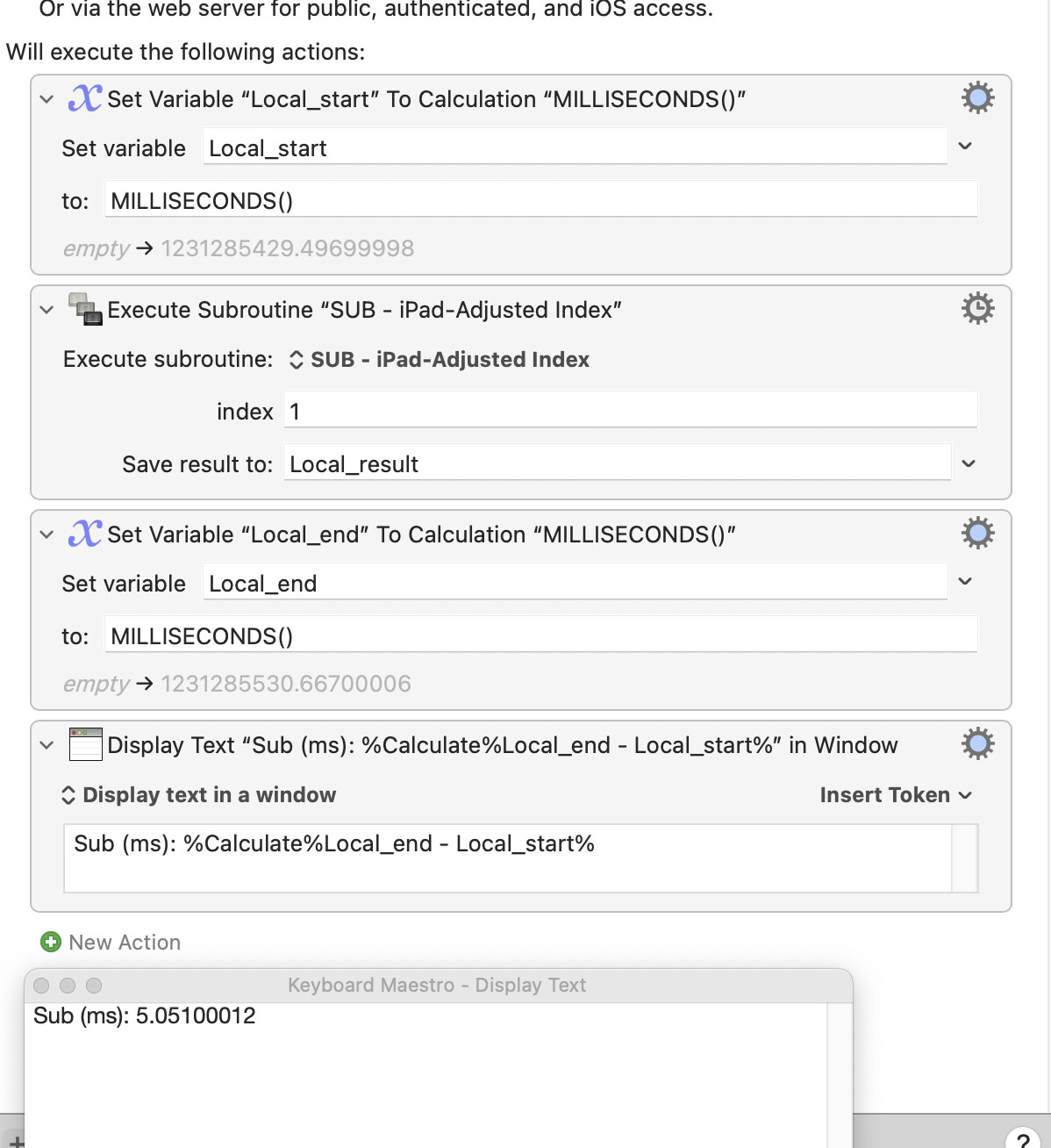
SUB - iPad-Adjusted Index.kmmacros (3.3 KB)
(You can even remove an Action and variable by including the LINES() call in the ternary instead of using Local_iPadIndex  )
)
Call it with the number (1 for leftmost, 2 for the next in, etc...) of the "normal" display you're interested in as the argument, it returns the KM screen index for you to use to target that screen.
I assume that you are talking about how Lunar assigns indices, is this correct? If yes, I have already asked the Lunar developer and will revert when I get a response as this may be simper than your creative macro.
On the detecting whether a particular monitor is connected I agree that is not part of the OP's ask but I was responding to your comment that the AppleScript approach was not ideal. Your approach is one I had nit yet thought of, I will give it a go.
Thanks.
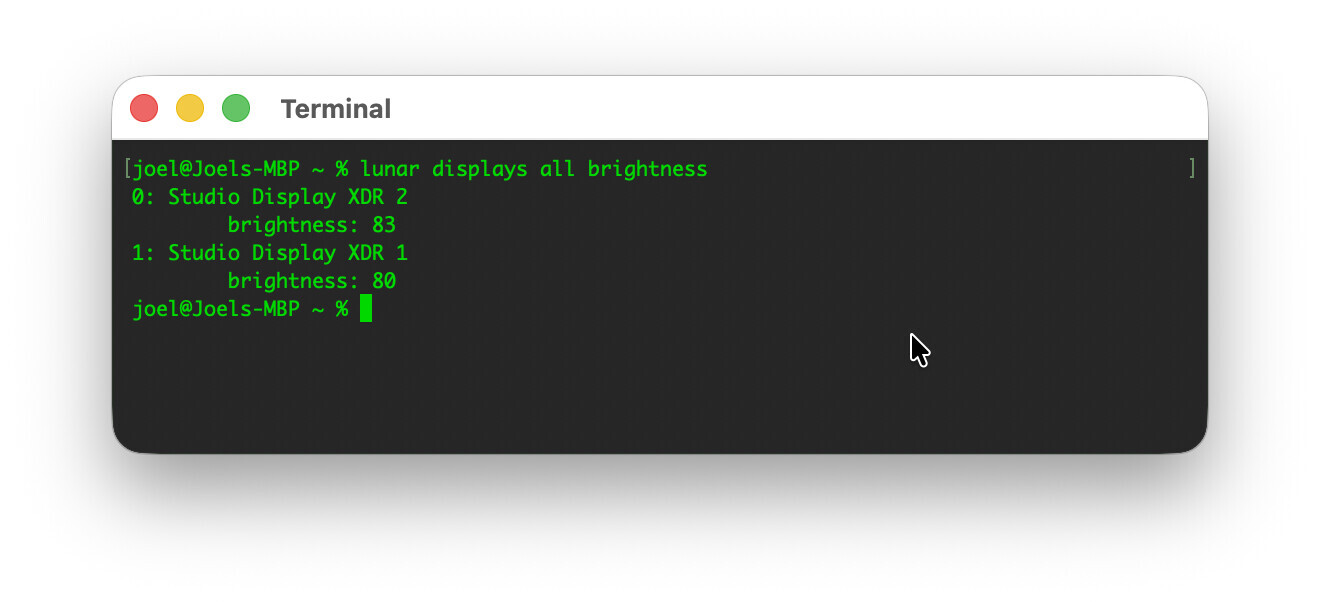
I suspect it doesn't -- it numbers the output, which isn't the same.
But it's easy to check. What's your setup that generated this output?
I'm guessing your "main" display is to the right. Make your "main" display the one on the left -- if those numbers really are indices you should get something like
[joel@Joels-MBP ~ % lunar displays all brightness
0: Studio Display XDR 1
brightness: 80
2: Studio Display XDR 2
brightness: 83
joel@Joels-MBP ~ %
Note the 2 for the second display.
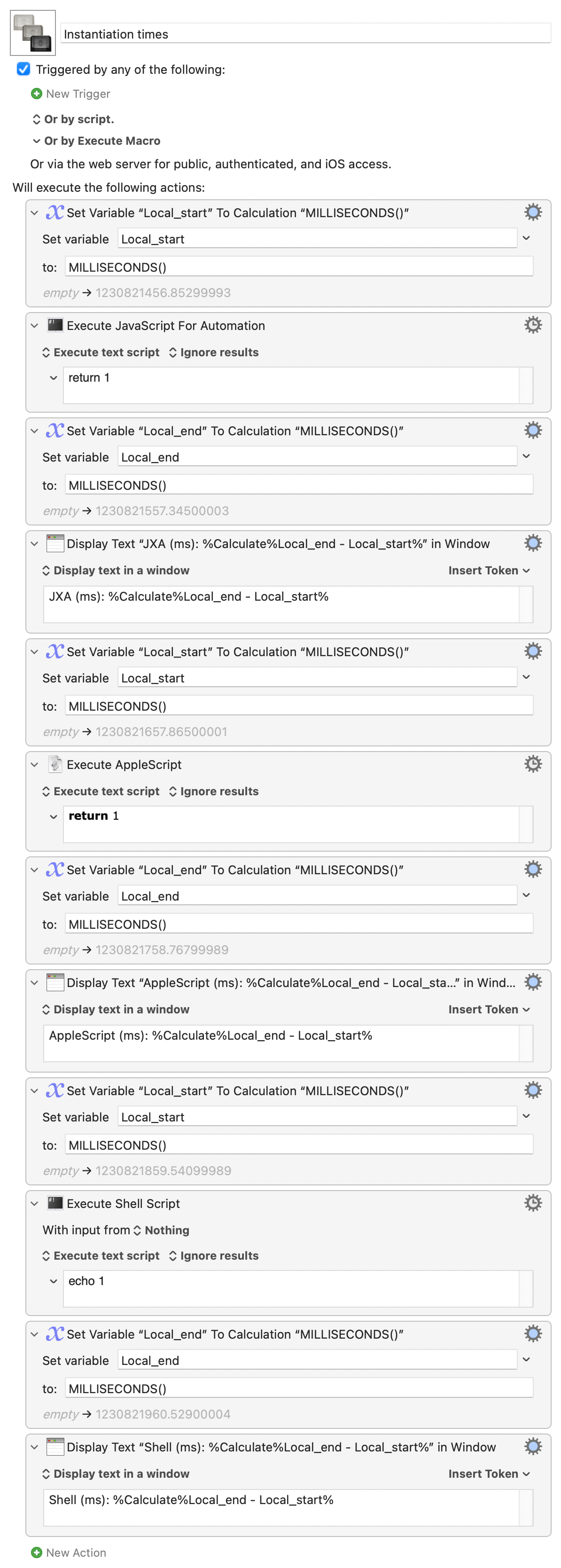
It's wrapping the shell command in an AS (that doesn't really add anything) that slows things down. JXA has an instantiation time, though not as long as AS. Shell is faster still:
Instantiation times.kmmacros (8.8 KB)
Even if Lunar works and is simpler (you've yet to extract those potential indices), I'm betting the KM subroutine is still faster:
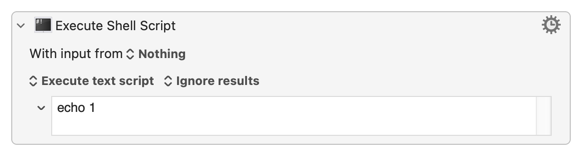
Granted, my Intel Mac is on the slow side. But I'd need a 300%-plus increase in CPU speed for a simple
...to execute more quickly than the "complicated" KM-native subroutine!
Have you worked out this bit yet?
Lunar: I confirm that there is no Smart Ordering (at least today).
Display Connection: I will give the shell script a try, I need to get much better at that! I can rattle off very few queries like that without AI helping! 
UPDATE:
I agree and thank you fr showing me that AppleScript wrapping a shell layer is pure overhead; teh shell wins hands down. Lesson learnt, thank you!
The one thing I will note is that I think there are two separate costs in play that pull in opposite directions:
'System_profiler SPDisplaysDataType` is heavy on the second axis (it walks the whole display subsystem), so a lightweight launcher around a heavy command still ends up slow.
The reason I think that I will be sticking with the JXA reading CoreGraphics directly is that the higher instantiation cost (relative to the raw shell) is more than offset by the near-zero work cost since it's in-process. Does this make sense?.
Constant Placement: I think so, it is because should the placement be constant then the index will be constant and never change; for example, if my main screen is in front me and my travel screen is to my left then the travel screen will always be screen 1.
Ahhhh, very few words other than brilliant! I love it.
What would happen were you to have multiple screens -- in this case iPads -- with the same resolution. Presumably you could sort on the x co-ordinate.
It might if I knew what you meant by
is more than offset by the near-zero work cost since it's in-process.
Remember that the JXA is performed via osascript, so both the Shell and JXA Actions spin up a shell process. And, at the level of processing we're discussing here, neither will take up more than a fraction of a second of CPU time on just one of your many cores.
It's more a general recommendation to not needlessly wrap shell scripts in AppleScript (and especially in an Action within a KM Repeat structure!). Most of the time it won't matter, and for less frequently used macros you may save more time by developing in a language you know than you spend with a slower-executing macro. But a macro or subroutine that gathers screen indexes for targeting might be executed 100s of times a day -- worth optimising.
Practically I'd rarely worry about it -- write a working macro, move on. But the Forum's a good place to pull these things apart so everyone can be at least aware of the considerations.
Wrong problem.
Consider Alice and Bob. Both have two, static, screens attached to their Macs and an "occasional" screen that may, or may not, also be connected. How do their KM macros always target by index one or the other of their static screens, regardless of whether the occasional screen is connected and without wasting CPU cycles on detection, calculation, or similar?
Alice's occasional screen always appears as the rightmost screen, so her two states are
 Screen A      Screen B              Screen A      Screen B     Occasional
 --------      --------              --------      --------      --------
|        |    |        |     OR     |        |    |        |    |        |
|        |    |        |            |        |    |        |    |        |
 --------      --------              --------      --------      --------
 Index 1       Index 2               Index 1       Index 2       Index 3
...and the answer is in the diagram
But Bob's occasional screen always appears as the leftmost screen, so his two states are
 Screen A      Screen B             Occasional     Screen A       Screen B
 --------      --------              --------      --------      --------
|        |    |        |     OR     |        |    |        |    |        |
|        |    |        |            |        |    |        |    |        |
 --------      --------              --------      --------      --------
 Index 1       Index 2               Index 1       Index 2       Index 3
You can see the problem in the diagram -- the clue's there, too
Hey @Joel 
Nige (@Nige_S) has you covered about the do shell script command usage in AppleScript or JXA.
There is also a possibility of leveraging ASObjC or Scripting Bridge‘s direct integration with JXA for the NSTask/NSUserTask or for newer Systems NSProcess Objective-C API‘s using the shell commands. I don’t remember everything at the moment … but there are even ways to write the code using properties to give speed at runtime for ASObjC so the only thing you‘ll probably have to decide is using cached Code in your Macros or possibly faster compiled Codefiles.
Also there is an additional advantage over the approach you’re currently using: it enables you when set up correctly parallel execution of shell tasks. Again I assume that this is all correct but maybe Nige or any other scripted who reads this and has far more knowledge than me can correct me if needed.
I just wanted to show you that there’s a possible other way to handle shell tasks in macOS.
Greetings from Germany 
Tobias
I was suggesting that while the JXA has to be spun up that the CoreGraphics is very fast and that the combination is faster than the shell script you provided which has to walk through all displays.
I will test this; not because I doubt you but because I am now very curious! 
Appreciated and understood to avoid wrapping shell scripts in AppleScripts.
Appreciated noting it is one of teh reasons I come here; to learn! Thank you!!
I see the problem but see the solution other than what was in your macro. Hint?
Except that the line that sets up your loop:
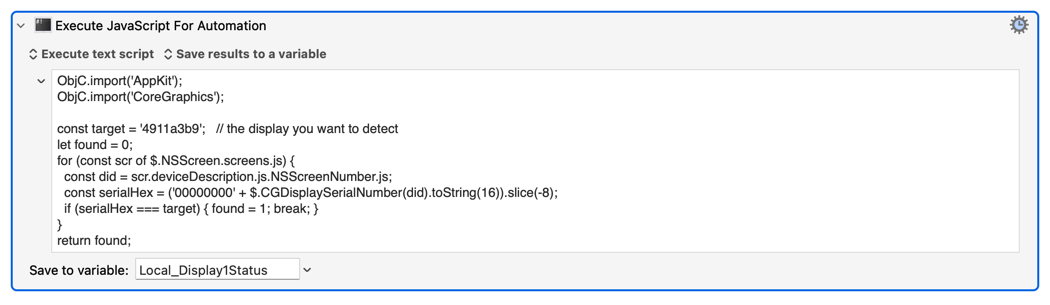
for (const scr of $.NSScreenscreens.js)
...does "collect" all the screens. I don't know enough (anything!) about CoreGraphics to know how much work that involves, whether it just collects a reference to every screen (fast) or creates an array of screen objects complete with properties/values for each (slower).
Yes, a test would be interesting.
You can crack it, if you don't (or do) think so <cough>negatively...
Is the answer to always count from the side that never has the temporary screen, that way the constant / consistent screen references do not change. This means that when adding the temporary screen on the left, one would use negative screen references when counting from the right?
The trap was that I was counting from the left, and my travel screen always lands on the left — so it shoves my two static screens from indices 1 and 2 to 2 and 3. Counted from the left, nothing about them is stable.
But the right-hand end never moves. So if I reference the static screens from the right — -1 for the rightmost, -2 for the next — they keep those indices whether or not the travel screen is attached. No detection, no screen count, no calculation: the occasional screen only ever disturbs the end I'm not counting from, so the anchor holds.
Which is also why you kept saying detection was beside the point — I was building "is it connected?" machinery for a problem that dissolves the moment you index from the stable end. Lesson taken.
And the mirror case — an occasional screen that always lands on the right — needs nothing at all, since the left-counted 1 and 2 never move.
Did I get it?
Bang on! On all counts.
I know I really dragged this out -- but that's because negative indexing is useful in all sorts of situations if a) we remember about it, and b) we can re-do our default (Westernised, left-to-right) logic to use it.
All good, I enjoyed the challenge!
It is something that I need to remember!