The new attached version lets you pick from four separate conversion methods: tectonic, xelatex, Word's built-in converter (which requires online tools), or macOS' own built-in print to PDF engine. Specify the desired engine to use in the first green box.
Note that using xelatex requires installing MacTeX from Homebrew, and that's a very long install. The results weren't any better than tectonic to my eye, so I'm not sure it's worth that effort.
I added Word while @Nige_S was posting about it, otherwise I probably would have skipped it. The best output—by far—comes from using print to PDF. Yes, this will briefly open and close some windows onscreen, but if you want fidelity, it was perfect with the three (somewhat complex) test documents I used.
Beyond that, you'll have to investigate what other PDF conversion tools are available for .docx files, as I'm out of time and known alternatives (beyond the mentioned libreoffice, but it definitely has conversion issues).
Download Macro(s): docx to pdf converter.kmmacros (27 KB)
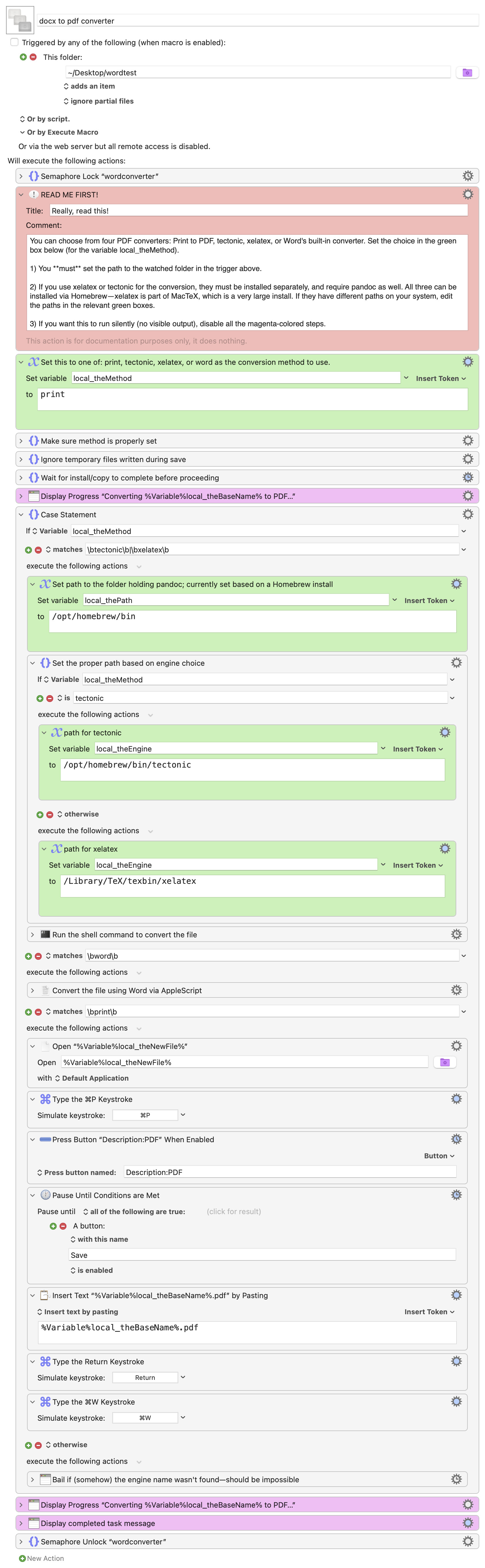
Macro notes
- Macros are always disabled when imported into the Keyboard Maestro Editor.
- The user must ensure the macro is enabled.
- The user must also ensure the macro's parent macro-group is enabled.
System information
- macOS 14.7
- Keyboard Maestro v11.0.3
-rob.