While I understand the urge to consolidate, you're much better off using the right tool for a particular job -- even if that means having multiple tools with overlapping functionality.
If you must do everything with, and only with, KM then have another look at using prefixes on your expansion snippets and un-prefixed snippets for spelling corrections and auto-caps. An added benefit of that is that you won't keep getting unwanted expansion -- with your macros you'll find it difficult to type "absolve", for example, but changing the trigger to ;abso would solve that.
Everyone understands “simple” differently. Personally, I use “space” twice as a suffix. That's simple for me. No strange characters that are difficult to type. The space bar is always under my thumb.
And it's also unique because I never use two spaces in a row. Space, space feels like a trigger.
“space” twice as a suffix
I think this is a really neat trick, thank you for sharing it. I will definitely keep this in mind when creating more complex snippets. I use the repetition of the last character in the same way. Like checkk > ✅ .
However, this does not solve my current problem, which is being able to expand my snippets and also capitalizing the first letter of every new sentence, because both of these macros conflict with each other and they change the string buffer. Unless there was something I didn't understand what you were suggesting.
While I understand the urge to consolidate, you're much better off using the right tool for a particular job -- even if that means having multiple tools with overlapping functionality.
I think, with the current flow of things, I might have to just fall back to continue using Typinator. My only issue with Typinator is
the support is not that great. When I email them, it takes so long to get a response, and even the response is not that helpful.
The automation tools are kind of limited and bare‑bones, and you have to do a lot of foundational work. With Keyboard Maestro, there are a lot of reusable modules already available within the app, so you can just drag and drop, and that's it.
The tool itself is fine, but all this stuff makes me wanna move away from it and consolidate to KM.
KM then have another look at using prefixes on your expansion snippets
I thought about this, but the problem is I sync my snippets with iOS as well. Basically, whatever snippets I have in Typinator/Keyboard Maestro, I have a script that extracts them and creates a file that gets pushed into the text replacements in macOS, which syncs to iOS.
As you know, typing a semicolon or comma, etc., is much more difficult on the iOS keyboard than on a Mac keyboard, which is why I always use alphabets snippets rather than adding any special characters - Because every time we have to press ⇧ and try to find that special character as a prefix or a suffix, which defeats the purpose of text expansion.
I'm not sure if I understand the problem correctly, but wouldn't it help to use the same letter sequence (abso) followed by two or three spaces?
Macro 1 (two spaces) would be triggered if no other key is pressed afterwards. KM would have to wait briefly to see if a third space is pressed. If nothing is pressed, “space space” is triggered. However, macro 1 would not be triggered if a third “space” is typed. Then macro 2 would be triggered.
Unfortunately, I don't know enough about KM, but with BTT, things like this work without any problems.
How much automation tooling do you need in the vast majority of your text expansions?
Again, this is an argument for using the right tool for the job rather than consolidating on one jack of all trades -- the expansions done in the way you want with Typinator, automations done via KM.
Should be trivial for that script to strip the prefix during the migration process, leaving you with the same snippet triggers but prefixed on the Mac, un-prefixed in iOS/iPadOS.
Or you could make your prefix something easily typed on iOS/iPadOS but still not something you'd type in normal usage -- qq instantly springs to mind. That could also be used with @Frankb's post-fix method, with the added bonus of stopping the false triggering when trying to type "absolve" etc.
Is it?
Press-and-hold on the 123 softkey, swipe to ;, lift finger -- the ; is inserted and you're back on the standard alpha keyboard. Yes, that slows your typing by a beat (and adds a character), but it's hardly difficult. If typing speed is that important you'll be using an external keyboard anyway, complete with punctuation keys!
Basically, I agree with @Nige_S It makes sense to use the tool that best solves a task. And unfortunately, that will never be just one app. “Consolidating” takes a lot of effort and usually produces poor and disappointing results.
Just out of curiosity, isn't it possible to set up a macro with KM that waits 0.5 seconds after “abso” has been typed?
If no other key is typed during this time, it expands. But if you continue typing, nothing happens.
To be honest, I don't need that. I'm used to my system. But I remember that many people were excited when BTT introduced this feature. In fact, it does have a few obvious advantages. If I were starting from scratch, I would consider this option.
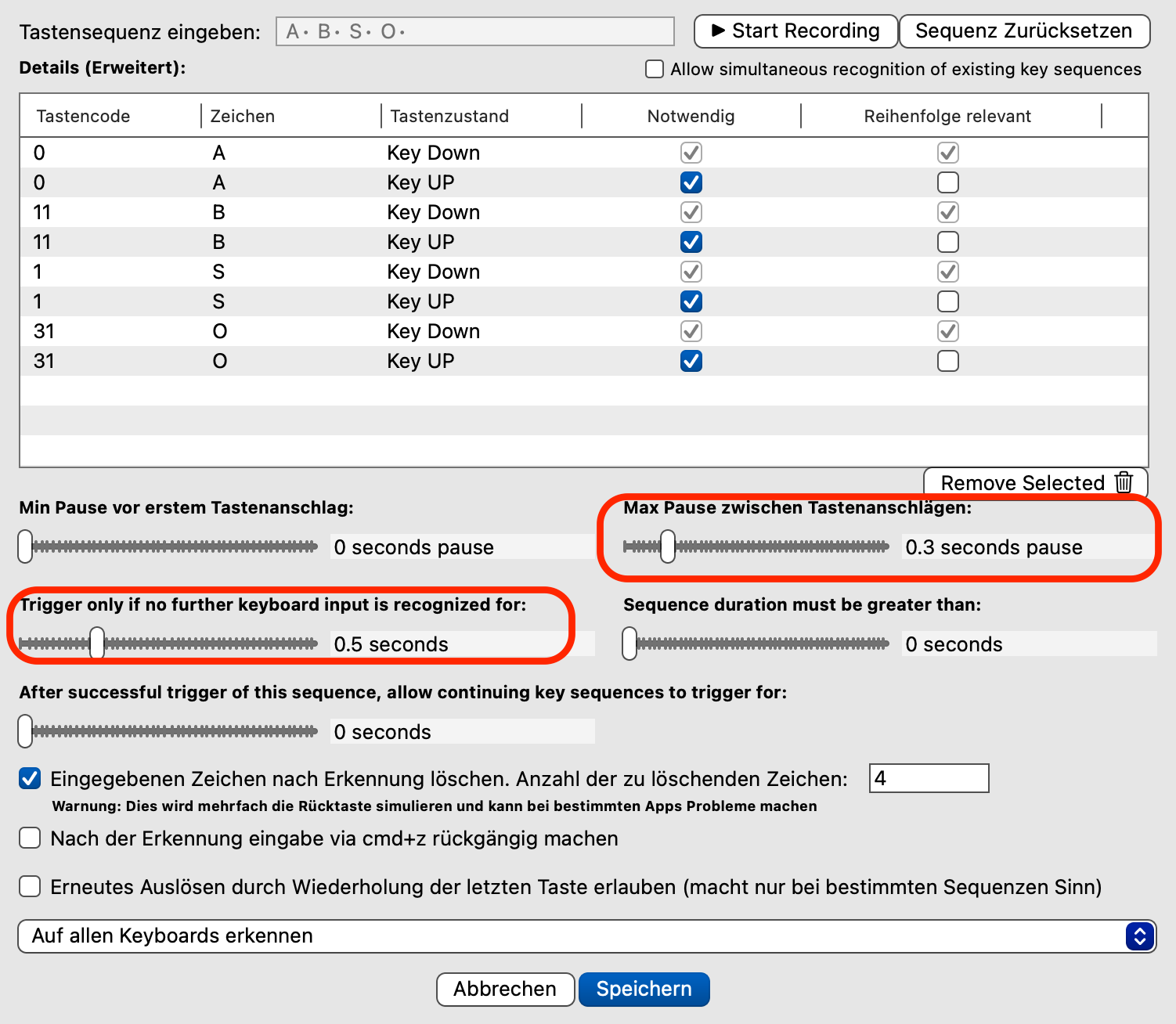
This BTT macro expands “abso” if the letters are typed within 0.3 seconds and no other key is pressed for 0.5 seconds afterwards.
So if you actually want to write “abso”, it is sufficient to type a little slower (>0.3 s).
If you simply continue typing after “abso” nothing will happen if the following letter is typed quickly (<0.5 s).
KM doesn't have an "any keyboard input" condition to use in a "Pause Until" -- and I'd hate to have to use an "any are true" and list every possible key!
The only way I can think of doing it is to use IDLE() -- if there's no "human input" for 0.5s then do the expansion. The trick is to put a slightly longer timeout on the "Pause Until" so the macro aborts if another character is typed -- which resets IDLE() and prevents the Condition from being true until after the timeout period.
That looks pretty promising For some reason, it doesn't work quite reliably for me yet. The expansion doesn't always happen. I've tried typing faster or slower, but that doesn't seem to have anything to do with it.
I imagine that many KM users would be interested in this. Expansion without additional characters offers several advantages.
Typing speed shouldn't matter (unless you're slower than KM's "clear the buffer" speed which, by default, is 5s) but you may have to increase the "Pause" Action's timeout to give more time for the 0.5s IDLE() check.
And anything that resets the IDLE() timer during that timeout period -- brushing the trackpad, jiggling the mouse, and so on -- will stop the expansion. Which is why BTT's explicit keyboard input mechanism is a better approach.
automation tooling do you need in the vast majority of your text expansions?
These automations are more on the line of when I type something, a form might open up with a certain set of feeds, and I just populate them, then hit Enter, and it does something. Either it could be running a script or processing text, or something similar. I was previously trying to do this in Type It and I was actually not using Keyboard Maestro at all, although I have Keyboard Maestro for a couple of years, but I don’t like having my automation in so many of these tools because when something breaks I don’t remember where that automation is even coming from Keeping it in fewer tools helps a lot.
Is it? Press-and-hold on the 123 softkey, swipe to ;
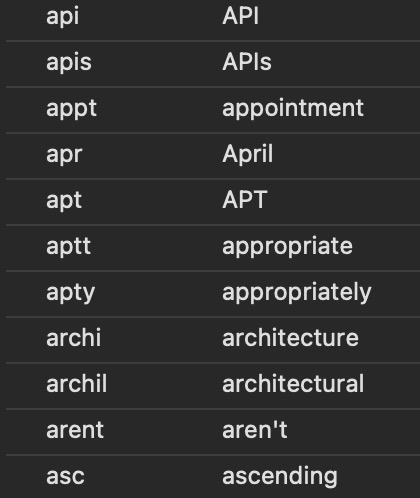
I use natural English words because they are also easy to type. See below.
These are just a few of the hundreds of snippets that I have. Some of them are a lot more complex than these, but basically they are like normal English letters, where I can type without thinking that I'm typing a snippet. The goal of making my typing faster and more productive is basically not thinking in the moment that I want to type a snippet I just type as is and it expands to a snippet. Now I have a lot of muscle memory, and my hands are already on the right hand on the right keys rather than pressing a semicolon or a period before typing something.
As you mentioned, pressing the soft key and then swiping to the semicolon is pretty fast, but even that takes about a second; it's not as fast as just typing English letters.
I'm a very vanilla person in terms of my hardware and mostly use my MacBook trackpad and the keyboard itself. It's connected to a monitor. That's how I usually work. It keeps my desk clean and eliminates the extra baggage of carrying a keyboard or mouse. Even when I go to work I carry my laptop everywhere, connect it to a monitor, and that's it.
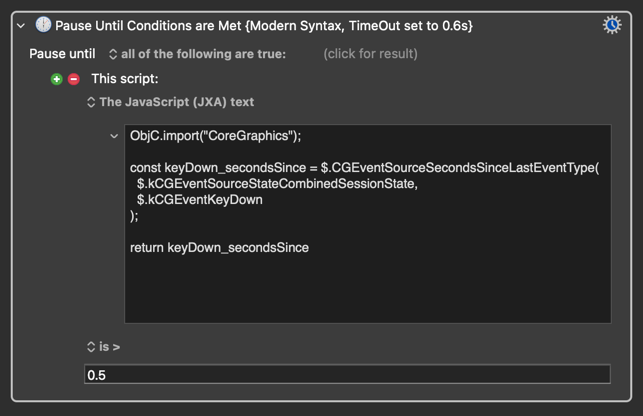
I have been fiddling with obtaining seconds since the last key press in the past. CoreGraphics stores seconds since the last Key Down event, and this time value can be obtained through the following JXA script (Modern Syntax):
Moving the pointer or clicking buttons of the mouse/trackpad does not reset this kCGEventKeyDown time value. Nor does modifiers (except fn/Globe) pressed on their own. But ideally (for it to be a true seconds since last typed character), it should also exclude things like F-keys, non-typing hot keys and such. So do tell if anyone has any idea on how to obtain a version of this that gets even closer to an easily obtainable 'seconds since last typed character' time value!
Keeping certain things in certain tools also helps -- maybe text expansions in Typeinator/TypeIt/whatever and more involved workflows, those with prompts for example, in KM.
If you do want to try and do it all in KM you can reduce the number of "false triggers" for your expansions by changing the trigger from "following any character" to "following a word break" -- that would at least let you type
...fell into a gaping hole...
...without it expanding to
...fell into a gAPIng hole...
But there's no easy way round the "expand and auto-capitalise" problem. You might be able to do something with a single regex-triggered macro, careful naming of your expansion macros, the "Call Macro by Name" Action and some parameter passing. Thinking on my feet here, but there's a few ways you could do this:
A single regex "trigger" macro that passes a "capitalisation" flag to the appropriate "expansion" macro that then does the insertion of either capitalised or lowercase text
A single regex "trigger" macro that calls the appropriate "expansion" macro, receives the expanded text, inserts that with appropriate capitalisation
A single regex "trigger" macro the uses an "abbreviation to expansion" lookup table to insert the appropriately capitalised expansion
...and probably more.
All these, of course, add complexity and therefore fragility compared to simpler solutions like using one thing for expansions and another -- OS- or application-level autocorrect, or even a utility like Grammarly -- for auto-capping. But you might like to have a play with them -- or give me a shout and I'll try and whip up some demos.

 For some reason, it doesn't work quite reliably for me yet. The expansion doesn't always happen. I've tried typing faster or slower, but that doesn't seem to have anything to do with it.