"When you say "return back to the prompt window" do you mean click on it (ie, does "return" mean "click")? "
Yes, return back to the prompt window means click on it to make it focus (the title bar of the window is no longer dim to indicate it is the current active window). So if the prompt window is in focus, check if hover work again.
Ok in that case,
- The hover buttons work when the window appears.
- The hover buttons do not work when I activate the KM Editor as a test.
- The hover buttons work again once I've clicked on the Custom HTML window again. (as you said, the title bar is no longer dim, I had never noticed that the title bar changes)
- The symptoms are the same for both my M1 Mac and my Intel Mac.
If I can't replicate your problem here, I can't really help. Why would I be able to get hover to work for me when others on this forum can't?
I have very little software installed on my Macs other than KM. Maybe the rest of you have installed something that's causing the problem. My theory is that Google Chrome might have damaged your systems. It has damaged my Macs in the past and I refuse to use it any more. I believe I've read that Google Chrome uses Webkit. I'm implying that Chrome upgraded/damaged your webkit software on your Macs.
Sleepy,
your result indicate that there is no issue on your side.
"Why would I be able to get hover to work for me when others on this forum can't?
That's the question we attempt to solve but up to now there is no confirmed explanation what causing that for those who has the issue.
"I have very little software installed on my Macs other than KM. Maybe the rest of you have installed something that's causing the problem."
Possible, but hard to know which specific application causing that.
I'm not too sure if Chrome is the reason. Hopefully someone who has the latest chrome running and have no issue with the hover test on custom prompt window can confirm that.
Maybe Chrome is the common factor between those that work and those that don't work. It's easy enough to find someone who has never installed Chrome, right?
By the way, deleting Chrome from the Application folder is NOT a clean delete. It took me hours to find the detailed instructions to delete Chrome completely. Next time I'll just reinstall MacOS, it will be faster and easier. Chrome is truly evil.
I seriously doubt that Chrome is the reason. Custom HTML Prompts use Webkit, which has nothing to do with Chrome.
Well, as I'm the only one without Chrome, and I'm the only one that it works for, that makes my theory the only theory that fits the facts. But it's easy to disprove me; just find a case that contradicts my theory. I have no stake in this theory.
Just remember that correlation is not causation.
@peternlewis What say you? Can Chrome have anything to do with this issue?
That's one of my favorite expressions. Along with "one is a sample size too small to determine correlation."
A person who comes up with a wild theory is never embarrassed to be wrong, but is very proud on those rare occasions when he turns out to be right. I have a few occasions of the latter in my life.
If you find one person with Chrome that this doesn't fail for, or one case of a person who has NEVER had Chrome installed that this does fail for, then I will give up my claim.
Chrome may be relevant because it uses Webkit and may have installed its own copy of webkit on MacOS which is what causes the differing behaviour.
1 Like
Sleepy, I had never chrome on my Mac, thus chrome can’t be “the” reason for it. In my case, I have the apple music.app, which needs to be running in order to enable the macro group which holds the chp. And after calling and checking the hover in the chp, I click into the music.app, which activates it.
The problem - to investigate - is (as I see it), why does the music.app does not loose its focus (grey control buttons), when clicking back into the chp, i.e. activating the chp. Now in my case - at this point - the music.app has still hover functionality and it is clear for me, that then the chp can’t have the hover-functionality too.
Thus, for me, the question is: Why does the Music.app does not loose its focus, when clicking into the chp.
I understand and agree. We now have a data point to disprove my theory.
I can't agree with that question because the hover buttons remain active for me after switching back to the Custom HTML window, but in my Music App the control buttons in the upper left of the Music App retain their colour.
Once again, my Music app retains its focus (and the MacOS Menu Bar still shows the name of the Music App) even though I've clicked on the Custom HTML app and the hover buttons work.
You are expecting the Music App to lose focus, even though on my system, which works perfectly well, including the Custom HTML window, the Music App retains its focus.
Sleepy, the control buttons of an app always keep their hoover functionality, regardless, what you are doing. Check the (light-grey)-hover on the play/pause button on the top of the music.app. It would be interesting, what it does on your mac.
Ok, I just tried it. The Play button in the Music app does "change colour" a little bit, showing that it is recognizing my mouse, when I'm on the Custom HTML window for the second time.
Although you say (correctly, I just tested it) that the control buttons of a MacOS do retain their hover status when the window is inactive (and I didn't realize that until now), I should point out that they also turn grey, but I still insist that the Music app control buttons do not turn grey when I click on the Custom HTML window for the second time. They are both colored and hoverable/active. That seems to be a difference from what you are expecting. I'm pretty sure that you are expecting "not colored" and "hoverable." This is a difference.
These tests over the last hour are on my Intel Mac. I have every reason to expect the same results on my M1 Mac if you want me to test that also.
he Music app control buttons do not turn grey when I click on the Custom HTML window for the second time .
That is interesting (if your Music.app is also (one of) the app which you have specified in KM as the app, which must be running to activate the macro group holding the chp. I assume that there is no difference on M1-Macs. Thus there is no need to check also on your M1. But it gives me a new starting point to think over why in my case the Music.app does not loose its hover-functionality.
You can use the former one. The latter one with a UUID is non-sensical. Window Ids are always numbers.
However:
- LastWindowID token is only valid in the macro instance that created the window.
- In order to get the LastWindowID, the Custom HTML Prompt action has to be asynchronous. Otherwise the macro instance would be stuck waiting for the prompt to complete.
- The asynchronous action may mean the window takes some time until it opens, so you may need a pause action after the Custom HTML Prompt action before the LastWindowID token is valid.
Thus:
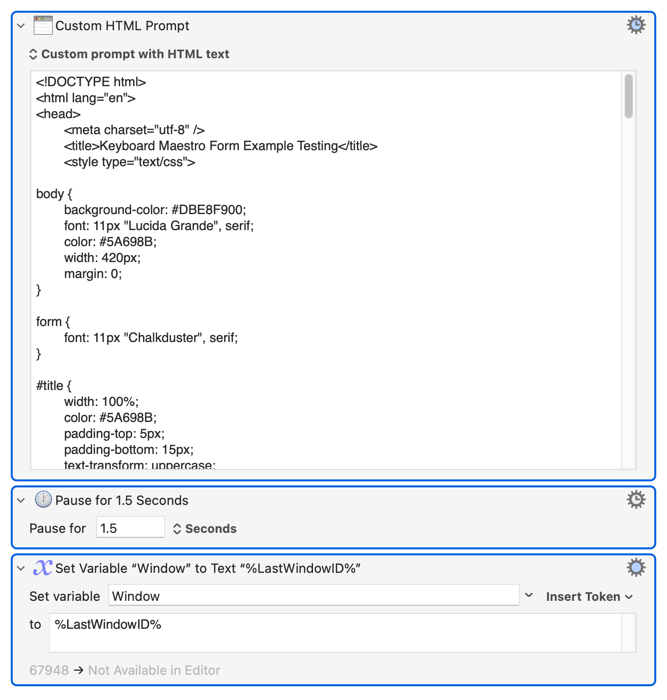
and then:

Note that Window IDs are the same ids as reported via AppleScript:
tell application "Keyboard Maestro Engine"
	windows
end tell
1 Like
@peternlewis So how do I bring a custom html prompt to the front, without a window id?
Thanks @peternlewis for explaining the role and type of windowid in the custom html prompt body attribute "data-kmwindowid" and the different role and type of WindowID in the KM-action 'Bring Engine Window with ID ... to the Front'. That was not clear to me, because I thought they were the same. Perhaps one should explain in the km-wiki that "data-kmwindowid" is not the WindowID (not the number) which applescript gives you for the WindowID and which you can use in the KM-action "Bring Engine Window with ID ... to the Front".
This explanation could not solve my problem either, but brought me one step further. And this may be at least solve partially your question Dan, namely
"How I bring a custom html prompt to the front"
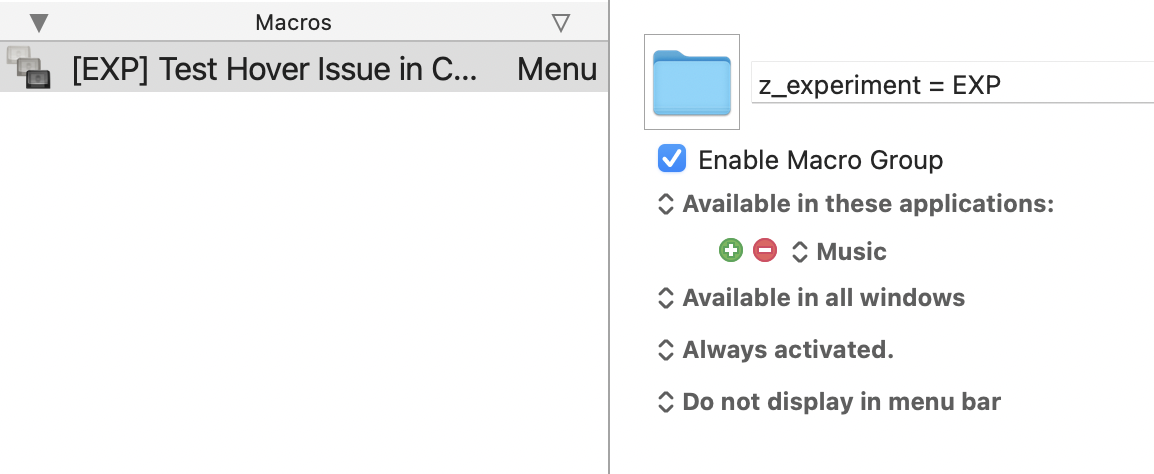
As Peter suggested, I made my chp run asynchronously and added a global KM-Variable to my KM-macro (which called the chp), saving %LastWindowID% (1.5 second after the call) into it. Now I can add a simple macro to my macro group which just 1 action, namely bring this chp-window to the front. This macro can easily be executed from a button within the chp, which - when pressed - gets back its hover functionality.
It is interesting to see now the following steps:
- call chp: hover-functionality works fine
- click in the e.g. Music.app: chp is defocused (grey control buttons) and music.app is focused
- click back in the chp: music.app still having its red,yellow,green control buttons and its hover-functionality and chp gets "partially" focused, i.e. gets also red,yellow,green control buttons and chp-buttons react, but hover-functionality is still not available.
- Press the new "bring window to the front"-button in the chp: This will then defocus the Music.app and hover-functionality is back to the chp.
Hard to guess what kind of problem this could be. If anybody has a hint, I would be very thankful.
Hover-functionality is available for me when I click back in the CHP. Doesn't this prove this is not a KM issue?
Isn't it a hint that I don't have this problem? Shouldn't we be focussing on what's the difference between your Mac and mine?
To be honest, the depth of this discussion is getting too deep for me. But I always try to help even when I'm in a little over my head. If you tell me to be quiet, I'll be quiet. I won't be upset.
I would agree, Sleepy, if it would be only my problem, but Dan and Macdevign_mac have Macs with the same behaviour. We do not know yet, if it is a km-chp-problem, macOS-problem or a problem of configuration, resp. some other apps on the machine.
Yes, you are right, its a complex problem touching km, macOS, java- and applescript. A normal user, who does not leave a chp before he quits it, will not get to know about the problem. But chp is such a great tool, which you can use for so many things, that sometimes you need to go beyond this "normal" usage. Thanks for your interest.
I'll let you handle it from here. You understand my point. I'm willing to help if you ask. I have both an M1 and Intel Mac if you want me to test anything.