Hi @alexcr!
I know Droplr but, apparently, they don't have an API that allows you to use their services from a command line.
Bit.ly has an API. So it's possible. Although a little more complex to implement than with TinyURL.
First, you need a Bit.ly account. Log in to your account and go to:
https://app.bitly.com/settings/api/
Enter your Bit.ly password and generate a token. Once you have your token, repeat the steps for my TinyURL solution and replace the shell script by:
Accesstoken=your_bitly_token
api=https://api-ssl.bitly.com/v4/shorten

curl -s -H Authorization:\ $Accesstoken -H Content-Type: -d '{"long_url": "'"$KMVAR_URL"\"} $api
If everything works correctly, you should receive a response similar to this one from Bit.ly:

As you can see, the response is formatted in JSON. We'll save this value in a variable called JSON (for example). The part we're interested in is "link". So we're going to use the %JSONValue% token to retrieve the short url generated by Bit.ly and send it to the clipboard:
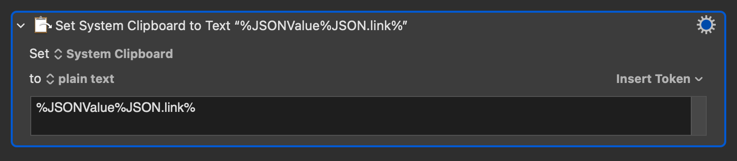
And… voilà!
Bit.ly Link.kmmacros (23.6 KB)