Hi, @RazMastero. As @noisneil mentioned and @Airy demonstrated, this is very doable.
@Airy leveraged the Prompt For User Input timeout and provided a nice, simple solution.
Albeit not as simple, here's a method that will display the countdown.
Download: Countdown Prompt.kmmacros (8.7 KB)
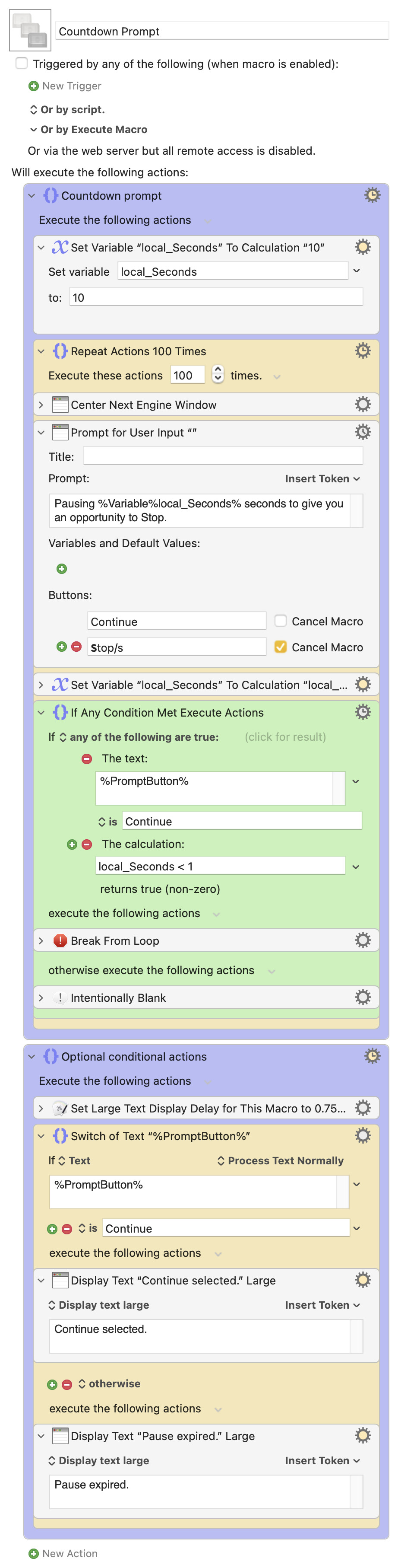
This method also required configuration of the Prompt For User Input gear settings.

If you want something with more flexibility, the sky is the limit with the Custom HTML Prompt action.
A macro I recently updated (Insert Text Into Restricted Field) includes a countdown window with three buttons: Cancel , Reset , and Restart ; the first will cancel the macro (esc will do the same), the second will restart the countdown, and the third will restart the macro.