I have a subroutine (part of a larger macro sequence - yes, it's back...) that checks if a volume on my external NAS is mounted and, if not, mounts it. It currently does this by processing the file path to get the parent volume, prefixing smb://My-NAS and then running an AppleScript to mount it.
Unfortunately, for reasons beyond my understanding, when connecting to this server MacOS (Tahoe) has taken to randomly flipping between accepting smb://My-NAS and smb://My-NAS.local - and not the other. Or, even better, accepting only the numeric IP. Getting the ‘wrong’ address results in the ‘can’t find this server’ Finder pop-up, which halts the rest of the sequence. The actual NAS address and name hasn’t changed at any point*.
Additionally, because the NAS itself shows under Network as its actual name, this often results in multiple NASes appearing connected when only one is. Which is messy, and bound to cause some issue at some point. So I'd like to avoid that if at all possible.
So, my ask: is there a (sensible!) way of
Looping through the various possible iterations of smb://My-NAS, smb://My-NAS.local etc. to see which one Tahoe wants to accept as valid today;
Choosing the ‘right’ iteration and setting the appropriate variable to prefix the parent path with
I’m assuming doing this will require totally rewriting this particular subroutine, if it's even possible, so I’m open to ideas - although my scripting skills sadly remain very limited!
*It’s a Synology NAS, so I’m not ruling out this actually being some strange DSM quirk. But I need to work with what I can actually observe and control here…
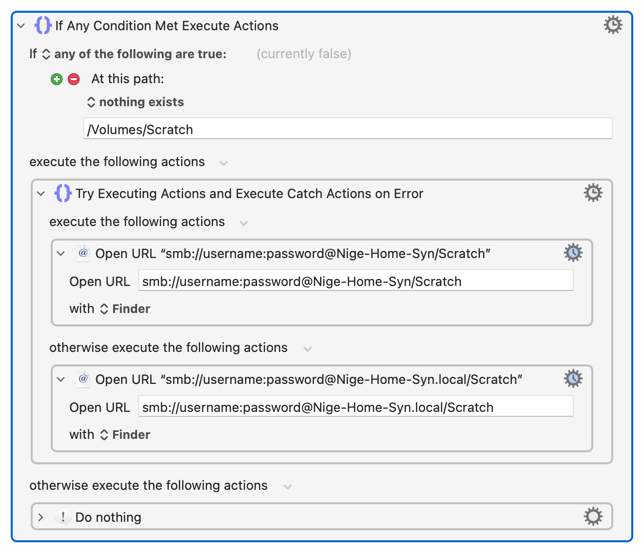
If you do want to use AppleScript there's a bunch of ways, for example:
tell application "Finder"
	if (every disk whose ejectable is true and name starts with "Scratch") = {} then
		try
			mount volume "Scratch" on server "Nige-Home-Syn" as user name "username" with password "password"
		on error
			try
				mount volume "Scratch" on server "Nige-Home-Syn.local" as user name "username" with password "password"
			on error
				--do nothing
			end try
		end try
	end if
end tell
...and you can do a better job of handling errors if you want.
For the rest -- are you swapping between wired and wireless connections on the client? The .local is from Bonjour service discovery, and some routers don't (by default) pass that across subnets/interfaces.
You'll probably need to tweak the above, depending on what the actual problem is. Ungraceful disconnects from the server, for example, can leave the behind the entry in /Volumes so that a remount of the share has a number appended -- Scratch, Scratch-1, Scratch-2. Far better, if you can, to fix the root cause rather than try to work round it.
So, to explain my (overall, probably convoluted) logic: the overall sequence currently mounts the drive in the background, separately to opening the folder - hence AppleScript.
The currently open Finder windows - specifically their titles (which all start /Volumes/…) - dictate how the target path tab is (re-)opened, in order to group together tabs with certain file paths. That’s obviously pretty involved - so the volume mount check step happens earlier, as a separate concern, to avoid interfering with that. It can also currently be skipped entirely if not needed (some volumes are permanently mounted via a usb dock).
I need it to be a ‘silent’ volume mount, I suppose is the best thing to call it. But error dialogs are… not silent nor should they be. It’s possible what I’m trying to do with checking for the ‘right’ SMB isn’t even realistically doable, of course (would not be the first time I’d come up with something like that).
(I’m not opposed to a separate subroutine that automatically checks and mounts all the NAS volumes before everything else kicks off, which would eliminate much of this. But it makes sense to get one volume consistently mounting again first!)
Back to the immediate issue, and your suggested solutions: Using KM Actions works if the drive is already mounted; however it causes issues with the overall macro’s window-sorting/folder-opening logic, and also doesn’t seem to work if the volume isn’t already mounted. And the AppleScript you kindly provided doesn’t work for me - it still throws the error dialog on the first failed server, which halts everything else.
I didn’t know that about Bonjour, but makes sense so I’ll investigate that. The most likely root cause of my SMB issue is ‘I need a new non-Synology NAS’ But given the current state of everything, that has to wait a bit longer and I need to figure out a workaround in the meantime.
OK, I see what you're doing now. And my bad -- I thought AS's try would suppress the Finder error, but it doesn't.
So the simple answer is -- sort your network out!
For some reason your Synology is sometimes being discovered via NetBIOS (smb://mySynName) and sometimes via mDNS/Bonjour (smb://mySynName.local). There are various reasons for that but, most commonly, it's your router.
The easiest way round this problem is to avoid it altogether You can use the server IP, as you say, but to make it more user-friendly:
Make sure your Synology is on a static IP address
Edit /etc/hosts, adding your Syn's static IP and the name you want to use (Google that so you find instructions for your preferred command line editor)
Flush your DNS cache: sudo dscacheutil -flushcache
From now on you should always be able to connect using smb://chosenName.
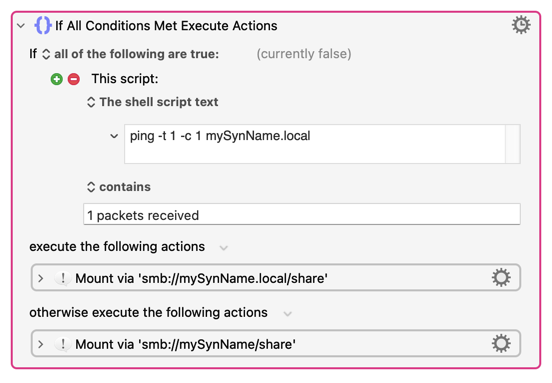
If you don't want to go through all that palaver (lots of machines to with hosts to edit?) or can't use a static IP for some reason then you might be able to ping test the .local address -- if that succeeds you can use the .local version to mount the share, otherwise the NetBIOS name:
Yep, that all makes sense. I don’t know why I didn’t think of using a ping!
I think it’s also made clear that incorporating conditional volume-mounting is a step too far long-term (for this macro, anyway). So makes more sense to just mount all volumes, and add the ping into that I think.
Thank you for your help! Back to debugging the rest of this sequence (and more AppleScript - this time, consistently getting all Finder window titles… )
 nor should they be. It’s possible what I’m trying to do with checking for the ‘right’ SMB isn’t even realistically doable, of course (would not be the first time I’d come up with something like that).
 But given the current state of everything, that has to wait a bit longer and I need to figure out a workaround in the meantime.
 You can use the server IP, as you say, but to make it more user-friendly:
 )