Help with using the shell script

Done

Works

Result: /var/folders/sq/23z5fk5s37vbkdn2530qbln00000gn/T/Keyboard-Maestro-Script-3D454EEA-714A-4ED3-B918-BAE2E4C726F3: line 1: awk: command not found

/var/folders/sq/23z5fk5s37vbkdn2530qbln00000gn/T/Keyboard-Maestro-Script-46794AFB-3B62-4B7F-B845-1355B8BB8E05: line 1: awk: command not found

This one works. And my original macro invoking the Terminal window worked fine...

Got it! I've checked the awk path, included it into the command and it works!

It's not especially strange - the shell environment in the Terminal depends on a bunch of your setting files (like .profile) that do not apply to a non-interactive shell that Keyboard Maestro spawns.

So the differences are many, generally related to environment variables.

1 Like

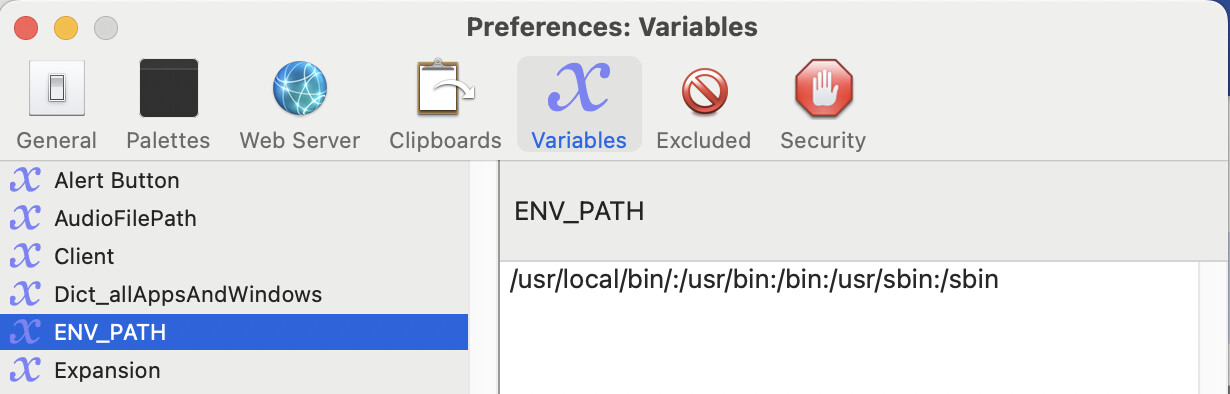
Then something is really wrong with your KM variable ENV_PATH -- this sets the action's PATH environment variable and, by default, contains /user/bin:/bin:/user/sbin:/sbin.

awk should be installed at /usr/bin/awk so would be expected to not need an explicit path.

The truth is I don't know where is it and how to set it. I've tried to read the manual on it and didn't understand. :slight_smile:

It's a global variable, so you'll find it with the rest in KM Editor's Settings, then the "Variables" pane.

Here's mine:

...and since you are on Apple silicon you'll want to include the relevant Homebrew paths, so something like:

/opt/homebrew/bin:/opt/homebrew/sbin:/usr/bin:/bin:/usr/sbin:/sbin
2 Likes

Thanks a lot!

I simply didn't have that variable. At least since this problem appeared. Something went wrong as even ls command stopped working and I had to use /bin/ls

So now I have finally have a fully working macro which sets the correct FPS in the Nuendo project settings and imports the video and the corresponding audio track into the new project.

Video how it works

2 Likes