I use an action like this for debug:
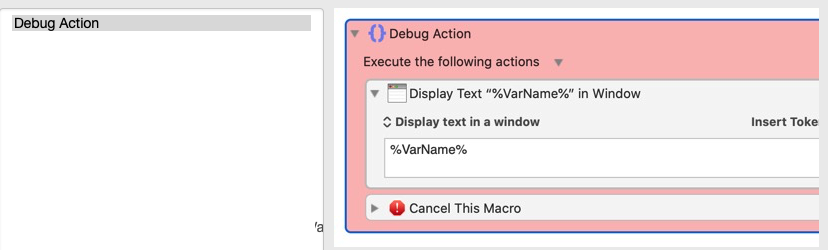
I use Dan's KMFAM to save this action and insert it to wherever I want the macro to stop and check display the variable value for me.
This is very useful for debugging.
A further thought: I think, it might be better if we are able to create a macro to
- get all the variables used in a macro that need debug.
- add these variables into the display text in a window in the debug action I created above to be displayed. Formatted as:
Varname1: %Varname1%
Varname2: %Varname2%
Varname3: %Varname3%
This will save some more time, as I usually have to edit the display text in window action to add the variables I want to display.
If I don't want to show certain variables, I can remove them from the list. Removing is easier than adding.
But (just did a quick search) looking at this post, this might not be easily accomplished as I initially thought.