KM will only display a static value of a Variable at the time of execution.
So I would simply Display the Mute Status in the Mute Toggle macro when the mute is toggled ON.
Remember that you can use rich text in the Display Text action, so you can make it as big and bright as you like:
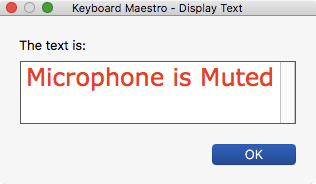
One thing you will have to do after the Display, is to set focus to some other window so you don't accidently press RETURN and close the window.
If you want more control over the window, you will need to use Custom HTML Prompt action.
When the Toggle is to un-mute, then close the Display window.
To close the KM Display Text Window, put this script in a KM Execute an AppleScript action