Hey JM,
Quoting in the shell gets rather complicated especially when you have embedded quotes within quotes.
Keep in mind that single quotes are literal, but double-quotes allow shell-expansion to take place.
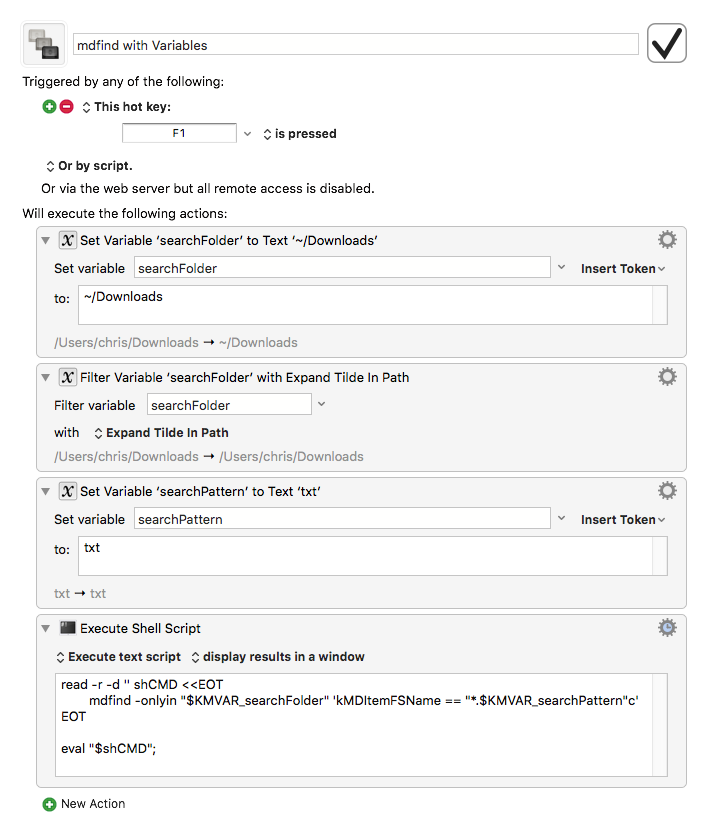
Here's what I had to do to make this little adventure work neatly (see macro below).
Note the difference between this read command and the previous one you've seen.
It uses a shell function called a here-document.
(The text after << is an arbitrary word that makes sense to the user and the context.)
<<'EOF' is what you saw before, and it causes the read text to be completely literal (notice the single quotes).
In this macro I've used <<EOT with no quotes, and that lets variable expansion take place in the here-document.
This makes composing the command relatively easy.
I had to resort to eval to get it to run correctly though.
-Chris
REFERENCE: Using variables inside a bash heredoc
mdfind with Variables.kmmacros (2.8 KB)