Now I've tested this added KM 11 functionality and it works well. Here's my test macro:
Download Macro(s): Test Setting Array Elements.kmmacros (3.9 KB)
Macro-Image
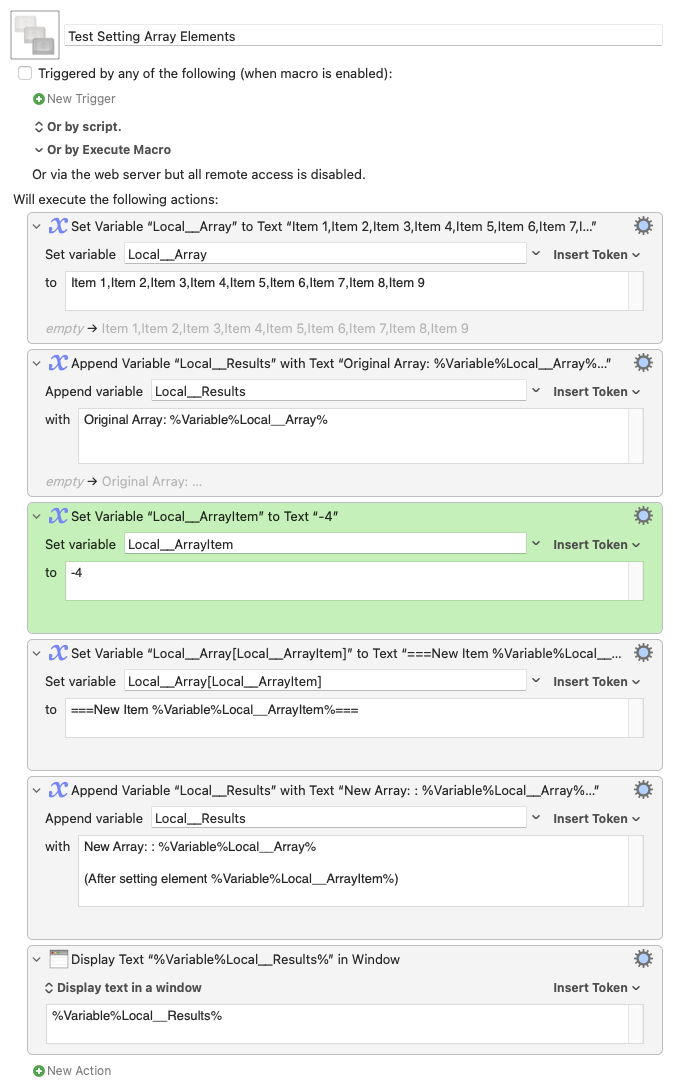
Macro-Notes
- Macros are always disabled when imported into the Keyboard Maestro Editor.
- The user must ensure the macro is enabled.
- The user must also ensure the macro's parent macro-group is enabled.
System Information
- macOS 13.6.1
- Keyboard Maestro v11.0.1d1
Example output:
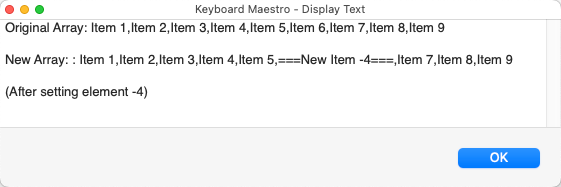
Some points to note:
-
Setting array element 0 (zero) causes the action to fail since element zero holds the array size.
-
Setting an element beyond the size of the array extends the array to accommodate the new element. For example setting array element 15 of a 3-element array extends the size of the array to 15.
-
Setting the element -1 of an array actually sets the last element. Setting the -2 element sets the next-to-last element. And so on...
-
For an array of size N, setting any element -N-1, or -N-2, or -N-3 etc results in no change to the array and no error. I would have thought this should raise an error - @peternlewis ?