Here's my contribution based on what I learned and applied for the last 2 years of working with KM:
1 - I follow a very intuitive color scheme for my actions, which makes it super easy to understand when I look at it (maybe some of you who have seen my shared macros may think it's too much, but to me it just makes everything faster and easier):
- Actions that require a stop such as "Pause Until", "Alert", "Prompt for User Input", etc, are colored red.
- All the other actions are green, because they are just running without stopping.
- All the conditional actions (or loops) are yellow such as "Switch", "If Then", etc.
- Any action that is related to setting/changing a variable are purple, just because it is the color I associate with the purple X icon that's set as the default for the variable actions
- The comments are teal and the groups are pink/magenta, for no particular reason.
So that gives me a quick hint of what my macro contains, where my variables are, etc. And when I want a certain action to grab my attention, I just leave it without a color. Usually it's a macro that I need to fix or something.
2 - I worked on a macro for 2 days recently and from my basic understanding of AppleScript (with a lot of help from Claude.ai) I'm starting to think that whenever possible, using AppleScript to find a button, for example, seems more reliable than using a Found Image or using the default "if found button..." option. This macro I was working on, didn't cause any trouble with the AppleScript actions I used, but did with the other options.
3 - Save as many favorite actions (and groups of actions) as possible, with the most common settings, with the colors you're using (if any), etc. That will save you so much time. Use extra actions with comments if needed, or add the comments to the actions themselves, for example in Execute Script actions to remind you that "XYZ is done this or that way". Things just flow so much faster.
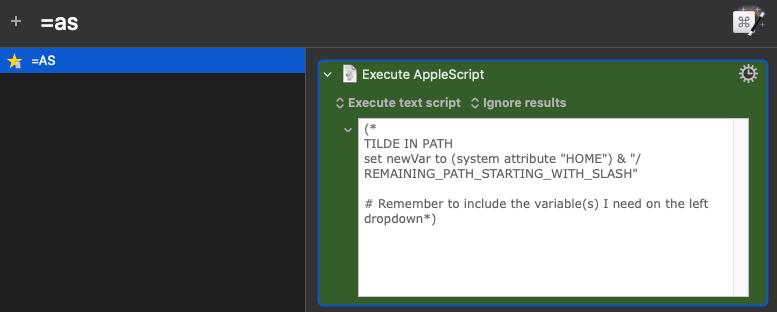
Still related to the favorites, add "codes" for certain actions/groups of actions, instead of setting names that are "exact" and "pretty". For example all my favorites start with = so when I type = all my custom actions are visible. For my Execute AppleScript, the name I gave it is =as (as for "AppleScript")
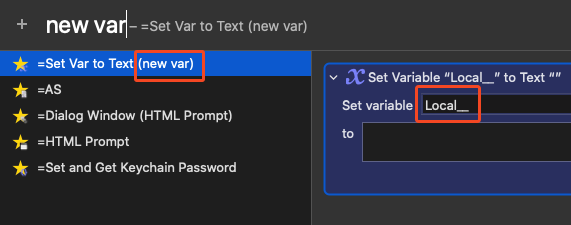
For new variables, even though I have the "right" name in the beginning, I have my own "code" new var which is what I type to insert a new variable. And you can see that it is already purple and since I use Local variables 99.999995 of the time, it's already set to that
4 - Create snippets for things you use regularly. For me, for example, is to add variables. When I copy a variable, for example "Local__databaseText", I then type %paste and it will automatically create %Variable%Local__databaseText%.
It's just easy for me to remember the % and then paste, because that's the action I need.
So yeah these are the most important things I learned that really sped up my workflow.