Now that I have your working version, I have a clue why I couldn't get @CJK's code to run: he's got a variable with a subscript on it that isn't in the your working version. Clearly I could not just copy and paste his version into the KBM action script field without knowing how to edit it to be able to run inside KBM. So thank you very much for the working example.
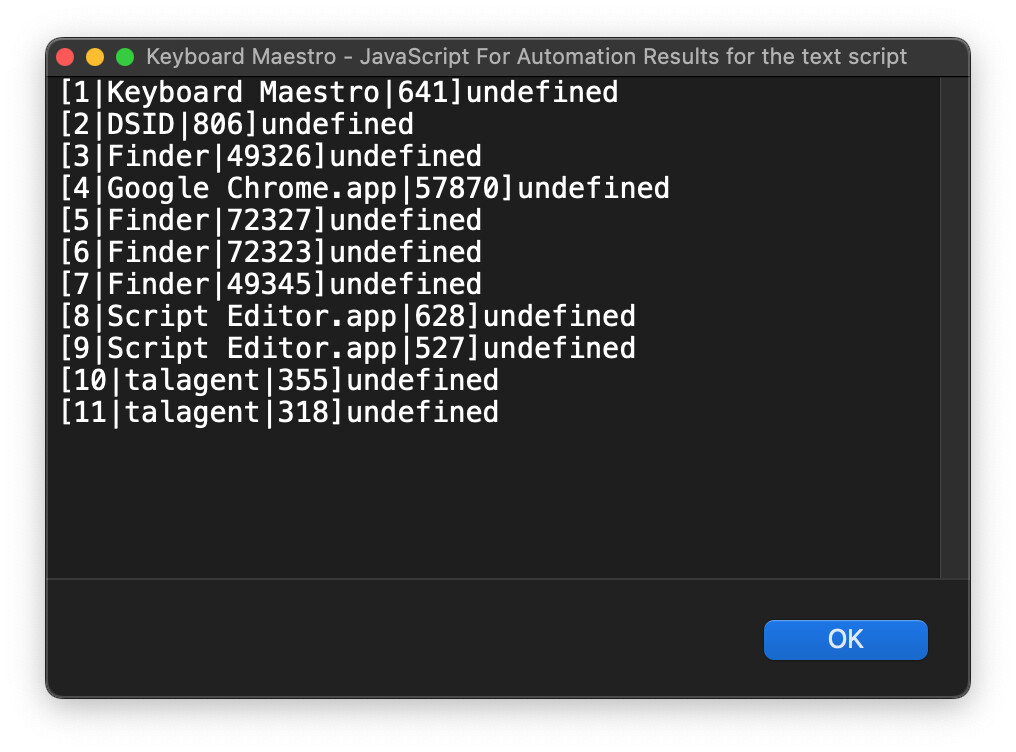
It looks like when you run it, you get the title of the window but I get "undefined".
I do hope that's not an OS version problem, because I'm still running Monterey 12.7.6.
I can see where four parts are assembled into the output line:
1 + index
_w.kCGWindowOwnerName
_w.kCGWindowNumber
_w.kCGWindowName
So it's clear that the problem is with _w.kCGWindowName being undefined for some reason. It's clear that it's a predefined value that is being being extracted in one of the previous lines, but I can't tell where.
I do need this because my ultimate use of it is to tell KBM to activate (bring to the front) the second window whenever a new Space is opened. I use activating the specific window of my DSID app to activate the Desktop Space containing it, so at the Space Change, that will always be frontmost. My desire is to reactivate what had previously been frontmost the last time this Desktop was active, which is what will now be in the number 2 position.
For that I will need the window title. Or could I do it by window number? Would that be faster?
I get "undefined" for all window titles using @_jims's script.
I thought it might be an OS version issue, Jim is running 26.1 while I'm running 12.7, Monterey. But CJK two years ago was running Monterey too.
When I run CJK's script in KBM I get nothing. When I run CJK's script in Script Editor, I get "undefined" for everything except the Script Editor window itself. For that I get
"[1|Script Editor.app|3618]Untitled 3.scpt"
So it's not a case of the _w.kCGWindowName variable not existing in 12.7. Script Editor is giving me it's window title in CJK's script (using the _w.kCGWindowName variable just as Jim does) on Monterey, but KBM, Finder, Chrome, etc. are not. Could it be that Script Editor was the frontmost app?
@CJK , @_jims , anybody — any ideas on why only Script Editor would be returning its window title in the _w.kCGWindowName variable and how I can get the others? I'm willing to try some tests. This seems like it ought to work.
You need to grant Screen & System Audio Recording permissions (in System Settings → Privacy & Security) to Keyboard Maestro (and probably to Keyboard Maestro Engine as well). And if you want it to work in Script Editor, you need to give it the same permissions.
That's because CoreGraphics data is only available to apps that have screen recording permissions. And yes, it's lots of fun to explain to users why our time tracking app needs the ability to record their screen, as otherwise we can't show them the titles of the windows they're working in.
rant Another Apple decision made in the interest of security that mainly screws up users' use of the OS on a daily basis. /rant
In my case, on Monterey, it was "System Preferences > Security and Privacy > Screen Recording". Keyboard Maestro Engine was already set so I added (+) Applications > Keyboard Maestro.app.
That did it.
Thanks.
As for explaining to users, it makes sense to me that one app is not allowed to see what other apps are doing until you give it permission. Maybe you should list that as a "feature" in your pre-purchase lit.
It's not the permissions I have an issue with. It's that what you have to grant is screen recording permissions. Any user should rightfully ask "Why does your app need to record everything I'm doing?!"
It makes no sense if all your app needs is the names of other windows; that permission shouldn't be lumped into screen recording. Because once you say yes, so that you can get window titles, we totally could record your screen. There's no need for that; the app just needs to be able to see window titles.
I want to mark this question as Solved, but with it being over two years old I can no longer edit the question or the title. I want to give solution credit to @CJK in post #15, @_jims in post #20, and @griffman in post #23 for their contributions.