I'm coming to this topic very late. (Real life intrudes.)
In an app with tons of friendly and thoughtful features (and a forum to match!), the getmacros command for an in-memory plist is one of KM's more forbidding. Moreover, it also has a bit of a lopsided effort-reward balance. Here, the advantage of not launching the Editor just to toggle groups and macros means frogging with an in-memory plist via Apple's Key-Value Coding (KVC) query conventions--an acquired taste in AppleScript, a spectacle of incantatory pomp and circumstance in AppleScriptObjC (nonetheless, the toolset geared for plist wrangling).
There is, however, a minor related feature available in getmacros:
the macro group activation toggle uid. (Also present in the xml of the macro group.)
(Thanks to @Nige_S for showing me the way on this.)
Explanation
As I tried to remember how to query this in-memory plist, a prior observation by the ever-sharp eyed and even sharper-witted @Nige_S came to mind--finally--who noticed that some macros in gethotkeys are not macros, but rather macro group hot key entries. That is, for any "macro" entry with a name value suffixed with [Macro Group] and sort value prefixed with ): macro entry ≠ macro. Of course, I foolishly ignored this until now.
![getmacros [Macro Group] dictionary](https://forum.keyboardmaestro.com/uploads/default/original/3X/e/6/e60a71750d695940b15c5886546b40cfd2bbe953.png)
It turns out that for [Macro Group] macro entries in both gethotkeys and in getmacros: 1. uid ≠ macro id 2. uid ≠ group id. Rather, uid is the value of the ToggleMacroUID key in the xml of the macro group in Editor.
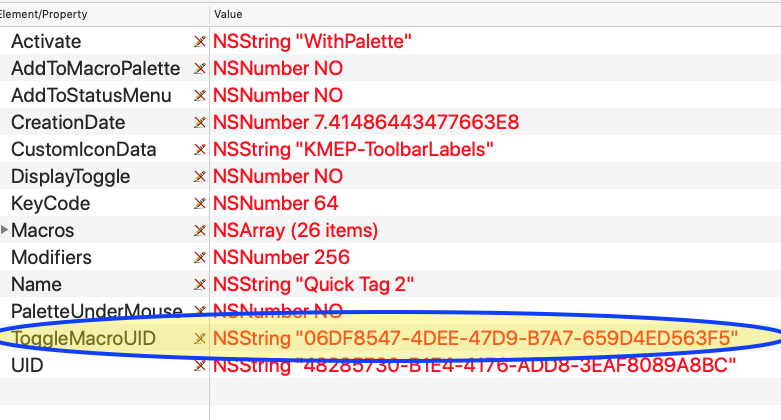
Pass this uid as a parameter to the "do script" Engine AppleScript and, voilà, it will toggle the active state of any macro group that is set to other that "Always Available".
In the dynamic gethotkeys listings, the [Macro Group] entry vanishes when the macro group--its hot keys--becomes unavailable.
The entry is a bit less dynamic in getmacros. It is present even when the macro group is unavailable, but vanishes when the macro goup is disabled.
Since the "uid" (ie.,ToggleMacroUID) won't be valid when the macro group is disabled, this makes sense.
The downside is that getmacros can't be used for getting a comprehensive listing of macro groups with hot keys and their symbols...but that is another discussion.
Smart Group Syntax for Keyboard Shortcuts: how to include Macro Group hot keys - Questions & Suggestions - Keyboard Maestro Discourse
Here is a macro that toggles the enabled state of macro groups and macros or the activation state of macro groups that are enabled and the setting is other that "Always Activated".
Toggle enable or activate from Prompt List of macros or groups.kmmacros (12.7 KB)
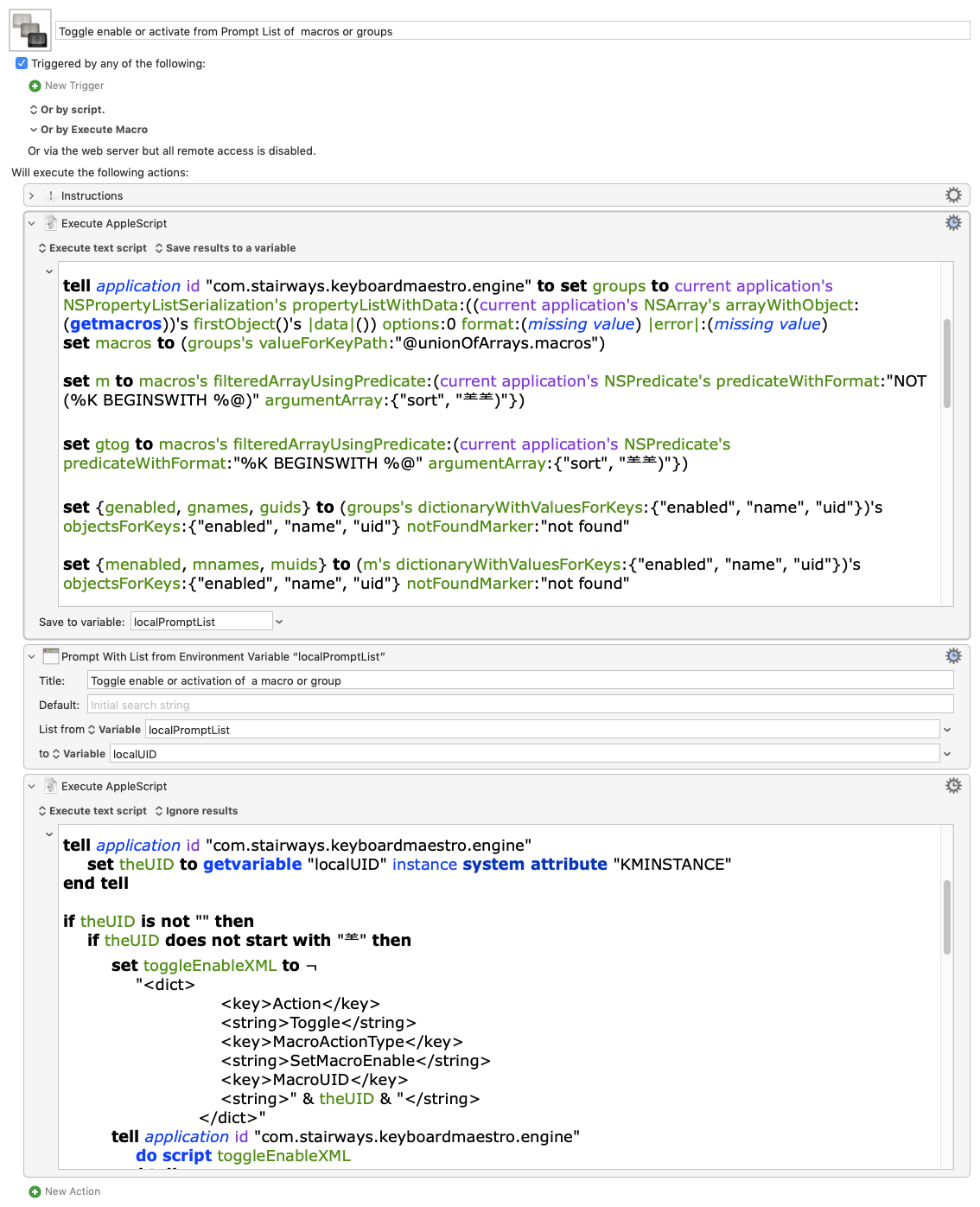
USAGE:
Enable the macro and run.
Select a name of macro or group from the Prompt with List.
A macro group or macro selection toggles its enabled state.
A toggle group activation selection toggles the activation state of the group. Palettes will show or hide.
Entries are prefixed with:
- (MG) = macro group
- (TG) = toggle group activation state
(I didn't try to remove the trailing [Macro Group] from toggle activation group entries.)
A trailing (x) shows that the group or macro is disabled.
A notification will display either:
 = toggled activation or
 =enabled or
 =disabled
followed by (G) or (M) and then the name of the group or macro.
AppleScript
Generates prompt list source (uid__group|macro name):
use AppleScript version "2.4" -- Yosemite (10.10) or later
use framework "Foundation"
use scripting additions
property author : "@CRLF"
--┏━━━━━━━━━━━━━━━━━━━━━━━
--┃ PURPPOSE:
--┃ Output "UID__macro|group name"
--┃ prompt for list lines
--┗━━━━━━━━━━━━━━━━━━━━━━━
tell application id "com.stairways.keyboardmaestro.engine" to set groups to current application's NSPropertyListSerialization's propertyListWithData:((current application's NSArray's arrayWithObject:(getmacros))'s firstObject()'s |data|()) options:0 format:(missing value) |error|:(missing value)
set macros to (groups's valueForKeyPath:"@unionOfArrays.macros")
set m to macros's filteredArrayUsingPredicate:(current application's NSPredicate's predicateWithFormat:"NOT (%K BEGINSWITH %@)" argumentArray:{"sort", ")"})
set gtog to macros's filteredArrayUsingPredicate:(current application's NSPredicate's predicateWithFormat:"%K BEGINSWITH %@" argumentArray:{"sort", ")"})
set {genabled, gnames, guids} to (groups's dictionaryWithValuesForKeys:{"enabled", "name", "uid"})'s objectsForKeys:{"enabled", "name", "uid"} notFoundMarker:"not found"
set {menabled, mnames, muids} to (m's dictionaryWithValuesForKeys:{"enabled", "name", "uid"})'s objectsForKeys:{"enabled", "name", "uid"} notFoundMarker:"not found"
set {gtenabled, gtnames, gtuids} to (gtog's dictionaryWithValuesForKeys:{"enabled", "name", "uid"})'s objectsForKeys:{"enabled", "name", "uid"} notFoundMarker:"not found"
set promptArray to current application's NSMutableArray's array()
set disabledSymbol to " (x)"
set i to 0
repeat with aUID in guids
set enabledSymbol to ""
if not (genabled's objectAtIndex:i) then set enabledSymbol to disabledSymbol
set theLine to (current application's NSString's stringWithFormat_("%@__%@ %@ %@", aUID, "(G)", (gnames's objectAtIndex:i), enabledSymbol))
(promptArray's addObject:theLine)
set i to i + 1
end repeat
set i to 0
repeat with aUID in muids
set enabledSymbol to ""
if not (menabled's objectAtIndex:i) then set enabledSymbol to disabledSymbol
set theLine to (current application's NSString's stringWithFormat_("%@__%@%@", aUID, (mnames's objectAtIndex:i), enabledSymbol))
(promptArray's addObject:theLine)
set i to i + 1
end repeat
set i to 0
repeat with aUID in gtuids
set enabledSymbol to ""
if not (gtenabled's objectAtIndex:i) then set enabledSymbol to disabledSymbol
set theLine to (current application's NSString's stringWithFormat_("%@__%@ %@ %@", aUID, "(TG)", (gtnames's objectAtIndex:i), enabledSymbol))
(promptArray's addObject:theLine)
set i to i + 1
end repeat
return (promptArray's componentsJoinedByString:linefeed) as text
Toggles enable of macro or group or activation state of group with uid output.
use AppleScript version "2.4" -- Yosemite (10.10) or later
use framework "Foundation"
use scripting additions
--┏━━━━━━━━━━━━━━━━━━━━━━━
--┃ PURPPOSE:
--┃ Process a uid to
--┃ toggle enable of macro or group or
--┃ activation state of group
--┗━━━━━━━━━━━━━━━━━━━━━━━
tell application id "com.stairways.keyboardmaestro.engine"
set theUID to getvariable "localUID" instance system attribute "KMINSTANCE"
end tell
if theUID is not "" then
if theUID does not start with "" then
set toggleEnableXML to ¬
"<dict>
<key>Action</key>
<string>Toggle</string>
<key>MacroActionType</key>
<string>SetMacroEnable</string>
<key>MacroUID</key>
<string>" & theUID & "</string>
</dict>"
tell application id "com.stairways.keyboardmaestro.engine"
do script toggleEnableXML
end tell
else
set theUID to text 2 thru length of theUID
tell application id "com.stairways.keyboardmaestro.engine"
do script theUID
end tell
end if
set theResults to enabledStatusOfMacroOrGroupUID(theUID)
if theResults ≠ missing value then
set {objectType, objectName, enabledStatus} to theResults
if enabledStatus is "true" then set enabledSymbol to "✅"
if enabledStatus is "false" then set enabledSymbol to "❌"
if enabledStatus is "toggled" then set enabledSymbol to "🔘"
if objectType is "group" then set typeSymbol to "(G)"
if objectType is "macro" then set typeSymbol to "(M)"
display notification typeSymbol & space & enabledSymbol & space & objectName
end if
return
end if
on enabledStatusOfMacroOrGroupUID(theUID)
tell application id "com.stairways.keyboardmaestro.engine" to set groups to current application's NSPropertyListSerialization's propertyListWithData:((current application's NSArray's arrayWithObject:(getmacros))'s firstObject()'s |data|()) options:0 format:(missing value) |error|:(missing value)
set macros to (groups's valueForKeyPath:"@unionOfArrays.macros")
set matches to macros's filteredArrayUsingPredicate:(current application's NSPredicate's predicateWithFormat:"%K == %@" argumentArray:{"uid", theUID})
set m to matches's firstObject()
if m ≠ missing value then
if (m's objectForKey:"sort")'s hasPrefix:")" then
set theObject to "group"
set enabledStatus to "toggled"
else
set theObject to "macro"
set enabledStatus to ((m's objectForKey:"enabled") as boolean) as text
end if
return {theObject, (m's objectForKey:"name") as text, enabledStatus}
else
set matches to groups's filteredArrayUsingPredicate:(current application's NSPredicate's predicateWithFormat:"%K == %@" argumentArray:{"uid", theUID})
set g to matches's firstObject()
if g ≠ missing value then
set theObject to "group"
set enabledStatus to ((g's objectForKey:"enabled") as boolean) as text
return {theObject, (g's objectForKey:"name") as text, enabledStatus}
end if
end if
return missing value
end enabledStatusOfMacroOrGroupUID
If anyone wants to read these in-memory plists using KVC, just ask. I'll try to untangle some of the underbrush of the interface the best I can. 