I make extensive use of DropBox, symlinks, and aliases.
##dropbox
- I use DB to sync all of my apps data across all of my Macs, and even with my iOS devices.
- I have set the Dropbox root folder on all of my Mac in the same exact locatiion, so it, and all subfolders/files, will have the exact same path on all my Macs
- I chose
/Users/Shared/Dropbox - I am the only user of my Macs, so being in the "Shared" folder is not an issue for me
- But you could put it anywhere you like, as long as it is the same on all Macs.
- I chose
- This has worked flawlessly for several years
- The sync seems to be near instantaneous (as soon as you save a file update), but I am conservative, and generally make sure I close all apps on one Mac before opening then on another.
###SymLinks
- See What Are Aliases, Symbolic Links, and Hard Links in Mac OS X?
- While you can manually create symlinks in the Terminal.app, I prefer this tool:
[OSX] Symbolic Linker 2.1 Update (SymLink)
.
- While you can manually create symlinks in the Terminal.app, I prefer this tool:
- I mostly use symlinks (rather than aliases)
- I have symlinks for all of my AppleScript system related folders, to a folder inside of my DropBox setup
- For example:
.
EDIT: 2017-03-13 12:58 AM CT
after double-checking, I realize that I have used this setup:~/Library/Scriptsis an alias to my DropBox folder- This is necessary because FastScripts does NOT recognize symlinks.
.
- For example:
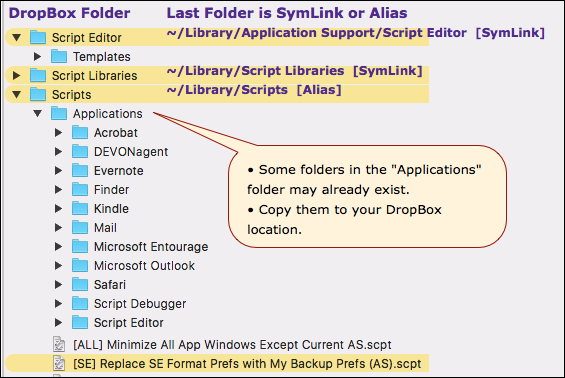
The last folder in each path in this list is a symlink or alias to the folder in my DropBox folders:
~/Library/Application Support/Script Editor    [symlink]
~/Library/Script Libraries    [symlink]
~/Library/Scripts     [alias]
###Procedure to Setup SymLinks
- FIRST, backup ALL of the existing related folders in your
~/Librarythat you are going to replace with sym links
.
-
Create the folder setup in your DropBox folders.
- It can be at any level, but I suggest they be in a parent folder that also contains all of your other script files, to facilitate searches.
- For example, all of the symlinks above link to a sub-folder of this folder:
/Users/Shared/Dropbox/DEV/Linked Folders - See my example folder organization below.
.
-
In the Dropbox parent folder of the target folder, create the SymLlink file.
-
Replace the corresponding folder in
~/Librarywith the SymLink file.- One easy way to do this is to rename the existing folder by appending " - OLD" to the end of it.
- Then make sure you move the symlink file to the SAME parent folder as the on you are replacing.
.
-
Take it slow. Do one folder at a time, and test to make sure it works like you expect it to.
- Put one or two files in the DropBox setup, and test access from Script Editor, like using a script library.
- Put some scripts in the Dropbox Scripts folder, and make sure you can see them from the Apple Script Menu bar.
.
-
If you have ANY questions or doubts, ask before you proceed.
Here's a general way to organize your scripts and development:
##example Folder Organization in DropBox
/Users/Shared/Dropbox
	/DEV
		/Linked Folders
			/Script Editor
			/Script Libraries
			/Scripts
		/My AppleScripts
		/My JXA Scripts
		/My KM
			/Scripts
			/Macros
			/Misc
			/Resources
			etc
		/Projects
		etc.
Note that all of your scripts are contained within the DEV folder.
So, if you set the Finder's target to DEV, then you can do a search for all scripts it contains.
For example:
kind:script @date
would find all of my script files that have the text tag "@date" in the name or contents of the script file, all within the /Users/Shared/Dropbox/DEV folder.
###Use in Keyboard Maestro
Now, I can reference any of these scripts by path in a KM Execute AppleScript Action, and it will be found on all of my Macs.
My usual convention is to put all scripts (regardless of kind) used by KM in the My KM/Scripts folders. I do this whether I use the script path, or just the script text, in the KM Action. I always develop and test all scripts in a file using Script Debugger 6 (or Script Editor). Then, if it is something I might share with others, I will change the Execute Script action to use "text" instead of "file".
Good luck to all who want to use this method.
Please feel free to ask any question.