MACRO: An Automatic URL Decrufter for Defined Hosts

Yes they are! This substack redirect link is not.

Also, is it possible to call the recruiter macro from another KM macro?

I have a text replacement macro that replaces ,,slink with the safari macro and that uses a JXA script. I am wondering if there is a way to introduce the decrufter macro into that macro.

Thanks!

Edit: Got it will look at the 12]... macro.
Edit 2: I read the description of the macro some more. Posted too soon - will add substack to it at a later date. The bigger opportunity for me would be to call this macro from the text expansion macro that I use. And thank again!

Edit 3: Sounds like if I add a URL to the system clipboard (from the ,,surl macro) and then invoke 00]... macro, I should find in the system clipboard the output. Will work on that. Unless you have a cleaner solution. Thank you!

Version 8.7 is out with some bug fixes and tweaks to improve speed (though most of the time taken is caused by curl, and there's no avoiding that one).

-rob.

1 Like

Are the curl issues solved? Thanks.

The Decrufter is phenomenal and so well built. Well documented and a joy to see how much had to come together for it to work. Well, maybe I mean that it's a joy that I didn't have to do all the work!

Clearly, we're of the same mind when it comes to an aversion against giving up more info than necessary. It's unfortunate curl is required in some cases - must be some people out there doing this and running the requests through Tor or a VPN :slightly_smiling_face:

Also, very clever to include a curl bypass for sites that don't need it.

Anyway - thank you! :clap:


Bonus: unlikely use case

A rare use case came to mind - so here's a potential enhancement this hypothetical person could try:

In case you're: constantly coming across new sites you want to share links from, and you want to understand whether curl is necessary.

Enhancement: decruft a URL from a new domain with and without curl, and display both URLs. If w/o curl is sufficient, add to curl bypass. Perhaps could automatically set to bypass if both URLs are the same.


Bonus: shortcut for iOS

A simplistic UTM parameter etc. remover for mobile: Remove query arguments from URLs in your clipboard

via u/adoboda on reddit's r/shortcuts

1 Like

Thank you; it was fun to build—sort of, at least :).

And thank you for the kind words.

I understand the request, but I don't think it's anything I'll take on. I don't have the same amount of time to spend on my macros as I had a year or two ago, so they're not getting a lot of new features. If you wish to tackle that project yourself, feel free (and feel free to post it if you wish).

-rob.

1 Like

Re-reading my comment, it sounds like I might've been that hypothetical person... but as far as I know they don't exist! Yet - and the immortal Keyboard Maestro Forum will be here for them should the billowing winds of corporate cruftification blow them down this thread.

2 Likes

Hi,

As everyone else has mentioned, this is phenomenal work! Thank you!

A few things:


Starting a year+ now YouTube began appending si= tracking IDs when sharing links via their their "Share" button (either at youtube.com or via their apps).

ex:
https://youtu.be/oHg5SJYRHA0?si=xxxxxxxxxxx

(Funny enough, it looks like Discourse has its own decrufter. Pasting that link above automatically removed the si= :joy:)

This one is especially pernicious in that the tracking id is uniquely identifiable. Just like Instagram's ?igshid and Facebook's ?fbclid. (Both of which this macro handles well.)

  • Adding youtu to the added domains list results in: youtube.com/watch (as @griffman and @Lantro discussed above)
  • Adding youtube does remove the si= but now you run into the problem of it removing playlist= as well.

I guess, ideally, that si= would be a hardcoded exception or something like that? Maybe in the macro's: 24] YouTube ?

I need to read your discussion above more carefully.


re: cURL and exclusions:

Is there a good case for reversing the current default behavior?

IOW: Default to not using cURL and add domains that should use it?

I understand why using cURL helps in some cases and the exception list is a great feature.

But I really hate the idea of any of these places getting a single "hit" with the tracking id included. Especially given what I wrote above about the ones that are essentially leaking personally identifiable information.

So with the current behavior, every link to decrfut is (at least for the first time) going to call out to that site. Which defeats the purpose.

It's especially bad when you're copying from a URL that's behind an html <button> or a something like a link preview in Messages.app where you don't even know if there's a tracking code without first copying it.

Apologies if this is already possible but I missed it in the comments above or the documentation.


btw: @griffman: Also thank you for Mac OS X Hints and all of the work you put into it. I use to read that site every day. It was one of my favorites.

And thank you for all of the work and time you put into this forum.

I'll look at that over the weekend, it shouldn't be too hard to fix.

Sadly, over time, more and more places are making it impossible to decruft without using curl: They're using intermediary servers that completely disguise the destination URL. As an example, here's a URL from a Flying magazine newsletter I receive (tracking characters have been randomized a bit):

https://fly.omeclk.com/portal/wts/uc%5EcnFmhDZxe4EDc6CDLmvzAgzaxA3cdzezYg3n

There's no way to even get to a decruftable URL without sending that through curl. Coming out of curl, it's still pretty crufty:

https://www.flyingmag.com/the-new-owner/bundling-up-your-aircraft-for-winter/?MailingID=%CAMPAIGNID%&utm_source=hs_email&utm_medium=newsletter&utm_content=text&utm_campaign=FLY-NL-Daily&oly_enc_id=068dG72s3356H4T

But at least the domain is correct, so then the decrufter can get to work and strip those bits out:

https://www.flyingmag.com/the-new-owner/bundling-up-your-aircraft-for-winter/

Without curl, though, there's no way to even start. When I look at it this weekend, I'll see if there are others that can skip curl, but it's typically been getting worse, not better. I'd love an alternative, but I just don't know how you can convert an intermediary URL with an embedded code into the destination link without loading it somewhere.

Those were some fun years; thanks for the kind words!

-rob.

1 Like

:+1:t2: Thanks.

Yes, agreed in those cases.

But I'm thinking about the cases where the query string is directly in the original url to clean. Where it's the destination is already know. Until they start using both query params AND paths :upside_down_face:

Thanks.

Agreed.

The only way I can think of would be checking against a central repository that keeps track of these URL patterns and their converted destinations. Somewhat like what SponsorBlock does. I don't know if that exists and there are going to be plenty of cases where even that won't work.

But in a somewhat related case, I assume you know about:

Also it might be cleaner (in some cases) to use JavaScript URLSearchParams instead of RegEx. Just a thought... That you've probably already had :slight_smile:

And I'd have to figure out how to interface with it, etc. So probably not something I'll look into.

Well, I don't use anything by Google unless forced, so not familiar with the first one at all. And I hadn't seen the second until just now.

Other than me not knowing anything more than a tiny bit of JavaScript, which could be a bit of a deterrent :).

-rob.

Yeah. I can imagine that would be really tricky via Keyboard Maestro.

I think this would be a great project for a native app.

Same. I was linking more for the approach they took rather than the extension itself. The mac equivalent (but without a community db) is: StopTheMadness

Ahh. That would do it :slight_smile:

This API essentially takes care of all of the hard work of capturing each of the query params. It also provides some direct ways to check and manipulate them.

So for example, removing utm_content= but keeping pageId= is as straight forward as: has("utm_content")

URLSearchParams: Examples

1 Like

Whoops.

It does do this but it's only available as part of the Web API, which is usually only available in browser implementations of JS. IOW: It won't work via Execute JavaScript for Automation Action.

So you'd either need to execute JS, that relies on the URL interface, via the Execute JavaScript in Browser Actions [1] or include a polyfill[2] at the top your JS.

It took me a while to track this down. The KM Engine.log helped:

Execute a JavaScript For Automation failed with script error: /var/folders/wc/xxxx/T/Keyboard-Maestro-Script-UUID: execution error: Error: TypeError: urls.map is not a function.


@peternlewis, Speaking of what JS is and is not available:

Do you think this would be a good topic to add to the new Fundamental Concepts [Keyboard Maestro Wiki] page?

Or maybe just adding specifics to these two wiki pages where this is mentioned only generally:

JavaScript for Automation [Keyboard Maestro Wiki]

Keyboard Maestro’s Execute a JavaScript in Safari and Execute a JavaScript in Google Chrome actions are for interacting with web pages, the Execute a JavaScript in Custom Prompt action is for interacting with Custom HTML Prompts, whereas JXA is for automating OS X and OS X Applications via the Execute a JavaScript For Automation action.

https://wiki.keyboardmaestro.com/actions/Browser_Form_Actions

:!: NOTICE: Some web pages may use dynamically generated element IDs and/or classes, which may result in some Keyboard Maestro Actions that do not work as designed. For these pages, you may need to use Keyboard Maestro tools like Execute a JavaScript in Browser actions with JavaScript tools like querySelector to get and set these dynamic web form fields.

After thinking about the error from Editor.log, I found the quotes above but still wasn't immediately sure what was going on.

Probably because I thought to myself: "But I'm not trying to get the elements from a webpage. I'm just using JS to manipulate plain text".

Eventually I got it but a specific mention of the Web API would have really helped.

Maybe something like this:

Some JS functions are only available via the Web API.

A list of browser-only JS APIs that ChatGPT compiled:
  • DOM (Document Object Model) APIs
    • document
    • Element
    • Node
  • Browser APIs
    • Window API
    • History API
    • Location API
  • Fetch API
  • Web Storage API
    • localStorage
    • sessionStorage
  • WebSockets API
  • Service Workers API
  • Geolocation API
  • Web Notifications API
  • Canvas API
  • Web Audio API
  • WebRTC API
  • Clipboard API
  • File API
  • Media Devices API
  • Payment Request API
  • WebXR API
  • Intersection Observer API
  • Resize Observer API

  1. I haven't tested this and seems like it would be slow. ↩︎

  2. I use this one (with some modifications) and it works well:
    GitHub - ryangoree/url-poly: Polyfill for the URL web api. ↩︎

Did you get to the discussion page: JavaScript for Automation [Keyboard Maestro Wiki]

Not a JS guru (by any stretch), but

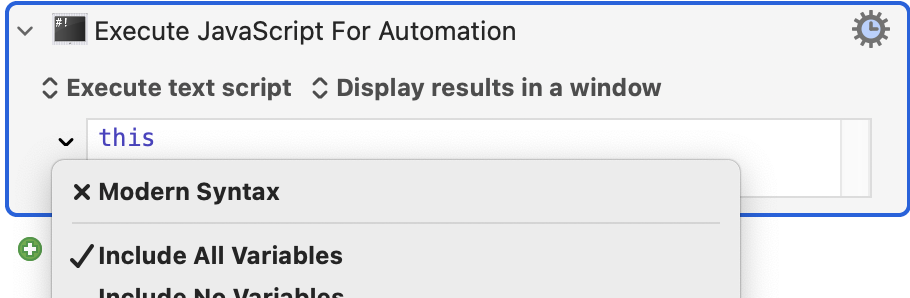
You can view the built-in, default function provided by JXA by running this simple, one-word script:

this

the result will be a listing of all the pre-defined names in JXA's osascript environment.

...seems to answer your question.

Long story short -- this is JXA, not JS, and certainly not JS-as-in-a-web-browser. Apple provides the functionality, not KM.

Yes, I read through it. That's where the "Keyboard Maestro’s Execute a JavaScript in Safari and Execute a JavaScript in Google Chrome actions are for interacting with web pages" quote comes from.

The text just above that is helpful:

JavaScript environment is very different from the set of web page (window and document) references that you find in the Browser JavaScript environments of Chrome and Safari.

I was just adding my 2c that it could be helpful to add additional details.

I also read this:

JXA is very flexible providing a rich set of default libraries for some basics like character, date, and URL handling.

But I wasn't able to find any good details on the URL function, instance, constructor, etc.

I tried an example directly in Script Editor.app:
let testUrl = new URL("https://example.com:8080/path/to/resource?query=value#hash");

But received the error:
Error: ReferenceError: Can't find variable: URL

This is really cool. I didn't know that.

However, I wasn't able to get that to work either. I think I replicated the instructions exactly. But when I try to run it, nothing happens:

I also don't see any errors in the Engine.log

KM 11.0.3 :lady_beetle: ?

@griffman Have you seen this by Jeff Johnson:

If you look at the screenshots on that page there's no pop-up menu arrow to the left of the text box. That implies they were done before "Modern Syntax" was implemented and made the default for the action.

Turn that off and you should be golden:

Any info about that will be in Apple's (sparse) documentation, available in Script Editor's Dictionary browser (probably in Standard Additions), or scattered over the web in various JXA examples. It really isn't down to the KM Wiki to document other people's stuff!

I suspect that URL requires properties, not just a string. I'll have a poke, but my limited AppleScript skills may not transfer to my non-existent JXA knowledge!

:person_facepalming:t2: Yes, that did it. Thanks.

Agreed, I was referring to Apple or out on the Internet. Not the KM docs/forum.

I think I recall looking at it a while ago. I can't remember when, or why I'm not using it, though :).

-rob.

1 Like

It does not sound like something I want to document. The actual behaviour of JavaScript For Automation or JavaScript within the browser is beyond the scope of Keyboard Maestro or its documentation.

@peternlewis I understand.

I was thinking, since many (most?) people's experience with JavaScript is via the web, that it would be helpful to call out the lack of some of the APIs they're use to.

Especially for new Keyboard Maestro users.

Thanks.