Thanks for the information, @Nige_S. If it's over your head, I hesitate to even comment. But let's give it a shot anyway...
@skillet, please open the macro and change this setting to 0.
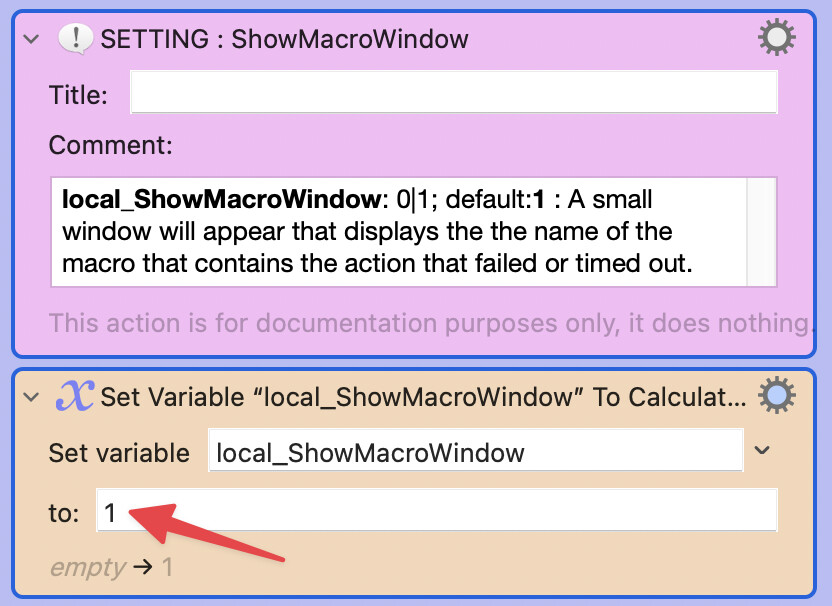
When you get a chance, please report back. Thanks.
Thanks for the information, @Nige_S. If it's over your head, I hesitate to even comment. But let's give it a shot anyway...
@skillet, please open the macro and change this setting to 0.
When you get a chance, please report back. Thanks.
Oh I love it, thanks for that, I don't know why I didn't think of that. Great for just about everything and will use that much more in the future. THANK YOU!
I've updated the OP with Version 10.0 of Engine.log Tool:
If ⌘ is down when the Latest button is selected, the failure/timeout lines will be displayed in a list. If ⌥ is down, the list will be displayed in ascending order. The failure/timeout selected will normally be displayed in the main dialog. An option was added: if ⌥ is down when the failure/timeout is selected, the selection will be saved to the clipboard and the macro will be cancelled.
If this macro is run from another macro using the Execute a Macro action (or via AppleScript), and With Parameter is specified, the following keyword has been added:
action:ID : the action based on ID will be selected in the Keyboard Maestro Editor
Changed local_BoundaryAlert default from 1 to 2.
Deleted the setting local_DescendingIsDefault since it is better to set the default order based on context. When the failure/timeout entries appear in a Prompt For User Input (⌘+Latest button) the default is to display the latest entry at the top. This order can be reversed by using ⌥+Latest button. In contrast, when the Engine.log entries are opened in a text editor (⌘+Console button), the latest entries are at the bottom (like in macOS Console.app). Again, this order, however, can be reversed using ⌥+ Console button.
Updated the Help window contents to clarify the sort orders mentioned in the above bullet.
In shell scripts, the tac command was replaced with tail -r. (tac is not available with macOS Sequoia.)
Updated the TESTED WITH section.
Whatever you did with this update it now works for me. Thank you! I am guessing it was the following but maybe not.