Aahh it worked. Not sure what happened or what was made different, but it works. And imagine it's because of the two of you. Thank you.
But of course, two other things came up that maybe you can answer/help with.
Referencing this macro, email content, variables - Towards the end of the Excel part, you'll notice the naming scheme of the file when I save it.
To make it perfect, it needs to be 2023 Entity Timesheet - Client - Last name, First name - Classification
2023 WYT Timesheet - Chimi - Rhino, Mike - Taco Eater
Is there a way to split the "Worker Name" variable before putting it into the Save title? Or another option is to split it in the beginning. So a way to save the first string to Local_First and after the space second string to Local_Last?
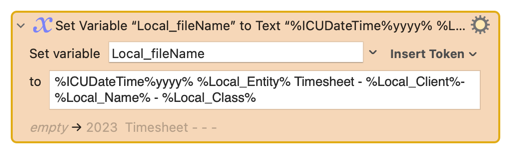
It could look something like this:
%ICUDateTime%yyyy% %Local_Entity% Timesheet - %Local_Last%, %Local_First% - %Local_Class%
Is this the answer: RegEx Split by Capital Letters
Edit: These examples in the link above work if it was one long string, not two words.