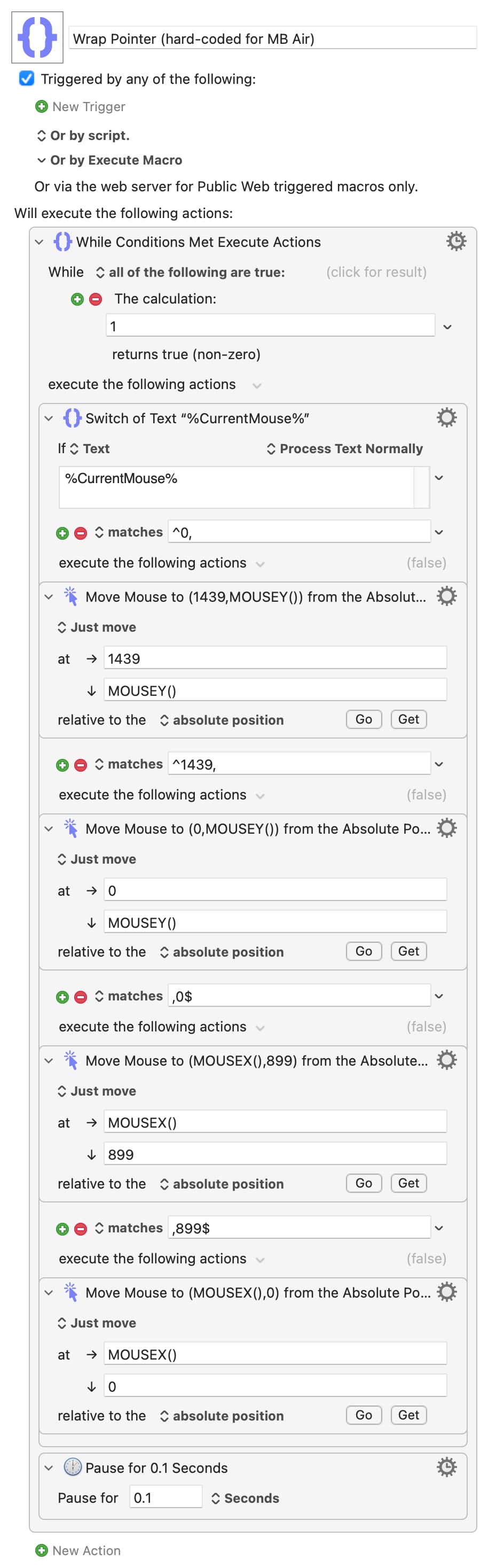
That makes it even easier -- you know the dimensions of the screen, they don't change, so you can hard-code all the numbers. The only gotcha, as you can see from my macro above, is that you need to set the "move to right edge" and "move to bottom edge" numbers to both be one less than you'd expect from the reported screen width and height.
(Weirdly, you can "Move mouse to" absolute x or y coordinates of -1,000,000 and the pointer stops at the left or top edge. Use +1,000,000, or even just 1 pixel more than would take you the screen's right or bottom edge, and the action errors. This is appears to be a macOS API issue, not a KM problem.)
Since my Air returns 0,0,1440,900 for the %Screen%Main% text token I'd use
0 for left-edge detection, 1439 for right, 0 for top-edge and 899 for bottom. The "Move" action would use the same numbers for its targets.
Hard-coding will save a few CPU cycles because you're evaluating fewer tokens. If you want to cut CPU usage even more you can add a "Pause" to the loop -- the longer the pause the greater the reduction, but it does mean a decrease in edge-detection frequency.
Wrap Pointer (hard-coded for MB Air).kmmacros (7.8 KB)
Nah -- just a case of watching CPU usage in Activity Monitor with and without the macro executing. YMMV, so try for yourself!