Thanks @randywolf244.
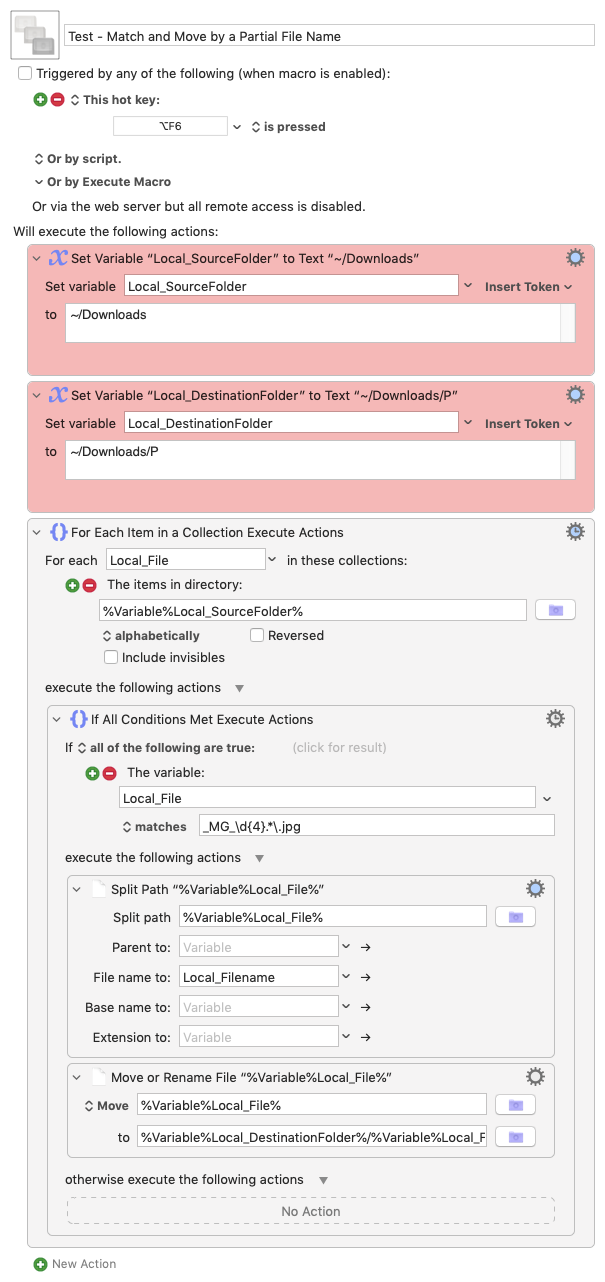
With your examples I'm going to use the following regex _MG_\d{4}.*\.jpg in this macro. You should change the paths in the two actions coloured red to suit your own system and obviously change the hot key trigger as you see fit.
Although I've tested this on my system, things may be different on yours so I strongly suggest you create some test folders containing files you don't mind losing to make sure it works as you expect it to.
Let us know how you get on 
Download Macro(s): Test - Match and Move by a Partial File Name.kmmacros (4.3 KB)
Macro-Image
Macro-Notes
- Macros are always disabled when imported into the Keyboard Maestro Editor.
- The user must ensure the macro is enabled.
- The user must also ensure the macro's parent macro-group is enabled.
System Information
- macOS 10.14.6
- Keyboard Maestro v10.2