Moving the Mouse like a Human would

I appreciate all the replies and help. Maybe I am thinking this is something that it is not? I found this macro as I am trying to record mouse gestures I use to click prompts that always in very specific spots in the same place for a software I use with my laser machine.

Am I able to record myself clicking the prompts like this?

Thanks!

| Airy
October 9 |

  • | - |

Well, I think it’s working and you don’t realize it. You see those blue circles? Those represent the path that the mouse is randomly taking using the recorded path(s) that you installed into the macro. Every single pixel that the mouse moves between those blue circles is being calculated from one of the paths that you previously recorded. There’s a lot of calculations going on while that Test Macro is running. If you look closely, you will notice that the path the mouse takes between each circle is a scaled replica of one of the path(s) that you recorded.

In order to stop the test macro from running, one method is to move the mouse to the top pixel of the screen. You may have to “fight” the macro a little bit as it is moving the mouse pointer itself.

I can’t explain what your problem was right now, and I’m sorry for asking you to disable two actions that don’t exist (I probably added them after uploading the macro) but please consider my words above and look closely, you may discover that it’s working as intended. At least that’s what your latest screen shot suggests to me.

You could also try creating your own test macro that moves the mouse from place to place. The whole purpose of my utility is to let you move the mouse, so you should try it yourself, rather than just run my test macro.
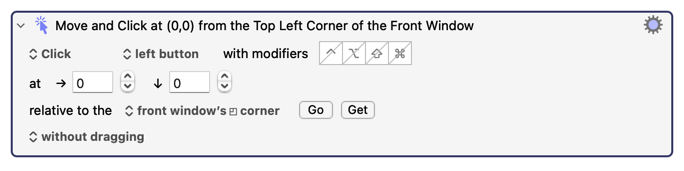
My macro does a lot more than move and click a mouse. For what you are describing, you don't need my macro. All you need is the following action:

The options that you pick, like the location and the relative field depend on you exact needs.

Oh wow I’ll give that a try, thanks!

| Airy
October 9 |

  • | - |

CoCoBoZo:

I found this macro as I am trying to record mouse gestures I use to click prompts that always in very specific spots in the same place for a software I use with my laser machine.

Am I able to record myself clicking the prompts like this?

My macro does a lot more than move and click a mouse. For what you are describing, you don't need my macro. All you need is the following action:

The options that you pick, like the location and the relative field depend on you exact needs.

My words are coming out looking like your words, in two of your posts now. You are supposed to be quoting my words. It's easy to do. Just select my words and click on the Quote button.

This is, I think, another side effect of the rich text editor. I had real trouble quoting people, even though it looked right in preview, until I switched back to Markdown.

-rob.

1 Like

Wild, I sent those as replies to the email notification for this thread instead visiting the forum manually like I’m doing now.

Thanks again!

Wow, then I think that’s another bug with the new web server. @peternlewis please note.

I've never found replying by email is a good idea - if you do, you should ensure nothing except what you intend to reply is included in your reply, especially including any signature or left over text.

I am on V.1.1 on macOS 26.1. I have only a single monitor. I have now recorded 10 paths using a trackpad, which seems to work OK in lieu of a mouse. I have run the Mouse Test and watched the pointer move around. Now I want to use it to click a point in a captcha screen that asks if I am human. I have tried it before with a simple Move & Click action that has not worked well when I run my macro. How would I use Moving the Mouse like a Human to get around using a Move & Click action, at least in this particular case? When I asked you about this in an earlier email (I should have posted it here–my bad), you suggested using Mouse like a Human would work better. I am still not sure how to apply this tool to solve this problem or perhaps others as well.

Did you look at the macro called "Mouse Test"? That macro demonstrates how to use this utility. I recommend that you read that demonstration macro.

The reason why it should solve your problem is that it is designed to move the mouse from point A to point B in the same manner that a human would move it. While I haven't used this macro on your particular captcha, I have used it in other places and it seemed to work fine. I suspect your captcha uses basic movement detection algorithms to ensure that your mouse is moving like a human would move a mouse, so my macro will probably pass your captcha's test.

Attached is a macro that does not always reliably click where a want it to. The problematic actions are colored in red. Do you think Moving the Mouse like a Human might help here? If so, please elaborate changes I should try in my macro.
DFCU Passwrd Login KM.kmmacros (44.3 KB)

Most of your macro runs after you login to the website. I don't have an account on that website/bank, so I cannot determine the reliability of your actions, because I can't see what they are trying to do.

Alright, so you said double click actions, which you marked in red, were sometimes failing. In order to determine why they are failing, we might need to see the web page (and possibly look at its javascript). But we can't examine the web page because we can't log in. So would you consider showing a screenshot of the web page at the moments when those actions are running? Clearly, without seeing the web page or the code running on that web page it's impossible to tell what the fix is.

However despite the fact that I'm completely unable to determine the solution due to lack of information, I'm going to give some advice. Two bits of advice....

FIRST ADVICE

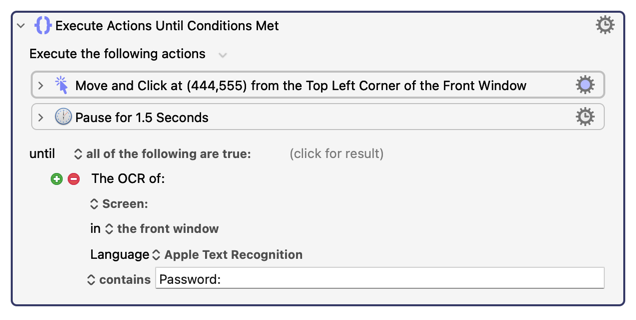
One of the biggest problems when creating a KM macro is simply assuming that a KM action will succeed. In my experience, it's always better to perform the action, and then test if the action succeeded, and then repeat the action if the action didn't succeed. In your macro, you are doing lots of clicks, but not a single time are you checking to see if the click worked. When I write my macros, I usually do checking. For example, this piece of code demonstrates how to "click until a condition is met"... (I do this thing all the time, which makes my code quite robust)

If you look at that code, you will see that it repeatedly clicks on a specific point in a window (which might be a Login button, for example) until the word "Password:" appears in the window. This is much, much better than simply clicking on a Login button and assuming that it worked. Even though the OCR might take a second to execute, the Pause is still helpful because you want the OCR to take its image about a second AFTER you click the Login button, especially on websites which can be slow.

This is the biggest problem with most people's macros... their code assumes everything worked instead of testing to see if it worked and repeat the attempt until it does work. In fact some of my code repeats for a certain amount of time, and if that time is exceeded, I get a notification sent to me on my Apple Watch. That's pretty cool, isn't it?

SECOND ADVICE

I have another wild guess. I'm guessing that your red actions are trying to click on captchas. Is that correct? In that case, you need to find a way to move the mouse in such a way that the captcha (which is implemented in javascript) is fooled. In that case, the macro that I uploaded in this thread will likely fix the problem. In order to use my macro, you need to learn how to use it, and to that end I provided a sample macro called "Mouse Test" above. Have you looked at that macro to see how it works? Did you at least run the Mouse Test macro and look at what it's doing to the mouse when it runs? It could be very helpful for you to learn how to use my macro by examining my sample code, called "Mouse Test."

Why are you double-clicking in those actions?

Before going to more complicated solutions (that may not be required), change both of them to separate "Move", "Pause", "Single Click" actions as described in the other thread.

Your first bit of advice is spot on. Using “Execute Actions Until Conditions Met” solved my captcha screen problem. In that respect I really don’t need the “Move Mouse Like a Human", but I do want to learn it better. I’ll keep experimenting with it. Appreciate your patience and expert help.

Great. Someday I might write a long post detailing how to "check" if KM actions worked.

I'm glad you want to learn more about it. It's not for everyone, because very few people need to trick bot-detectors like captchas. KM is essentially a "bot" but it doesn't include any anti-bot detection techniques so we have to write our own. For example, the KM "Insert text by typing" action inserts characters in a linear, non-human way. Somewhere in my macro library I've got a macro that performs the same result but places much more human "timing" between keys to avoid bot-detectors. I probably should call that macro "Typing Keys like a Human Would."