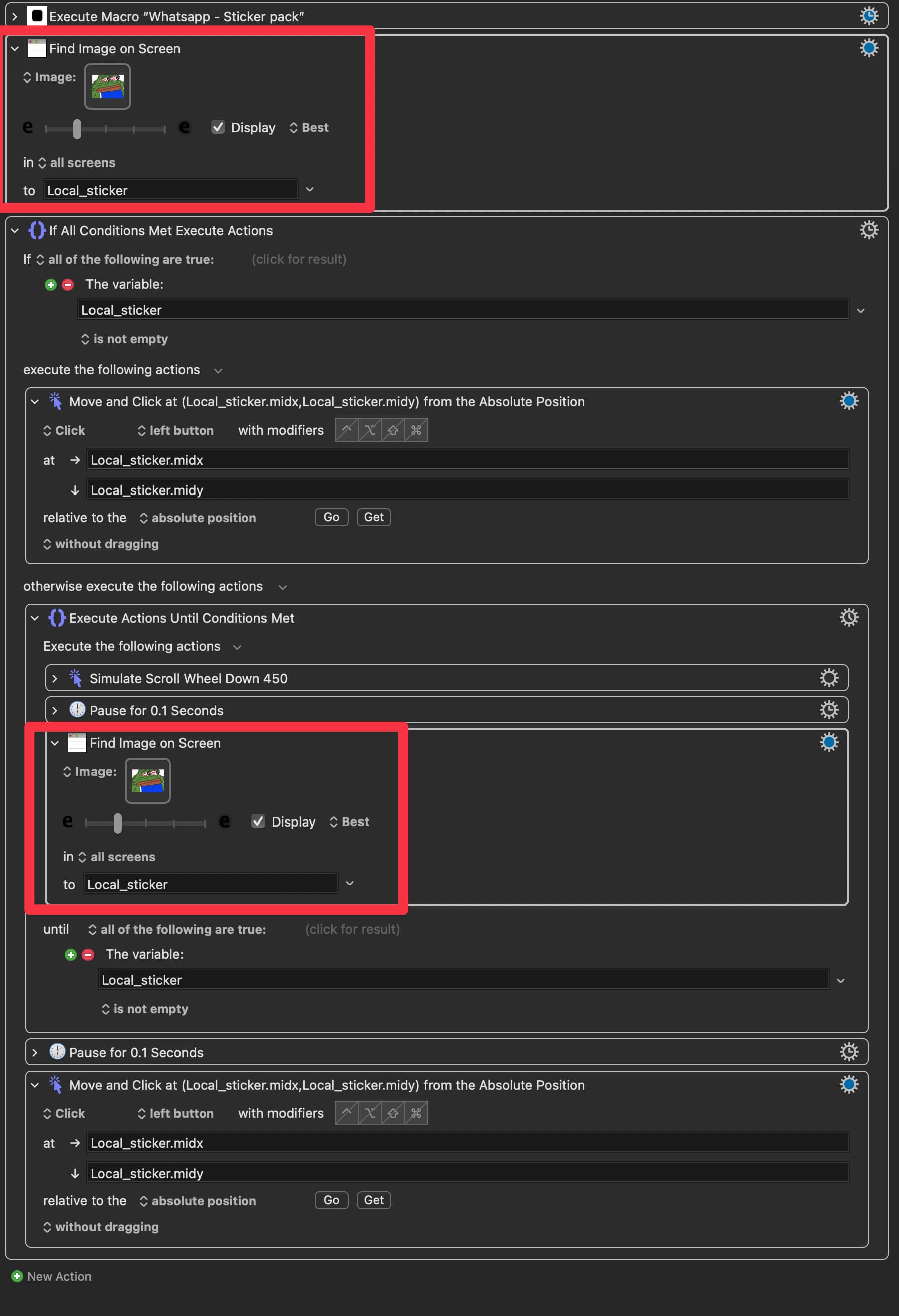
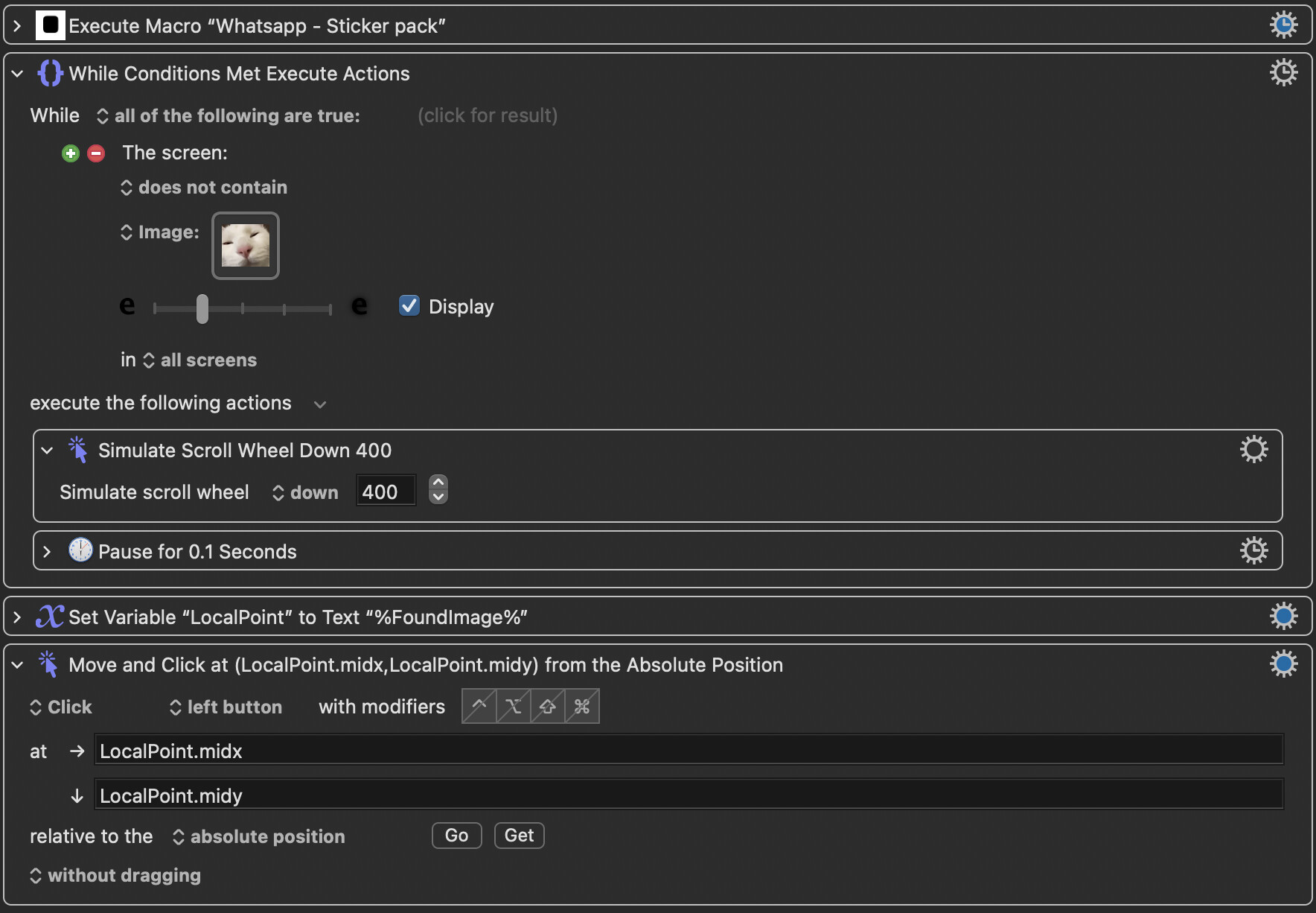
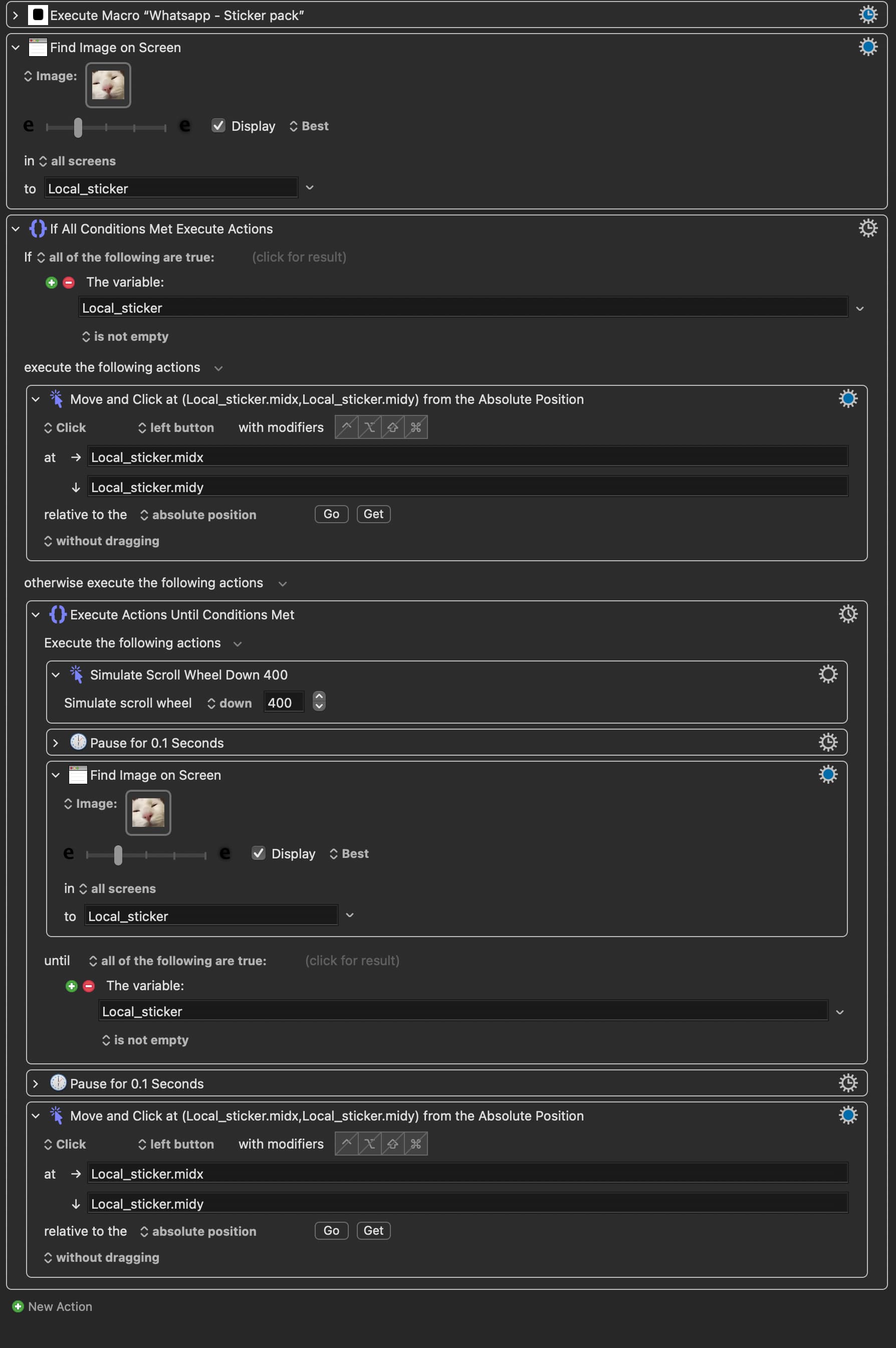
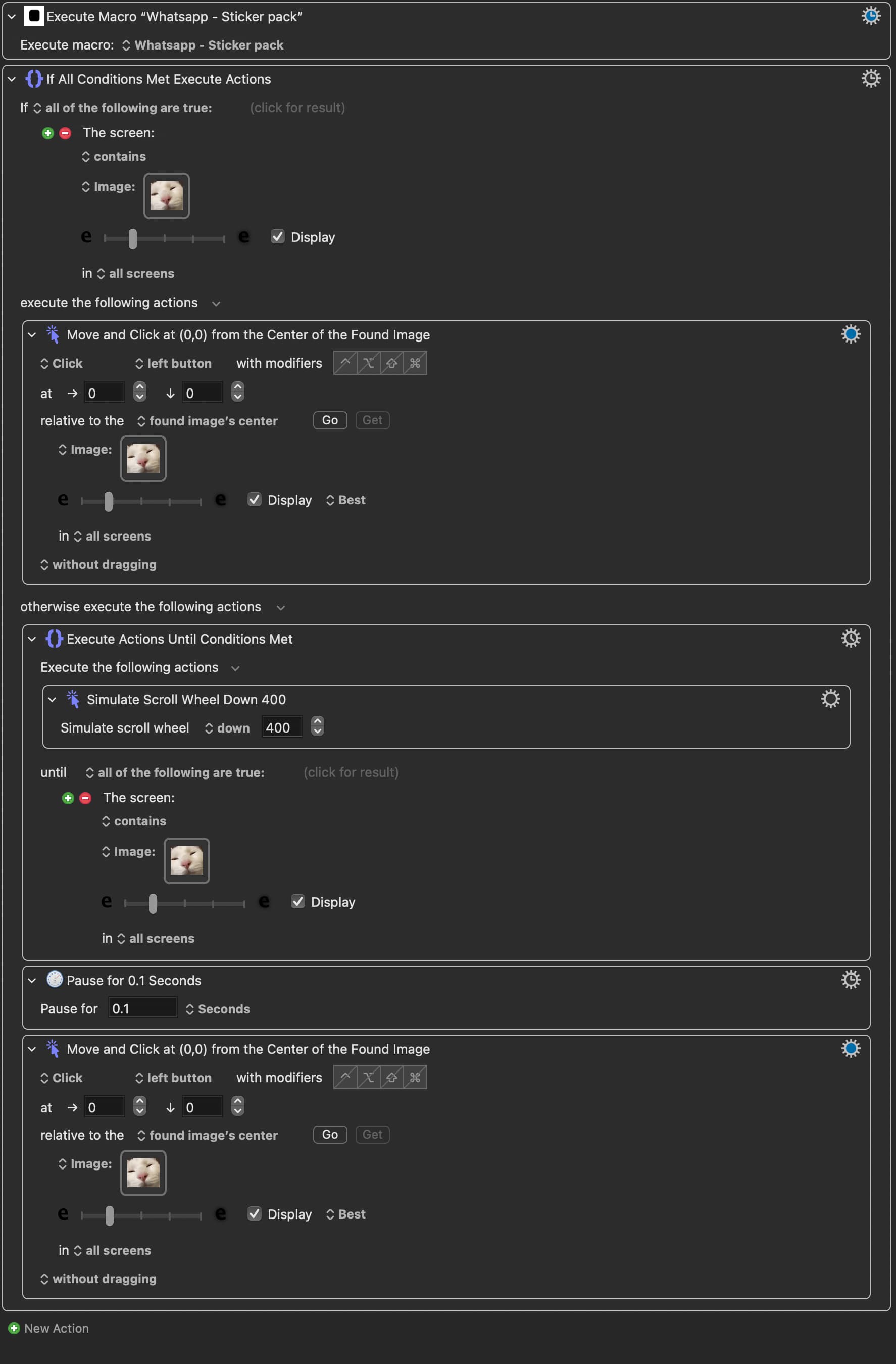
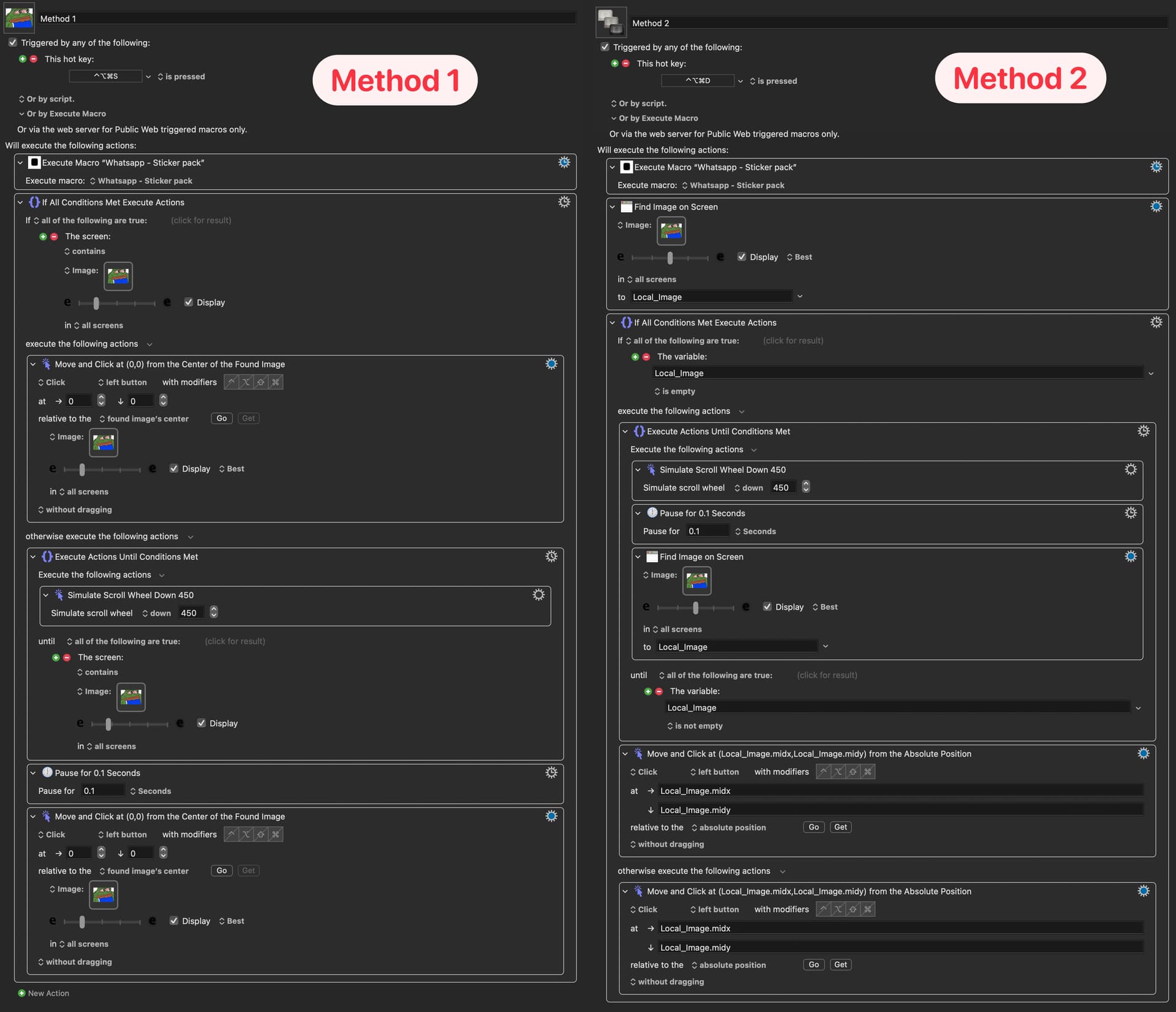
I wrote two different macros that do the same thing:
If the image is on the screen → click on it
If the image is not on the screen → scroll until it is on the screen → then click on it
They both works but I think neither macros are “clean code” (and method 2 works slower than method 1). And I was wondering how I could make them better?
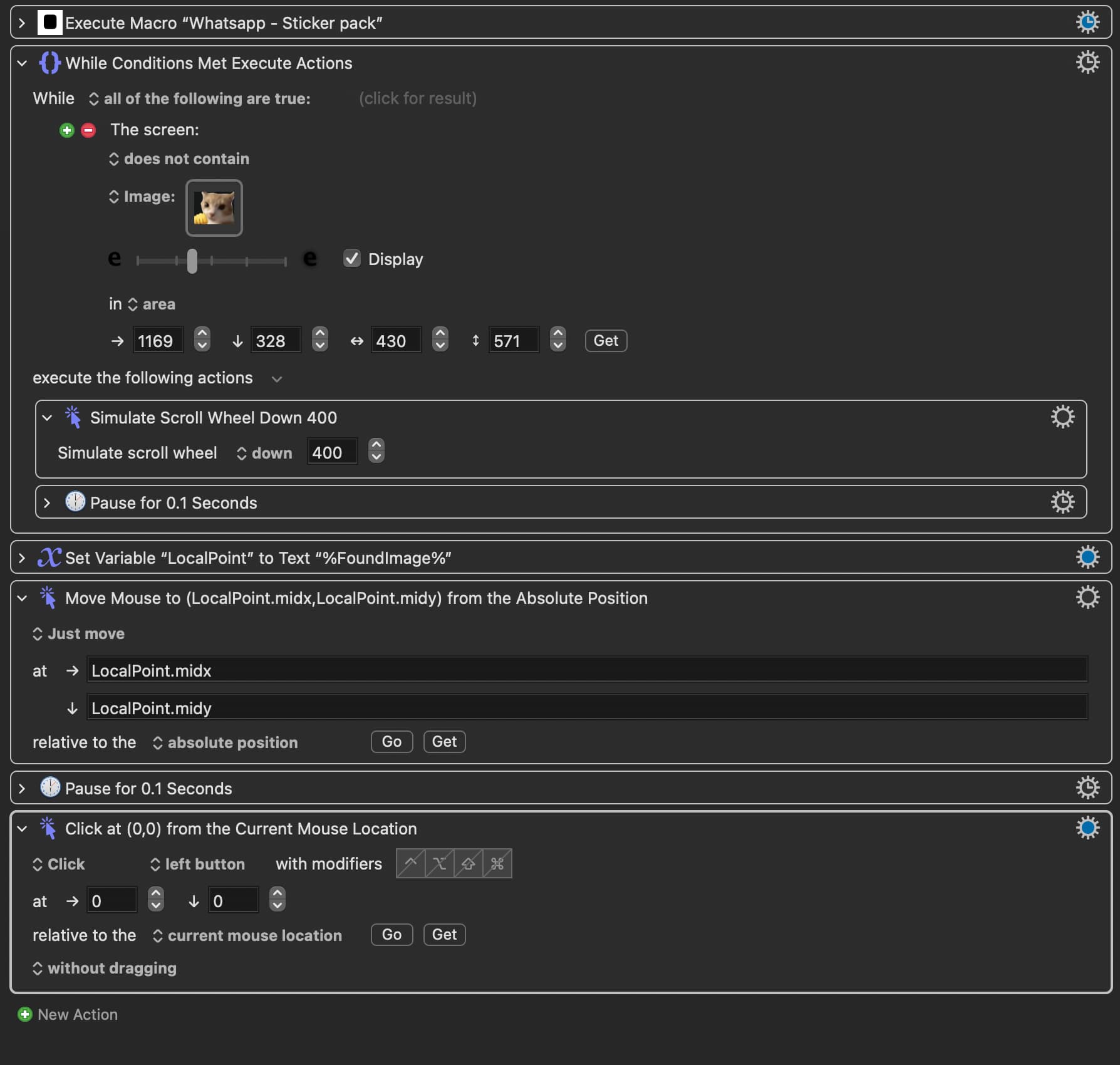
I changed the ‘Page Down Keystroke‘ to ‘Stimulate scroll wheel’ because Page Down doesn’t work in my specific case. And Pause for 0.1s rather than 1s. Everything else stays the same.
When I run it, I can see that it can detect the image but it didn’t click on it. Not quite sure why that is? Also this method is quite slow compare to method 1. Is there anyway to speed it up?
I can't guarantee this, because I don't have your app, but I suspect it's because you changed the Pause from 1.0 to 0.1. Try putting that back (in fact, as a test, start with the value 3.0 instead of 1.0). If it works with 3.0, then it's your job to figure out the smallest value that will always work.
I'm asking you to try this because it's possible that KM's click action is occurring shortly AFTER the detection of the image, and if the image is scrolling it will miss the image. So by adding some extra delay time, you could fix the problem.
Since I don't have your app, and you haven't uploaded a video of the problem, this is just an educated guess.
That depends on whether I'm right above. What I'm guessing is that the problem is that your app is slow to scroll. Speeding up that process isn't something KM can do. KM can do a lot of things, but it can't make apps behave differently from what they do.
Before I changed it to 0.1s Pause, I have tested it with 1s pause first and tested it again just now with 1s and 3s. In all cases, the images can be detected as evidenced by the temporary green light over the image, but curisouly it didn’t click on the image. I also tried a few different images but they also did not work.
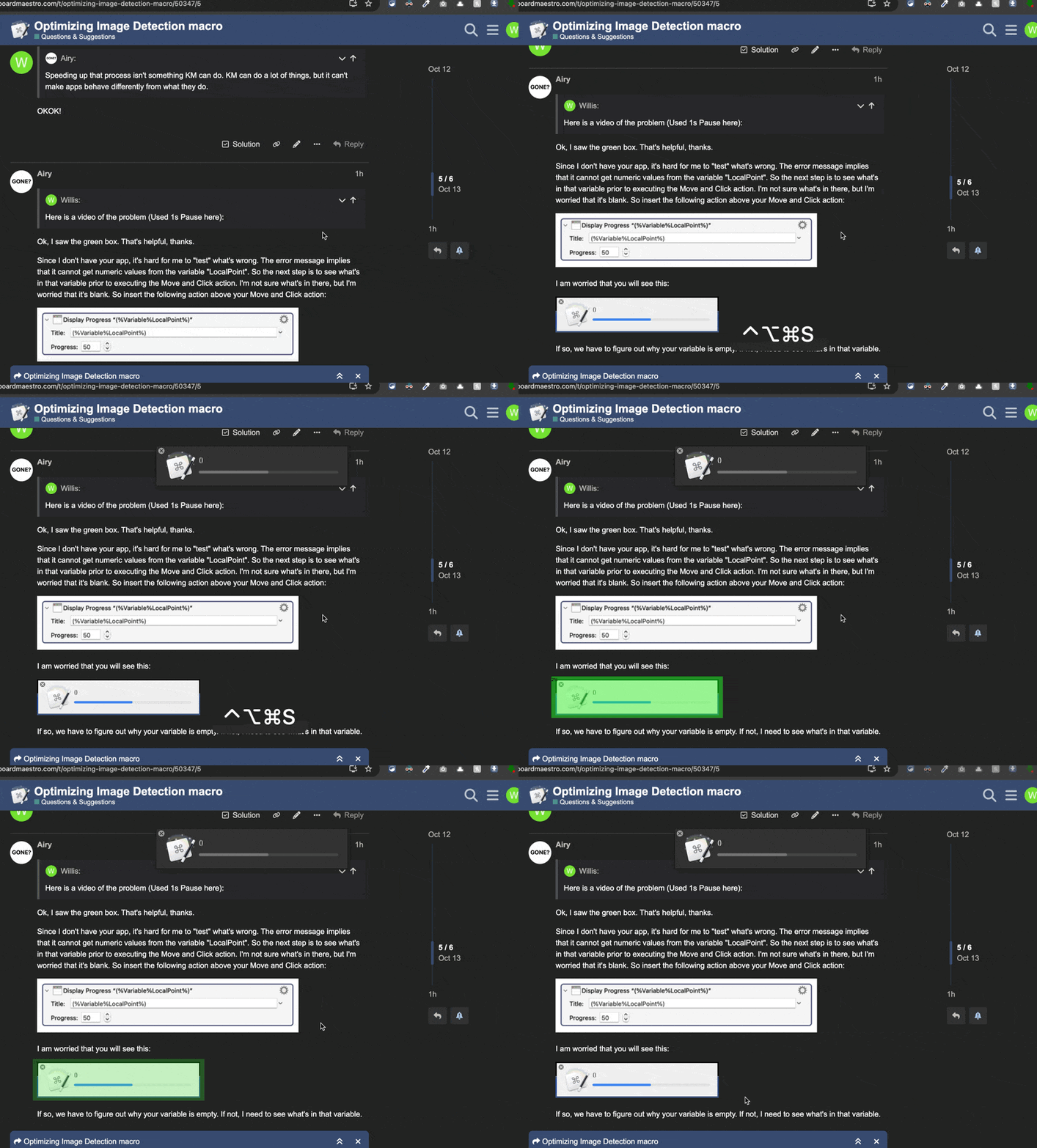
Here is a video of the problem (Used 1s Pause here):
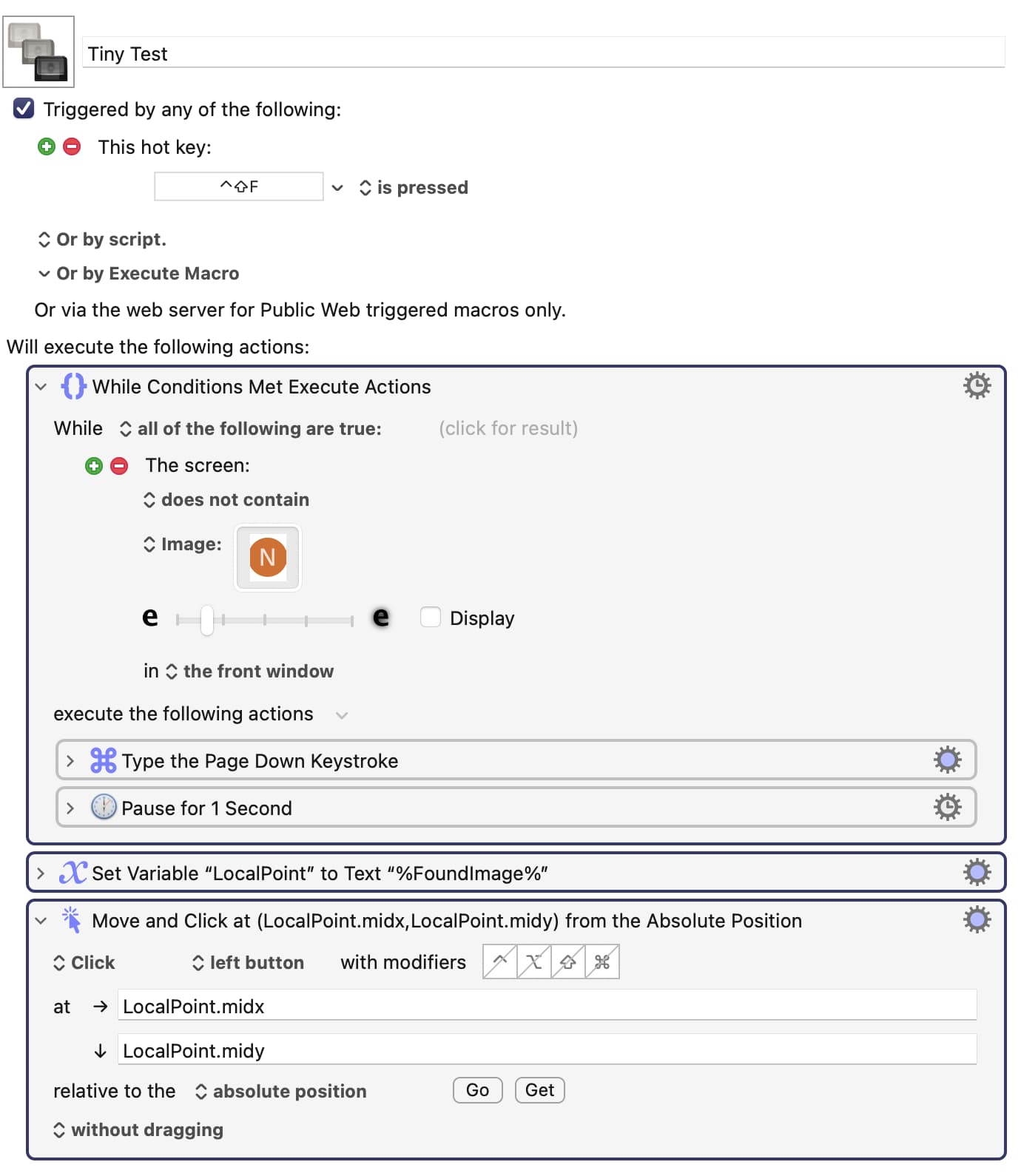
Since I don't have your app, it's hard for me to "test" what's wrong. The error message implies that it cannot get numeric values from the variable "LocalPoint". So the next step is to see what's in that variable prior to executing the Move and Click action. I'm not sure what's in there, but I'm worried that it's blank. So insert the following action above your Move and Click action:
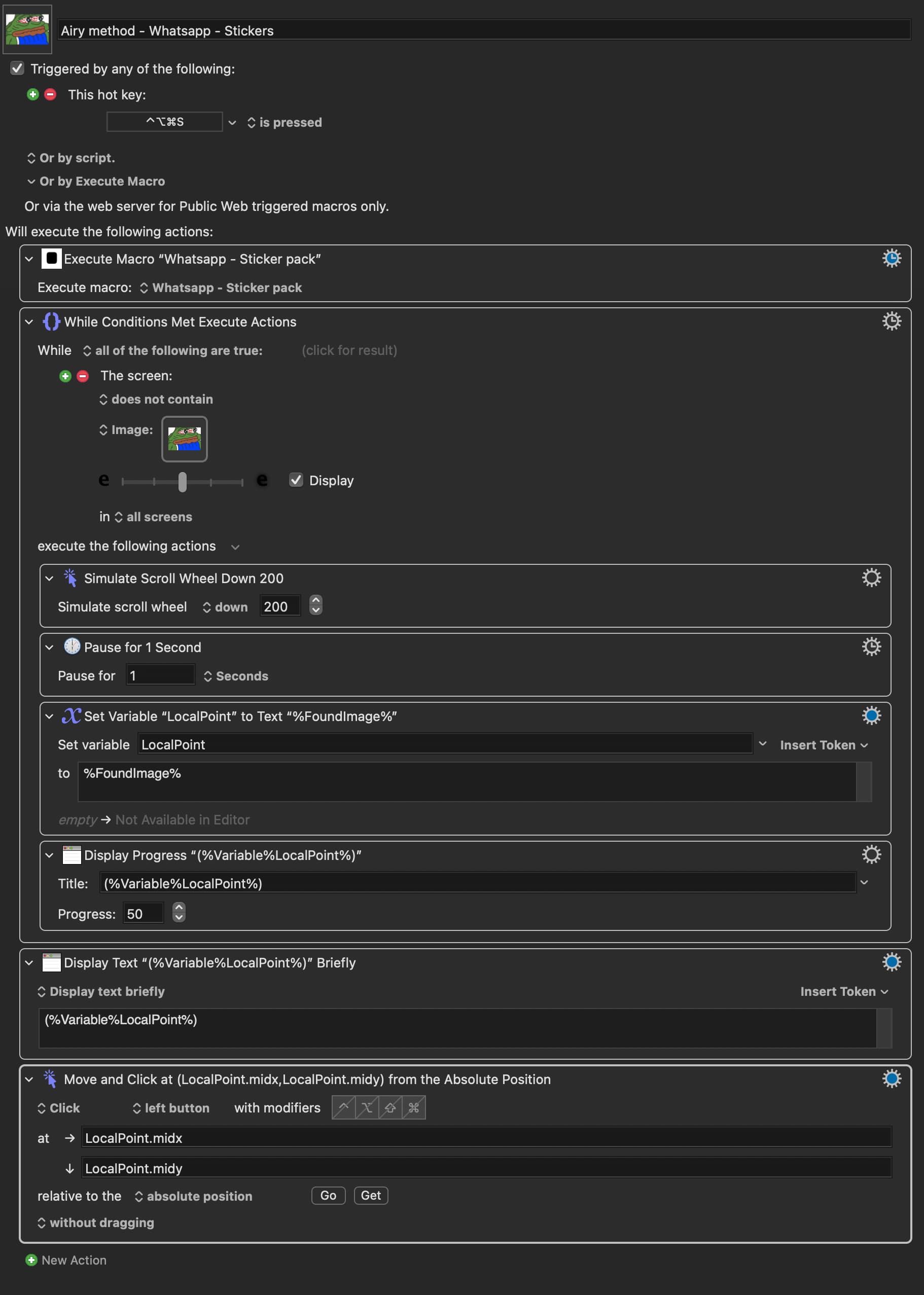
I think I see the problem. You have an action that sets LocalPoint to %FoundImage%. But you placed that inside your For Each loop. If you look back to my code, that action followed the loop. That would explain your problem, I think. I'm sorry I didn't notice that the first time you posted your code.
Hey, my advice is free, so you can't complain too much if I make a mistake.
G-sus how embrassing of me! No no, don’t apologize, its my responsibility to make sure the code at least looks like what you have shown me! Sorry!
I wouldn’t complain one bit! you are my Savior ! I’m learning a great deal in the process! And its FREE like you said!
Alright, after I snap them back into the right place, it works now.
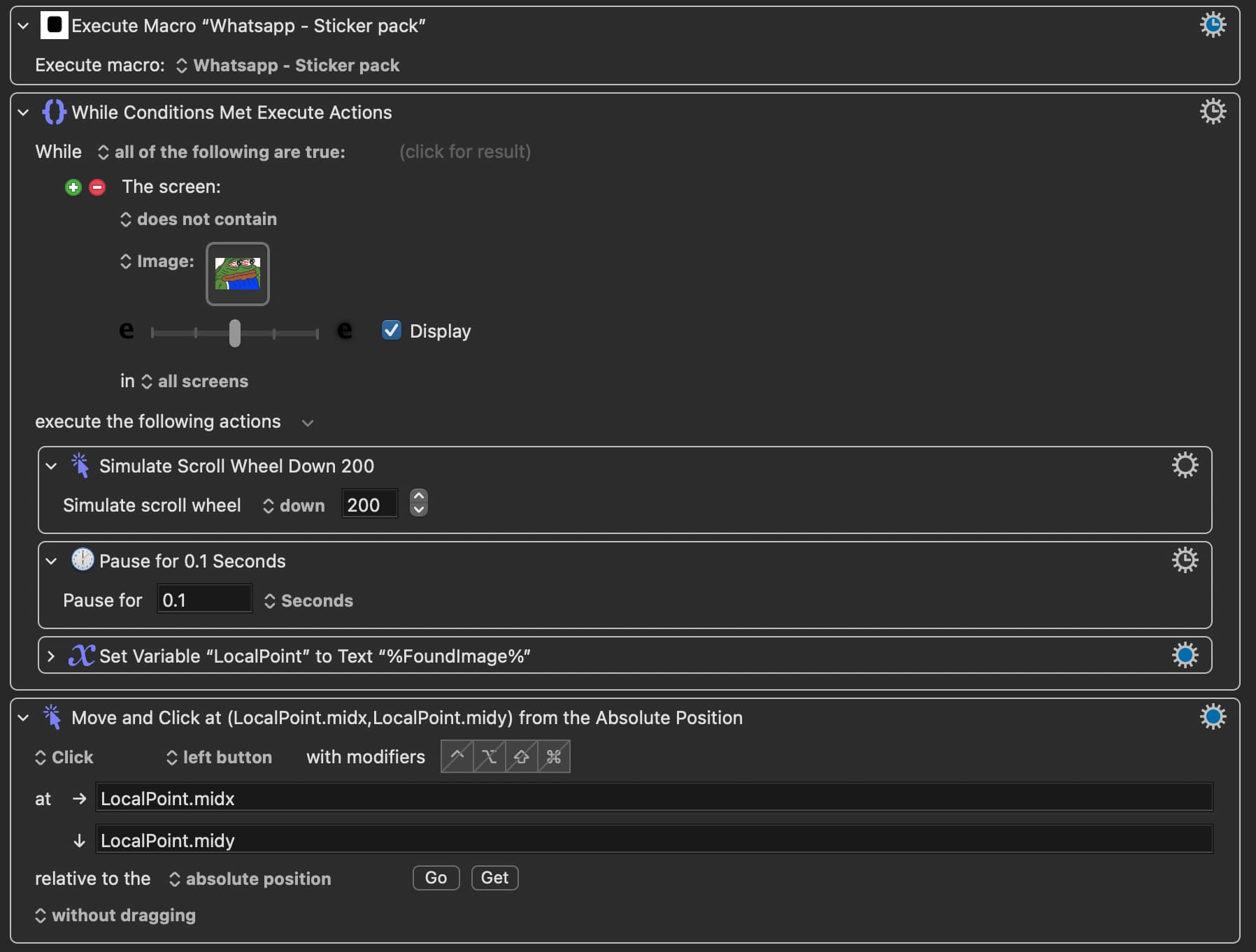
However, I ran dozens of tests with your method and mine. I noticed that when I increased the scrolling speed and/or decreased the time paused in the loop, my method seemed to be significantly more consistent with being able to click on the image, I am not sure how or why. So I’m thinking maybe we could modify this code of mine a little to make it “cleaner”? Specifically, I wonder if it is possible to just use one “Find Image on Screen” action only, so that if I have to change the image or adjust the fuzziness in the future, I only have to do it once, instead of twice like now. (I tried to save “Local_sticker” into a variable, then use the “Use variable“ action later down the code but it doesn’t work (not shown below))
Local_sticker already is a variable -- it contains the "rectangle" of the found image or, when there's no image found, is empty.
To use only one "Found Image" action you are either going to have to go with @Airy's method or put the "Found Image" action into a subroutine and call that twice (and IMO that is worse than having two actions to occasionally tweak).
The only obvious difference between the two versions you posted is that the one based on @Airy's method allows twice the fuzziness in a match. Try setting the fuzziness the same, preferably even lower since straight detection doesn't have the option of "Move and Click"s "best" match. And help yourself by limiting the area -- you don't need "all screens" if you are only checking in WhatsApp's sticker picker pop-over.
Actually, I can think of THREE other ways to meet his requirement. But the two ways that you mentioned are the simplest, so I probably shouldn't mention my three other methods (hint: two of my methods require that he rename his variable to an Instance instead of a Local.)
That's interesting. I'm not sure what that means, however, in practical terms. "Fine tuning" a macro with Find Image actions usually requires that I have the macro running on my own Mac. Nige gave you some good advice. Moving the Find Image action to its own macro is probably the simplest solution for you. Give that a try. But if you do that, you may need to rename your Local variable to an Instance variable or a global variable, because Local variables are NOT available to parent or child macros, I think.
Before I try out what you guys suggested (Subroutine, limiting the area, instance variable etc), could we try and figure out why Airy method is not working too well for me? I like Airy method because I only need one Found Image action (as opposed to 2 or 4 “found images“ in my other methods). If we can find the issue here, I might not need the other stuff.
What I meant was your macro can detect the image (it “green“ highlights the image every time) but it does not click on it as it should.
I tried this! I set everything up the same way across the 3 different methods as shown below (including the pause time, scrolling speed and fuzziness). But Airy method can only detect the image but doesn’t click on it (it happens at random! Sometimes it works fine, then without changing the macro one bit, it stops working 2 hours later! It’s inconsistent. Other times it just doesn’t work at all, but the other methods do), whereas the two other methods work way better (the “4 images” method works best).
If this works out, I’m going to make over 100+ macros like this, so it’s much easier to just have one found image action like in Airy method (and I only need to change the image and adjust the fuzziness once for each macro if I need to make any modifications)
Many apps are written using non-standard APIs and that can mean a single click does not work. So some apps require a second click, or at least a pause BETWEEN the movement of the mouse and the CLICK of the mouse.
The KM action "Move and Click Mouse" does not insert a pause between the Move and the Click (or at least no a long enough pause for some apps) so I suspect if you change your action to "Move Only" and then insert a slight Pause and then insert a "Click at current mouse location" it will probably work. I have to do this sort of thing all the time.
That's proof that my theory is probably right. So try my advice.
YOU ARE RIGHT! I have made the adjustment you suggested, and it seems to finally click on them images every time now! Will continue to monitor for the next few days.
I would never have figured that out! I was at this for like a good 5 hours and changing all kinda stuff!
Thanks for the positive feedback. Keyboard Maestro is a very well-behaved program, adhering to most macOS pubic APIs and interface guides, but about 50% of all other macOS programs are not well behaved, which means macros in KM have to make adjustments to accommodate those badly behaved programs, like you are seeing here.
You got me thinking. Maybe there's a way for KM to issue a warning, or at least detect for the user, if a specific app is known to be badly behaved or not. Sometimes this can be determined programmatically (eg, Electron apps) but sometimes it may need to come from a database of known problem apps. And even if KM can't/won't do it, someone should write a post indicating a list of known bad apps, or ways of determining if an app is bad.
I've been thinking about it for the last hour. I think I can write a macro that will determine the "friendliness" of any Mac app. Perhaps this week I'll write it.
I spent a few hours working on it. It's not easy, and it may take me a few days to get working, if I can get it working at all. Basically, I'm using some macOS tools to determine if an app is well behaved. And for fun, my macro looks through all the apps in your /Applications folder.





 ! I’m learning a great deal in the process! And its FREE like you said!