I have two lists that belong to different categories, I'd like to choose from the menu w/o scrolling down too much.
Is there a way to use several of the lines preselected as “default” setting ?
There is now!
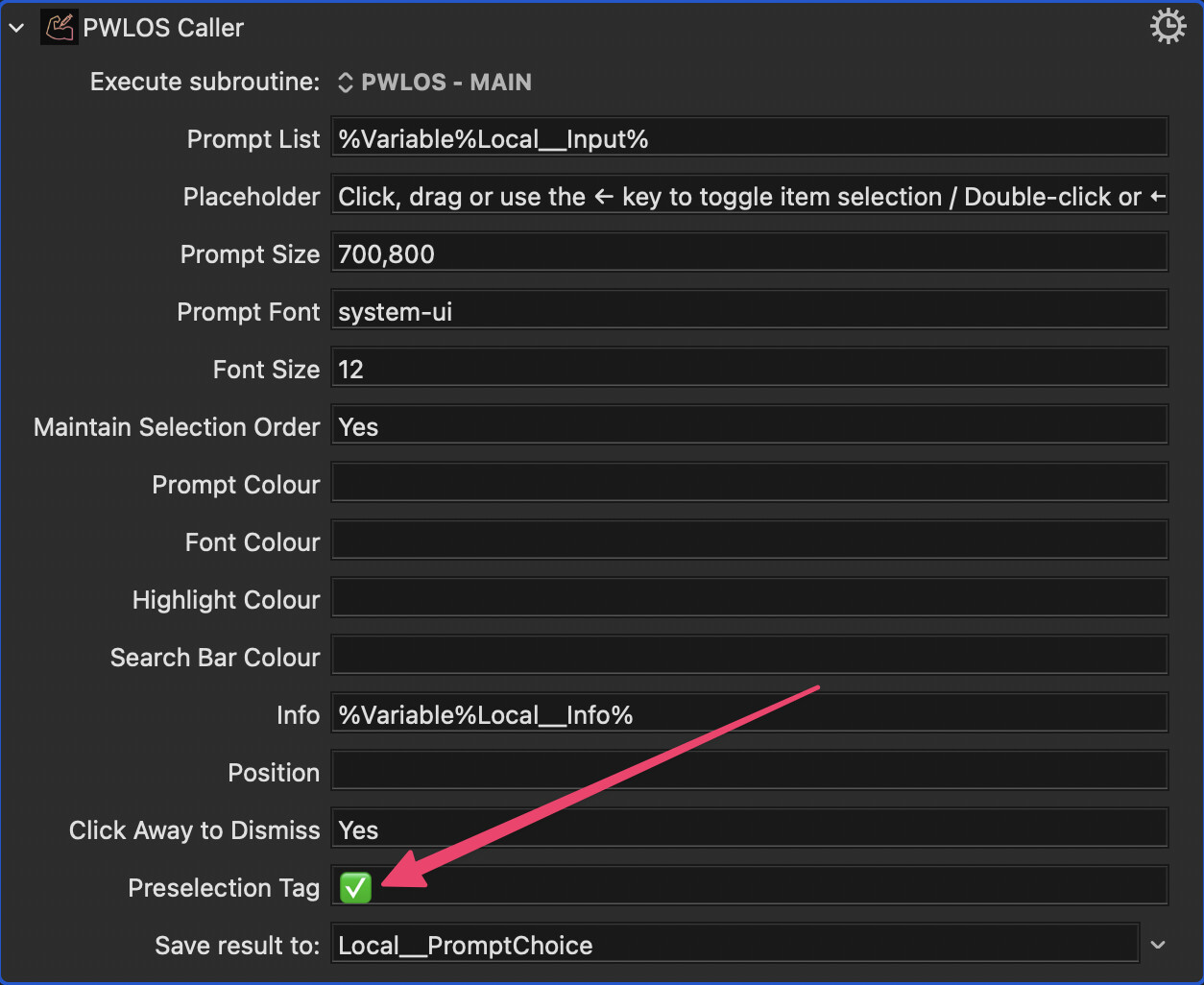
Download the macro again and you'll see there's a place to set a preselection tag. Any input line that contains this tag will be selected when the prompt appears.
2 Likes
Amazing! Exactly what I needed - thank you!
1 Like
I’ve been adapting @noisneil's wonderful "Prompt With List on Steroids" macro and wanted to share my modifications in case others find them useful.
My goal was to replicate some of Alfred features. I love being able to select items directly using ⌘ + Number, and toggle the selection with ⌥ + Number. I also wanted a specific key (Tab) to control the workflow after selection.
MODIFIED CODE for the 'HTML List Prompt'
<!DOCTYPE html>
<html>
<head>
<title>Prompt With List (HTML)</title>
<style id="dynamic-styles">
/* --- Animation & Base Styles --- */
@keyframes fadeIn {
from { opacity: 0; }
to { opacity: 1; }
}

html, body {
margin: 0;
padding: 0;
height: 100%;
border-radius: 20px;
overflow: hidden;
}

body {
font-family: var(--font);
font-size: var(--font-size);
display: flex;
flex-direction: column;
align-items: center;
opacity: 0;
animation: fadeIn 0.5s ease-out forwards;
backdrop-filter: blur(10px);
-webkit-backdrop-filter: blur(10px);
}

body.dragging {
user-select: none;
}

/* --- Input Styles --- */
input[type="text"] {
width: 500px;
padding: 12px;
margin: 10px 0;
box-sizing: border-box;
border: none;
font-size: var(--font-size);
outline: none;
border-radius: 20px;
}

/* --- List Styles --- */
ul {
list-style-type: none;
margin: 0;
padding: 0 5px 0 0;
width: 500px;
height: 425px;
overflow-y: auto;
}

li {
padding: 10px 6px;
cursor: pointer;
font-size: var(--font-size);
line-height: 1;
white-space: nowrap;
overflow: hidden;
text-overflow: ellipsis;
border-radius: 5px;
}

/* Styles for the Shortcut Badges */
.shortcut-badge {
float: right;
font-family: -apple-system, BlinkMacSystemFont, "Segoe UI", Roboto, Helvetica, Arial, sans-serif;
font-size: 0.85em;
opacity: 0.5;
margin-left: 10px;
pointer-events: none;
font-weight: 500;
min-width: 25px;
text-align: right;
}

li.selected {
background-color: rgba(38, 63, 245, 0.5);
color: white;
}

li.selected .shortcut-badge {
color: rgba(255, 255, 255, 0.8) !important;
}

li.highlighted {
background-color: rgba(58, 58, 60, 0.5);
}

li, body.dragging {
user-select: none;
}

/* --- Checkbox Styles --- */
input[type="checkbox"] {
position: relative;
appearance: none;
background-color: transparent;
margin-right: 10px;
width: 3px;
height: 6px;
vertical-align: middle;
}

input[type="checkbox"]:checked::before {
content: "";
position: absolute;
top: calc(50% - 2px);
left: 50%;
transform: translate(-50%, -50%) rotate(45deg);
display: inline-block;
width: 3px;
height: 6px;
border-width: 0 2px 2px 0;
border-style: solid;
}

/* --- Scrollbar Styles --- */
::-webkit-scrollbar {
width: 6px;
}

::-webkit-scrollbar-track {
border-radius: 10px;
}

::-webkit-scrollbar-thumb {
border-radius: 10px;
}

::-webkit-scrollbar-thumb:hover {
background: #555;
}

/* --- Info Panel Styles --- */
#info-panel {
display: none;
margin: 10px 0 0 0;
border-radius: 12px;
font-family: var(--font);
font-size: var(--font-size);
line-height: 1.4;
box-sizing: border-box;
word-break: break-word;
background: transparent;
color: inherit;
border: none;
}

#info-panel-header {
padding: 10px 16px;
cursor: pointer;
user-select: none;
display: flex;
align-items: center;
border-radius: 12px;
}

#info-panel-header:hover {
opacity: 0.8;
}

.disclosure-triangle {
width: 0;
height: 0;
border-top: 6px solid transparent;
border-bottom: 6px solid transparent;
border-left: 8px solid currentColor;
margin-right: 8px;
transition: transform 0.2s ease;
}

.disclosure-triangle.expanded {
transform: rotate(90deg);
}

#info-panel-content {
padding: 0 16px 10px 16px;
display: none;
}

#info-panel-content.expanded {
display: block;
}
</style>
<script>

var VariableNameOfSubmitTrigger = "INSTANCE__SubmitTrigger";

var isOptionDown = false;

var KeyboardMaestro = window.KeyboardMaestro;
var selectedIndices = [];
var selectedItems = [];
var selectionOrder = [];
var maintainSelectionOrder = false;
var isDragging = false;
var marking = false;
var shiftSelectStartItem = null;
var didDrag = false;
var windowScrollTicking = false;


// ---------------------------------------------------------
// BADGE LOGIC FUNCTIONS
// ---------------------------------------------------------

function updateBadgeSymbols() {
var symbol = isOptionDown ? "\u2325" : "\u2318"; // ⌥ or ⌘
document.querySelectorAll("li[data-shortcut-index]").forEach(function(li) {
var badge = li.querySelector(".shortcut-badge");
if (badge) {
badge.innerText = symbol + li.dataset.shortcutIndex;
}
});
}

function updateShortcutBadges() {
document.querySelectorAll(".shortcut-badge").forEach(function (el) {
el.remove();
});
document.querySelectorAll("li[data-shortcut-index]").forEach(function (el) {
el.removeAttribute("data-shortcut-index");
});

var list = document.querySelector("ul");
var listRect = list.getBoundingClientRect();
var items = document.querySelectorAll("li");
var badgeCount = 1;

var currentSymbol = isOptionDown ? "\u2325" : "\u2318";

for (var i = 0; i < items.length; i++) {
var item = items[i];
if (item.style.display === "none") continue;

var itemRect = item.getBoundingClientRect();
var isVisible =
itemRect.bottom > listRect.top + 10 &&
itemRect.top < listRect.bottom - 10;

if (isVisible) {
if (badgeCount <= 9) {
var badge = document.createElement("span");
badge.className = "shortcut-badge";
badge.innerText = currentSymbol + badgeCount;
item.appendChild(badge);
item.dataset.shortcutIndex = badgeCount;
badgeCount++;
} else {
break;
}
}
}
}

function onListScroll() {
if (!windowScrollTicking) {
window.requestAnimationFrame(function () {
updateShortcutBadges();
windowScrollTicking = false;
});
windowScrollTicking = true;
}
}

// ---------------------------------------------------------
// SELECTION & INTERACTION FUNCTIONS
// ---------------------------------------------------------

function selectItem(item, shouldSelect) {
var itemIndex = Array.from(document.querySelectorAll('li')).indexOf(item);
var index = selectedIndices.indexOf(itemIndex);

if (index > -1) {
if (shouldSelect !== true) {
selectedIndices.splice(index, 1);
item.firstChild.checked = false;
var orderIndex = selectionOrder.indexOf(itemIndex);
if (orderIndex > -1) {
selectionOrder.splice(orderIndex, 1);
}
}
} else {
if (shouldSelect !== false) {
selectedIndices.push(itemIndex);
item.firstChild.checked = true;
selectionOrder.push(itemIndex);
}
}

document.querySelector('input[type="text"]').focus();

var selectedItem = document.querySelector('li.selected');
if (selectedItem) {
selectedItem.classList.remove('selected');
}
item.classList.add('selected');
}

function keydown(event) {
// [OPTION Key Handler]
if (event.key === "Alt" && !isOptionDown) {
isOptionDown = true;
updateBadgeSymbols();
}

// 1. Handle CMD + Number (Submit immediately)
if (event.metaKey && event.key >= "1" && event.key <= "9") {
event.preventDefault();
var num = event.key;
var targetItem = document.querySelector(`li[data-shortcut-index="${num}"]`);
if (targetItem) {
var val = targetItem.dataset.fullText;

KeyboardMaestro.SetVariable("Local__PromptChoice", val);

KeyboardMaestro.SetVariable(VariableNameOfSubmitTrigger, "Enter");

KeyboardMaestro.Submit("OK");
return;
}
}

// 2. Handle OPTION + Number (Toggle selection without submitting)
if (event.altKey && event.code.startsWith("Digit")) {
var num = event.code.replace("Digit", "");
if (num >= "1" && num <= "9") {
event.preventDefault();
var targetItem = document.querySelector(`li[data-shortcut-index="${num}"]`);
if (targetItem) {
selectItem(targetItem);
}
return;
}
}

// 3. Standard Navigation
var items = Array.from(document.querySelectorAll('li'));

// Intercept 'Tab' so it doesn't move focus, but triggers our logic
var keys = ['ArrowDown', 'ArrowUp', 'ArrowLeft', 'Enter', 'Escape', 'PageUp', 'PageDown', 'Tab'];

if (keys.includes(event.key)) {
event.preventDefault();
}

var selectedItem = document.querySelector('li.selected');
var visibleItems = items.filter(function(item) { return item.style.display !== 'none'; });
var selectedIndex = visibleItems.indexOf(selectedItem);

if ((event.key === 'a' || event.key === 'A') && (event.metaKey || event.ctrlKey)) {
event.preventDefault();
visibleItems.forEach(function(item) {
selectItem(item, true);
});
return;
}

if (event.key === 'ArrowDown' || event.key === 'ArrowUp') {
var newIndex = event.key === 'ArrowDown' ? selectedIndex + 1 : selectedIndex - 1;

if (newIndex >= visibleItems.length) newIndex = 0;
else if (newIndex < 0) newIndex = visibleItems.length - 1;

if (visibleItems.length > 0) {
if (event.shiftKey) {
if (!window.selectedItemStart) {
window.selectedItemStart = selectedItem;
}
markRange(window.selectedItemStart, visibleItems[newIndex]);
} else {
removeHighlightFromAll();
}

selectedItem.classList.remove('selected');
visibleItems[newIndex].classList.add('selected');
scrollSelectedItemIntoView();
window.selectedItemStart = visibleItems[newIndex];
}
}
else if (event.key === 'ArrowLeft') {
selectItem(selectedItem);
}
// Handle both Enter and Tab
else if (event.key === 'Enter' || event.key === 'Tab') {
if (selectedIndices.length === 0) {
selectedIndices.push(Array.from(document.querySelectorAll('li')).indexOf(selectedItem));
selectionOrder.push(Array.from(document.querySelectorAll('li')).indexOf(selectedItem));
}

var indicesToUse;
if (maintainSelectionOrder) {
indicesToUse = selectionOrder.slice();
} else {
indicesToUse = selectedIndices.slice().sort(function(a, b) {
return a - b;
});
}

var selectedItems = indicesToUse.map(function(index) {
return document.querySelectorAll('li')[index].dataset.fullText;
}).join('\n');

KeyboardMaestro.SetVariable('Local__PromptChoice', selectedItems);

var exitTrigger = (event.key === 'Tab') ? 'Tab' : 'Enter';
KeyboardMaestro.SetVariable(VariableNameOfSubmitTrigger, exitTrigger);

// Always submit 'OK' to close the window cleanly
KeyboardMaestro.Submit('OK');
}
else if (event.key === 'Escape') {
KeyboardMaestro.Submit('Cancel');
}

if (event.key === 'PageUp' || event.key === 'PageDown') {
var list = document.querySelector('ul');
var visibleHeight = list.offsetHeight;
if (event.key === 'PageUp') list.scrollTop -= visibleHeight;
else if (event.key === 'PageDown') list.scrollTop += visibleHeight;
}
}


function keyup(event) {
if (event.key === "Alt") {
isOptionDown = false;
updateBadgeSymbols();
}
}

// ---------------------------------------------------------
// MOUSE & UTILITY FUNCTIONS
// ---------------------------------------------------------

function handleItemClick(event) {
if (didDrag) return;
var clickedItem = event.currentTarget;
var selectedItem = document.querySelector('li.selected');
if (event.shiftKey && window.selectedItemStart) {
markRange(window.selectedItemStart, clickedItem);
} else {
window.selectedItemStart = clickedItem;
if (selectedItem) {
selectedItem.classList.remove('selected');
}
clickedItem.classList.add('selected');
selectItem(clickedItem, true);
}
}

function removeHighlightFromAll() {
var items = Array.from(document.querySelectorAll('li'));
items.forEach(function(item) {
item.classList.remove('highlighted');
});
}

function markRange(startItem, endItem) {
let visibleItems = Array.from(document.querySelectorAll('li')).filter(function(item) {
return item.style.display !== 'none';
});
let startIndex = visibleItems.indexOf(startItem);
let endIndex = visibleItems.indexOf(endItem);
let isUpward = startIndex > endIndex;
if (startIndex > endIndex) {
[startIndex, endIndex] = [endIndex, startIndex];
}
if (isUpward) {
for (let i = visibleItems.indexOf(startItem); i >= visibleItems.indexOf(endItem); i--) {
selectItem(visibleItems[i], true);
}
} else {
for (let i = startIndex; i <= endIndex; i++) {
selectItem(visibleItems[i], true);
}
}
}

function filterList() {
var filter = document.querySelector('input').value.toLowerCase();
var terms = filter.split(' ');
var items = document.querySelectorAll('li');

for (var i = 0; i < items.length; i++) {
var itemText = items[i].textContent.toLowerCase();
if (terms.every(function(term) { return itemText.indexOf(term) > -1; })) {
items[i].style.display = '';
} else {
items[i].style.display = 'none';
}
items[i].classList.remove('selected');
}

var firstVisible = Array.from(items).find(function(item) {
return item.style.display !== 'none';
});
if (firstVisible) {
firstVisible.classList.add('selected');
}
updateShortcutBadges();
}

function getContrastColor(bgColor) {
let temp = document.createElement('div');
temp.style.color = bgColor;
document.body.appendChild(temp);
let rgb = getComputedStyle(temp).color;
document.body.removeChild(temp);
let match = rgb.match(/^rgb\((\d+),\s*(\d+),\s*(\d+)\)$/);
if (!match) return '#888';
let r = parseInt(match[1]), g = parseInt(match[2]), b = parseInt(match[3]);
let luminance = (0.299 * r + 0.587 * g + 0.114 * b) / 255;
return luminance > 0.5 ? '#222' : '#eee';
}

function parseHexWithOpacity(input) {
if (!input) return null;
if (input.indexOf(',') === -1) return input;
var parts = input.split(',');
var hex = parts[0].trim();
var opacity = parseFloat(parts[1].trim());
if (!/^#([A-Fa-f0-9]{6}|[A-Fa-f0-9]{3})$/.test(hex) || isNaN(opacity)) return input;
if (hex.length === 4) {
hex = '#' + hex[1] + hex[1] + hex[2] + hex[2] + hex[3] + hex[3];
}
var r = parseInt(hex.substr(1,2),16);
var g = parseInt(hex.substr(3,2),16);
var b = parseInt(hex.substr(5,2),16);
return `rgba(${r}, ${g}, ${b}, ${opacity})`;
}

// ---------------------------------------------------------
// INITIALIZATION
// ---------------------------------------------------------

function init() {
window.selectedItemStart = null;
var selectionOrderVar = KeyboardMaestro.GetVariable('Local__Maintain Selection Order');
maintainSelectionOrder = (selectionOrderVar === 'Yes' || selectionOrderVar === 'YES' || selectionOrderVar === 'yes');
var preselectionTag = KeyboardMaestro.GetVariable('Local__Preselection Tag');

document.body.style.setProperty('--font', KeyboardMaestro.GetVariable('Local__Prompt Font'));
document.body.style.setProperty('--font-size', KeyboardMaestro.GetVariable('Local__Font Size') + 'px');

var promptSize = KeyboardMaestro.GetVariable('Local__Prompt Size').split(',');
var inputWidth = promptSize[0] - 40;
var listWidth = promptSize[0] - 40;
var listHeight = promptSize[1] - 100;

var input = document.querySelector('input[type="text"]');
input.style.width = inputWidth + 'px';
input.placeholder = KeyboardMaestro.GetVariable('Local__Placeholder');

// --- Info Panel Setup ---
var infoPanel = document.getElementById('info-panel');
var infoText = KeyboardMaestro.GetVariable('Local__Info');
var promptColourRaw = KeyboardMaestro.GetVariable('Local__Prompt Colour');
var promptColour = parseHexWithOpacity(promptColourRaw);
var fontColour = KeyboardMaestro.GetVariable('Local__Font Colour');

if (infoText && infoText.trim() !== "") {
infoPanel.style.display = 'block';
infoPanel.style.width = inputWidth + 'px';

function escapeHtml(text) {
var div = document.createElement('div');
div.textContent = text;
return div.innerHTML;
}

var lines = infoText.split('\n');
var title = lines[0].trim();
var content = lines.slice(1).join('\n').trim();

document.getElementById('info-panel-title').textContent = title;
var infoPanelContent = document.getElementById('info-panel-content');
if (content) {
infoPanelContent.innerHTML = escapeHtml(content).replace(/\n/g, '<br>');
}

if (promptColour) {
infoPanel.style.backgroundColor = promptColour;
} else {
var isDarkMode = window.matchMedia && window.matchMedia('(prefers-color-scheme: dark)').matches;
infoPanel.style.backgroundColor = isDarkMode ? 'rgba(0, 0, 0, 0.7)' : 'rgba(243, 240, 241, 0.7)';
}

if (fontColour) infoPanel.style.color = fontColour;
else {
var isDarkMode = window.matchMedia && window.matchMedia('(prefers-color-scheme: dark)').matches;
infoPanel.style.color = isDarkMode ? 'white' : '#000';
}

var borderColor = fontColour ? fontColour : (window.matchMedia && window.matchMedia('(prefers-color-scheme: dark)').matches ? 'white' : '#000');
infoPanel.style.border = '1px solid ' + borderColor;

document.getElementById('info-panel-header').addEventListener('click', function() {
document.querySelector('.disclosure-triangle').classList.toggle('expanded');
infoPanelContent.classList.toggle('expanded');
});
} else {
infoPanel.style.display = 'none';
}

// --- List Setup ---
var list = document.querySelector('ul');
list.style.width = listWidth + 'px';
list.style.height = listHeight + 'px';
list.addEventListener("scroll", onListScroll);

var promptList = KeyboardMaestro.GetVariable('Local__Prompt List').split('\n');
for (var i = 0; i < promptList.length; i++) {
var originalEntry = promptList[i];
var shouldPreselect = false;

if (preselectionTag && preselectionTag.trim() !== '') {
if (originalEntry.indexOf(preselectionTag) !== -1) {
shouldPreselect = true;
originalEntry = originalEntry.split(preselectionTag).join('');
}
}

var parts = originalEntry.split('__');
var li = document.createElement('li');
var checkbox = document.createElement('input');
checkbox.type = 'checkbox';
checkbox.disabled = true;
li.appendChild(checkbox);

li.appendChild(document.createTextNode(' '));

if (parts[1]) {
var displayText = parts.slice(1).join('__');
li.appendChild(document.createTextNode(displayText));
li.dataset.fullText = parts[0];
} else {
li.appendChild(document.createTextNode(parts[0]));
li.dataset.fullText = parts[0];
}

if (shouldPreselect) {
selectedIndices.push(i);
checkbox.checked = true;
if (maintainSelectionOrder) {
selectionOrder.push(i);
}
}

li.addEventListener('click', function(event) {
selectItem(event.currentTarget);
});

li.addEventListener('dblclick', function(event) {
selectedItems = [event.currentTarget.dataset.fullText];
KeyboardMaestro.SetVariable('Local__PromptChoice', selectedItems.join('\n'));
KeyboardMaestro.Submit('OK');
});

list.appendChild(li);
}

if (list.firstChild) list.firstChild.classList.add('selected');

input.addEventListener('input', filterList);
window.addEventListener('keydown', keydown);
window.addEventListener('keyup', keyup);
window.addEventListener('blur', function() { isOptionDown = false; updateBadgeSymbols(); });

window.addEventListener('mouseup', handleMouseUp);
bindClickEvents();

window.requestAnimationFrame(function () {
updateShortcutBadges();
setTimeout(updateShortcutBadges, 50);
document.body.style.opacity = "1";
});
}

function scrollSelectedItemIntoView() {
var selectedItem = document.querySelector('li.selected');
var list = document.querySelector('ul');
var listRect = list.getBoundingClientRect();
var itemRect = selectedItem.getBoundingClientRect();

if (itemRect.top > listRect.top + listRect.height / 2) {
list.scrollTop += itemRect.top - listRect.top - listRect.height / 2 + itemRect.height / 2;
} else if (itemRect.bottom < listRect.top + listRect.height / 2) {
list.scrollTop -= listRect.top + listRect.height / 2 - itemRect.bottom + itemRect.height / 2;
}
}

function setTheme() {
var promptColourRaw = KeyboardMaestro.GetVariable('Local__Prompt Colour');
var promptColour = parseHexWithOpacity(promptColourRaw);
var fontColour = KeyboardMaestro.GetVariable('Local__Font Colour');
var highlightColour = KeyboardMaestro.GetVariable('Local__Highlight Colour');
var searchBarColour = KeyboardMaestro.GetVariable('Local__Search Bar Colour');
var styles = document.getElementById('dynamic-styles');
var isDarkMode = window.matchMedia && window.matchMedia('(prefers-color-scheme: dark)').matches;

if (promptColour) document.body.style.backgroundColor = promptColour;
else document.body.style.backgroundColor = isDarkMode ? 'rgba(0, 0, 0, 0.7)' : 'rgba(243, 240, 241, 0.8)';

if (fontColour) document.body.style.color = fontColour;
else document.body.style.color = isDarkMode ? 'white' : '#000';

var inputBg;
if (searchBarColour) inputBg = searchBarColour;
else inputBg = isDarkMode ? 'rgba(0, 0, 0, 0.9)' : 'rgba(243, 240, 241, 0.9)';

var inputColor = fontColour ? fontColour : (isDarkMode ? 'white' : '#444444');
styles.innerHTML += `input[type="text"] { background-color: ${inputBg} !important; color: ${inputColor} !important; }`;

var placeholderColor = getContrastColor(inputBg);
styles.innerHTML += `\ninput[type="text"]::placeholder { color: ${placeholderColor} !important; opacity: 1 !important; }\n`;

if (highlightColour) {
styles.innerHTML += `li.selected, li.highlighted { background-color: ${highlightColour} !important; color: white !important; }`;
} else {
styles.innerHTML += `li.selected { background-color: rgba(38, 63, 245, 0.5) !important; color: white !important; }`;
styles.innerHTML += `li.highlighted { background-color: rgba(58, 58, 60, 0.5) !important; }`;
}

var checkColor = fontColour ? fontColour : (isDarkMode ? 'white' : '#000');
styles.innerHTML += `input[type="checkbox"]:checked::before { border-color: ${checkColor} !important; }`;

if (isDarkMode) {
styles.innerHTML += `::-webkit-scrollbar-track { background: #2f2f2f; }`;
styles.innerHTML += `::-webkit-scrollbar-thumb { background: #888; }`;
} else {
styles.innerHTML += `::-webkit-scrollbar-track { background: #888; }`;
styles.innerHTML += `::-webkit-scrollbar-thumb { background: #666666; }`;
}
styles.innerHTML += `.shortcut-badge { color: ${checkColor} !important; }`;
}

window.matchMedia('(prefers-color-scheme: dark)').addEventListener('change', setTheme);

function bindClickEvents() {
var listItems = document.querySelectorAll('li');
listItems.forEach(function(item) {
item.addEventListener('click', handleItemClick);
item.addEventListener('mousedown', handleMouseDown);
item.addEventListener('mouseup', handleMouseUp);
item.addEventListener('mouseover', handleMouseOver);
});
}

function handleMouseDown(event) {
event.preventDefault();
isDragging = true;
didDrag = false;
marking = !event.target.querySelector('input[type="checkbox"]').checked;
var checkbox = event.currentTarget.querySelector('input[type="checkbox"]');
checkbox.checked = marking;
selectItem(event.currentTarget, marking);
document.body.classList.add('dragging');
}

function handleMouseUp(event) {
isDragging = false;
document.body.classList.remove('dragging');
}

function handleMouseOver(event) {
if (isDragging) {
didDrag = true;
var checkbox = event.currentTarget.querySelector('input[type="checkbox"]');
checkbox.checked = marking;
selectItem(event.currentTarget, marking);
}
}

function applyInitialStyles() {
var isDarkMode = window.matchMedia && window.matchMedia('(prefers-color-scheme: dark)').matches;
document.body.style.backgroundColor = isDarkMode ? 'rgba(0, 0, 0, 0.7)' : 'rgba(243, 240, 241, 0.7)';
}

function preload() {
applyInitialStyles();
document.body.style.opacity = '0';
}

preload();
</script>
</head>
<body onload='(function(){
var size = window.KeyboardMaestro.GetVariable("Local__Prompt Size").split(",");
var pos = window.KeyboardMaestro.GetVariable("Local__Position");
var arg;
if (pos && pos.trim() !== "") {
var xy = pos.split(",");
arg = xy[0] + "," + xy[1] + "," + size[0] + "," + size[1];
} else {
arg = size[0] + "," + size[1];
}
window.KeyboardMaestro.ResizeWindow(arg);
setTheme();
init();
})()'>
<div style="height: 5px;"></div>
<input type="text" oninput="filterList()" autofocus>
<ul></ul>
<div id="info-panel">
<div id="info-panel-header">
<div class="disclosure-triangle"></div>
<span id="info-panel-title"></span>
</div>
<div id="info-panel-content"></div>
</div>
<div style="height: 10px;"></div>
</body>
</html>
You can copy and paste the modified code above into the Custom “HTML List Prompt” action within the “PWLOS - MAIN” macro, or simply download the complete macro group
PWLOS with ⌘⌥ Shortcuts Macros.kmmacros (239.8 KB)
EDIT: I’ve attached the whole group of macros here. Because I only attached the main macro previously, the “Click Away to Dismiss” submacro was causing errors (thanks @_jims for the report!).
Here is a breakdown of the new features:
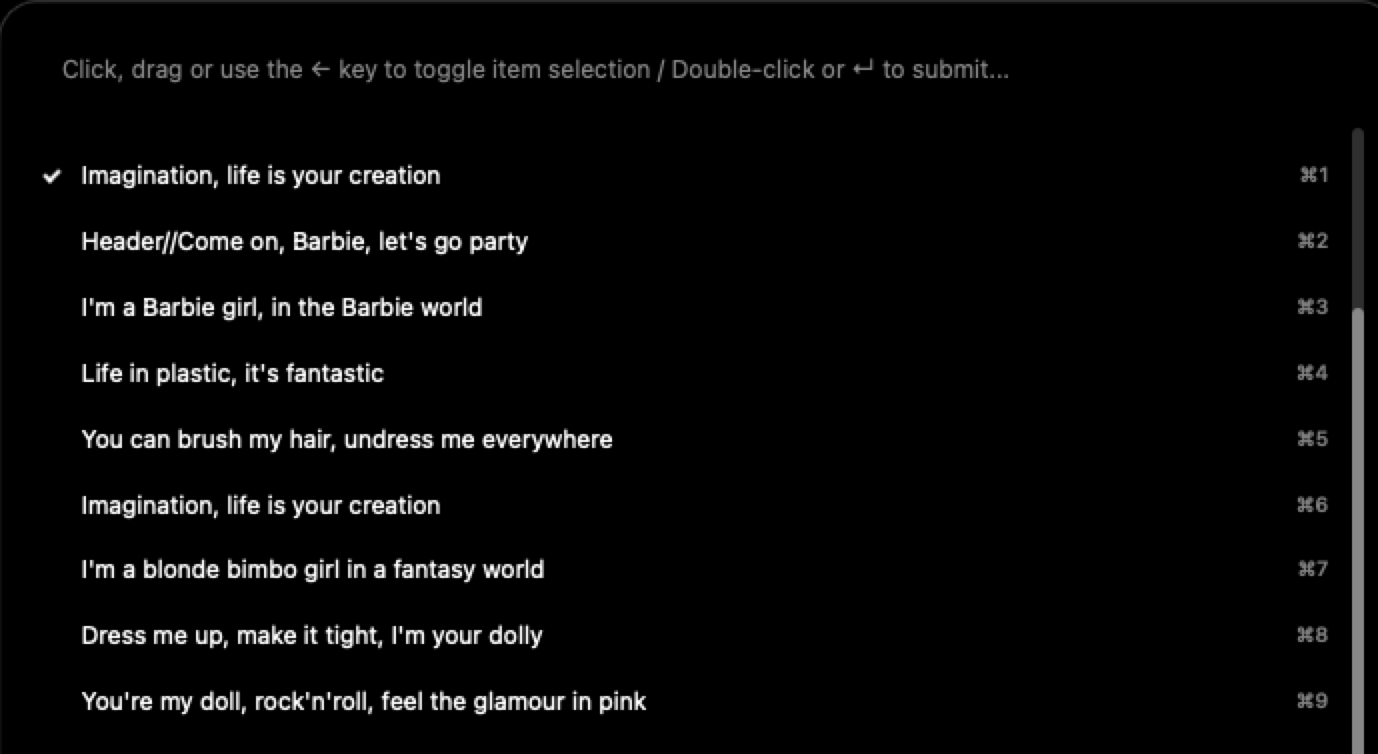
1. Quick Select with ⌘1 – ⌘9
Dynamic badges are now assigned to the top 9 visible items in the viewport. Pressing Command + Number instantly selects the corresponding item and submits the prompt (bypassing any other item(s) selected). These badges update dynamically as you filter or scroll.
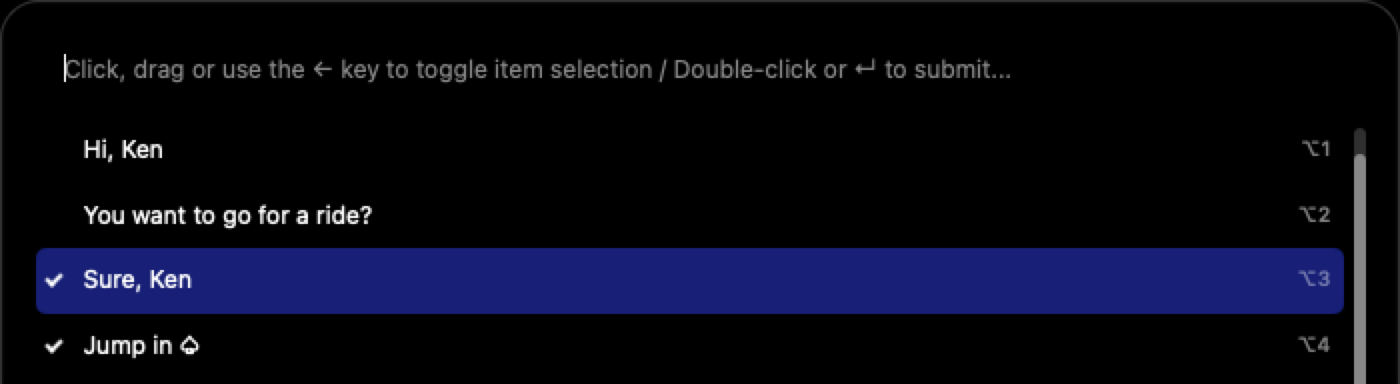
2. Quick toggle with ⌥1 – ⌥9
Holding the Option (⌥) key switches the badges to toggle-selection mode. Pressing Option + Number toggles the selection of that item without closing the window, allowing you to select multiple non-adjacent items.
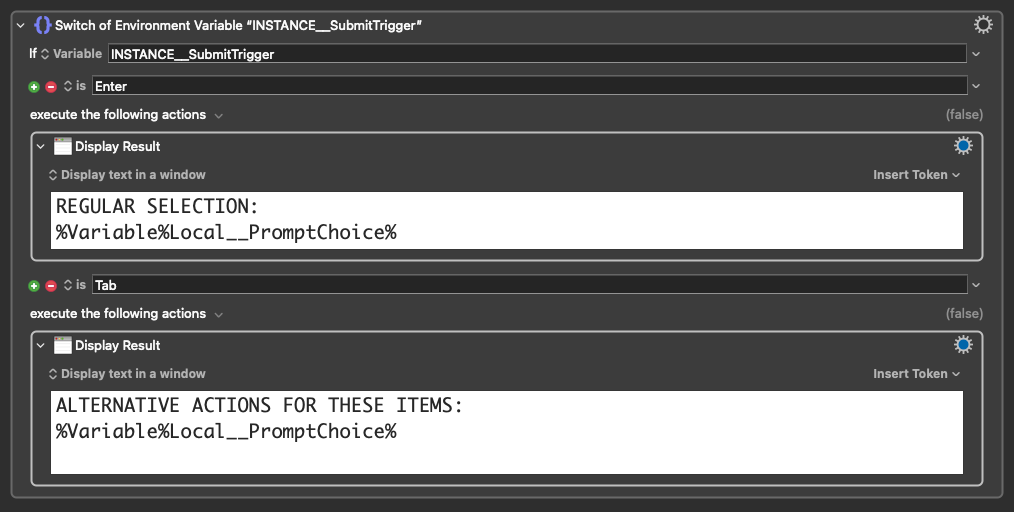
3. Secondary Trigger (Tab)
Pressing Tab now submits the form and passes "Tab" to the INSTANCE__SubmitTrigger variable. This allows for flow control (e.g., routing to a specific "Switch", "Prompt for User Input" or "Prompt with List", like Alfred's Universal Actions), to perform different actions on the selected items.
2 Likes
@JuanWayri, very nice additions to @noisneil's amazing tool. If we're lucky, maybe he'll roll them into the next version.
@noisneil, I have another small enhancement request. It would be nice if there was an option to start with the Info disclosed. One simple method would be to check the first character of Info for + or some other special character. (I suspect that you'd like to avoid the addition of new subroutine parameters.)
1 Like
I love it!
Very nice!
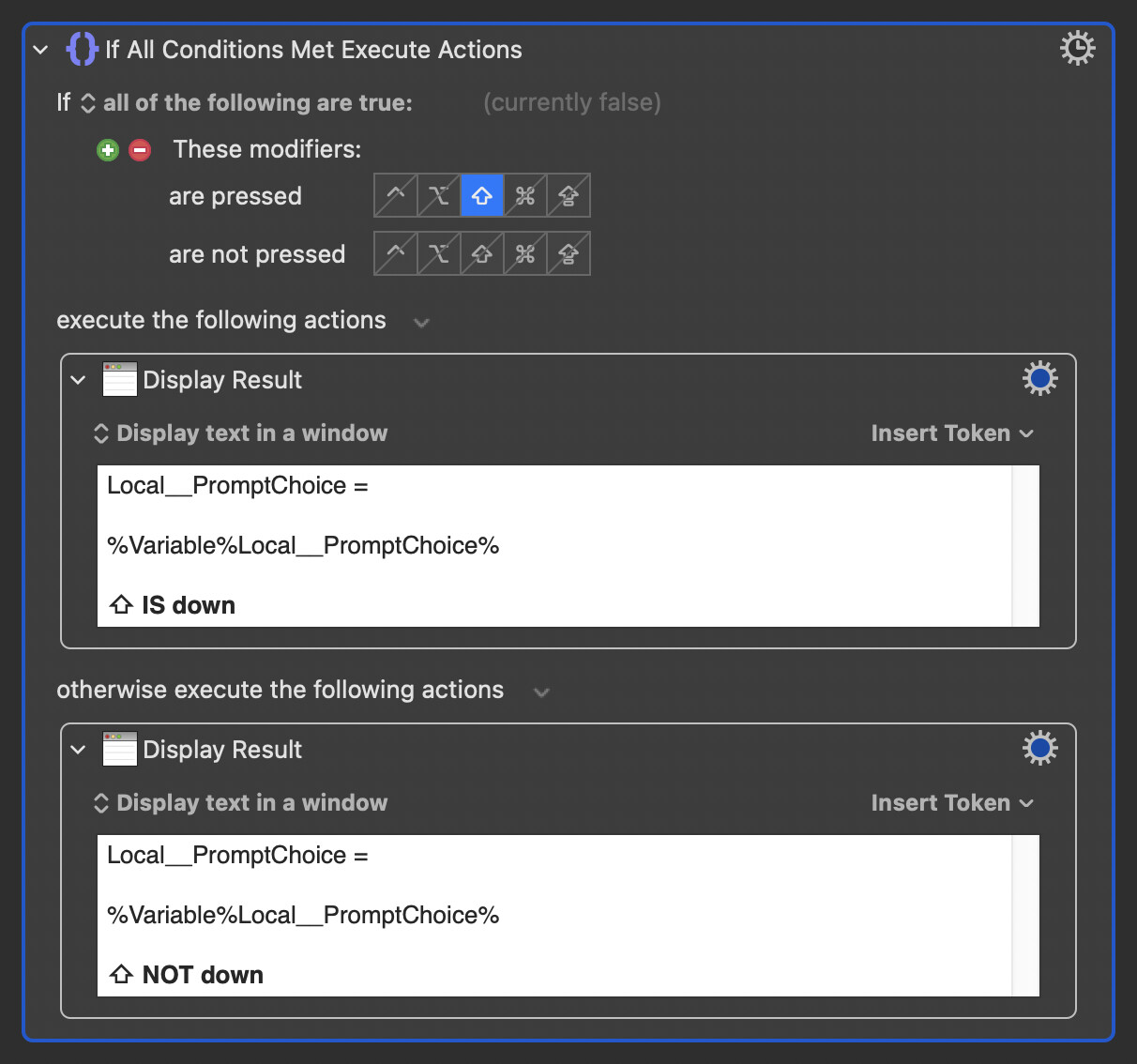
I understand the idea, but I don't think it needs to be accounted for within the html. As with any prompt, one can already test for modifiers on submission:
Nice idea! I figured < might make sense as the opposite of >, which looks like a disclosure triangle.
I've updated the original post to include @JuanWayri's first two suggestions and @Jim's request.
@JuanWayri, if I've missed something and there's a good reason to incorporate Tab as a submission trigger, let me know. I'm just trying to keep things lean, and I can imagine that Tab might end up being useful for another feature at some point.
3 Likes
Happy New Year. Thanks for incorporating the suggestions.

1 Like