If you make a Variable and say call it "MyBrilliantVariable" you can actually access it in a Text Field by writing it as %MyBrilliantVariable%. In other words the percent signs are what allows Keyboard Maestro to know that either a Variable or a Token is what you want when entered in a field that would normally just expect actual text.
Which means if something has a % each side it is to be used in a Text Field. (That's my way of remembering it anyway.)
So, both of these would work:
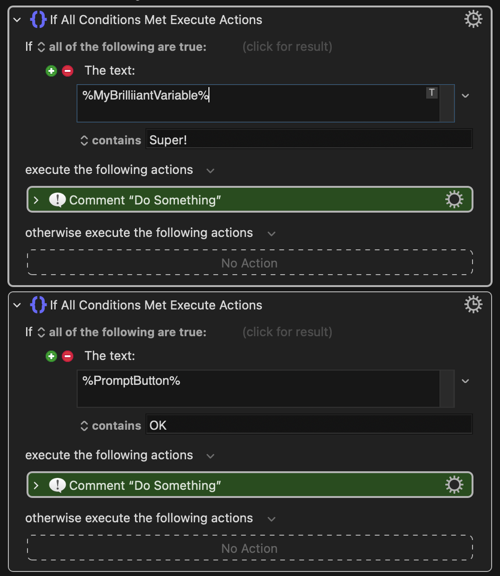
If the "thing" you are trying to use has percent signs each side of it, it can be used in a text field.
So... how do we know if %PromptButton" is a Token or a Variable (since it is perfectly possible for you to make your own Variable called "PromptButton" and enter it as %PromptButton% ?
The answer is, you can't know the difference - which leads to one of the best bits of advice I was given on the Forum which is to always quote your Variables with the notation %Variable% at the front of their name so that you can see at a glance what are Variables and what are Keyboard Maestro Tokens when looking through or debugging your Macros.
%Variable%MyBrilliantVariable% and %MyBrilliantVariable% will both work but the former is a clearer way of working and allowing you to tell the difference.
This is the better way:
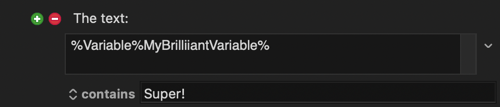
And... it's a very good practice to have some standard naming convention. I've copied a convention used by many here to put a capital letter acronym followed by two underscores in front of all my Variable names.
VAR__MyBrilliantVariable instead of MyBrilliantVariable (where VAR could be anything that means something to me). In the context of a Macro to work in Calendar I might call a Variable CALENDAR__MyBrilliantVariable. Or if I want a Variable that disappears once the Macro has run I would write is as LOCAL__MyBrilliantVariable.
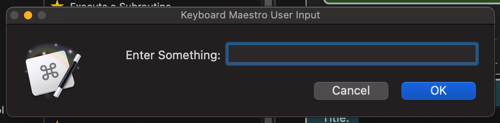
And... why the two underscores? That is because in Prompt for User Input Fields, Keyboard Maestro hides anything before two underscores. Example:
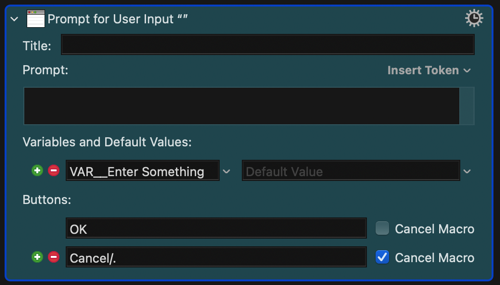
Gets shown as:
Circling back to your initial confusion (which we have all had by the way) it was the % sign each side of %PromptButton% which was the clue to use it in a Text Field rather than the dedicated Variable Field. The dedicated Variable Field is there for you to use your own Variables without the % signs. The list of possible entries in the Dropdown List has all the various forms of data that can be used:
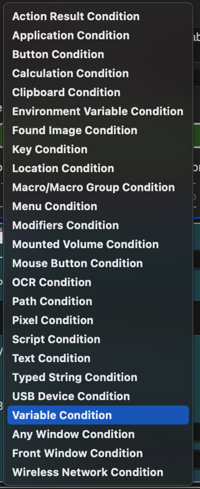
Notice that is has "Variable Condition" but there is no "Token Condition". There is also no "Dictionary Condition" and that is why you are left with using "Text Condition" and using the % signs to tell Keyboard Maestro that the "text" is something special like a Token or a Variable or a Dictionary Entry.
It took me years before I dipped into using Variables and Tokens and Dictionaries (and actually understanding what they were rather than copying and pasting bits of other people's Macros) but now the whole thing seems quite logical and simple 
As well as lots of excellent Posts explaining all this, and the Wiki etc I see that this has just been posted by @macdevign_mac in Tips and Tutorials: