One nice thing about using a variable to store all your macros' Pause durations is that you can change its value. In fact, you can even give the user a method to change the value. For example, this single action could increase the value of thePause by 20%, which would result in all Pause actions to wait a little longer:
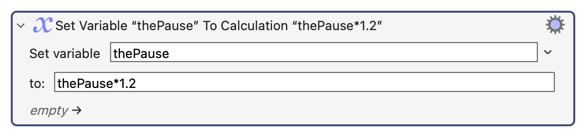
As for me, when I create global variables, I always think about a way to let the user change their value. So for example, I would like the user to be able to increase thePause by 20% when one button is pressed, and reduce the value by 20% when a different button is pressed. I would also show the user the new value. And I would insert some code to handle the case where thePause is not set, and for the case when the user tries to change the value twice in a row before the first change is completed.
thePause Handler Macro (v11.0.2)
thePause Handler.kmmacros (6.8 KB)

In the above case, I use a mouse button to increase the Pause value, and a control mouse button to decrease the Pause value. Also, it's worth noting that the symbol used for "control" is not the keyboard symbol (^), it's a different symbol (⌃).