Good evening to you, too @tsolignani!
It's easy to get the sender and date information if you have an email in eml format.
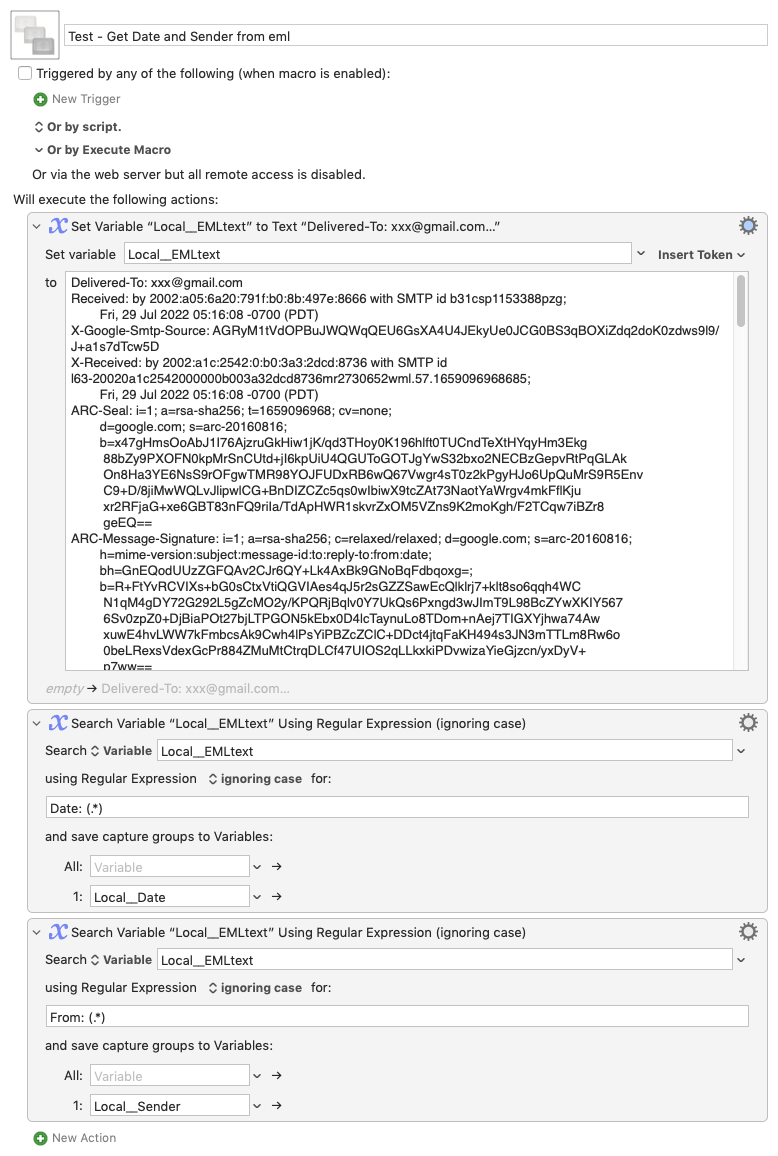
I've created an example macro for you that takes the contents of an eml file and performs the extraction using a couple of KM Search actions.
This is not a stand-alone macro insofar as you have to get the contents of an eml file into a KM variable; I do this in the example macro by explicitly setting the KM variable Local__EMLtext to the raw text of an email.
The macro then extracts the two fields into the KM variables Local__Date and Local__Sender. In the example these come out as:
= Local__Date =
Fri, 29 Jul 2022 13:16:04 +0100 (BST)

= Local__Sender =
OWL Messaging <noreply@owl.co.uk>
Which might not be the format you're looking for but the information is there to rename the file.
I leave it up to you to produce a complete macro using mine as a starting point, but do ask further questions if you have them.
Here is the example macro for you: