Here's a possible untested solution.
It will use all numbers for the file name, sequentially numbering them starting with "0000000001".
-
Set a Counter Variable "Local__Count" to 0.
-
Use For Each action with a Folder Contents collection.
Name the For Each loop variable "Local__FilePath"
with these Actions in it:- Use the Get File Attribute action to get the file extension into Variable "Local__FileExt"
- Increment counter Variable Local__Count by 1, and use the format option to pad with zeros:
-
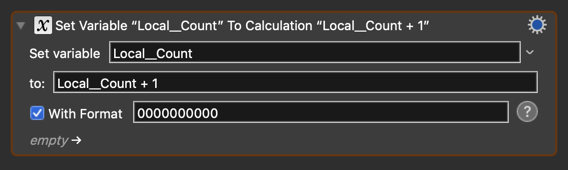
(enter 10 zeros into the format field)
-
- Rename using Move or Rename Action
-
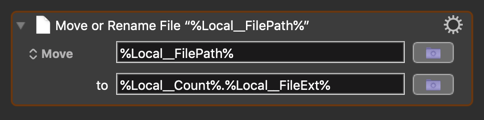
%Local__Count%.%Local__FileExt%
-
That should do it.
Of course, you should carefully test in a TEST folder with only a few files to make sure it does what you want.