Hi kc,
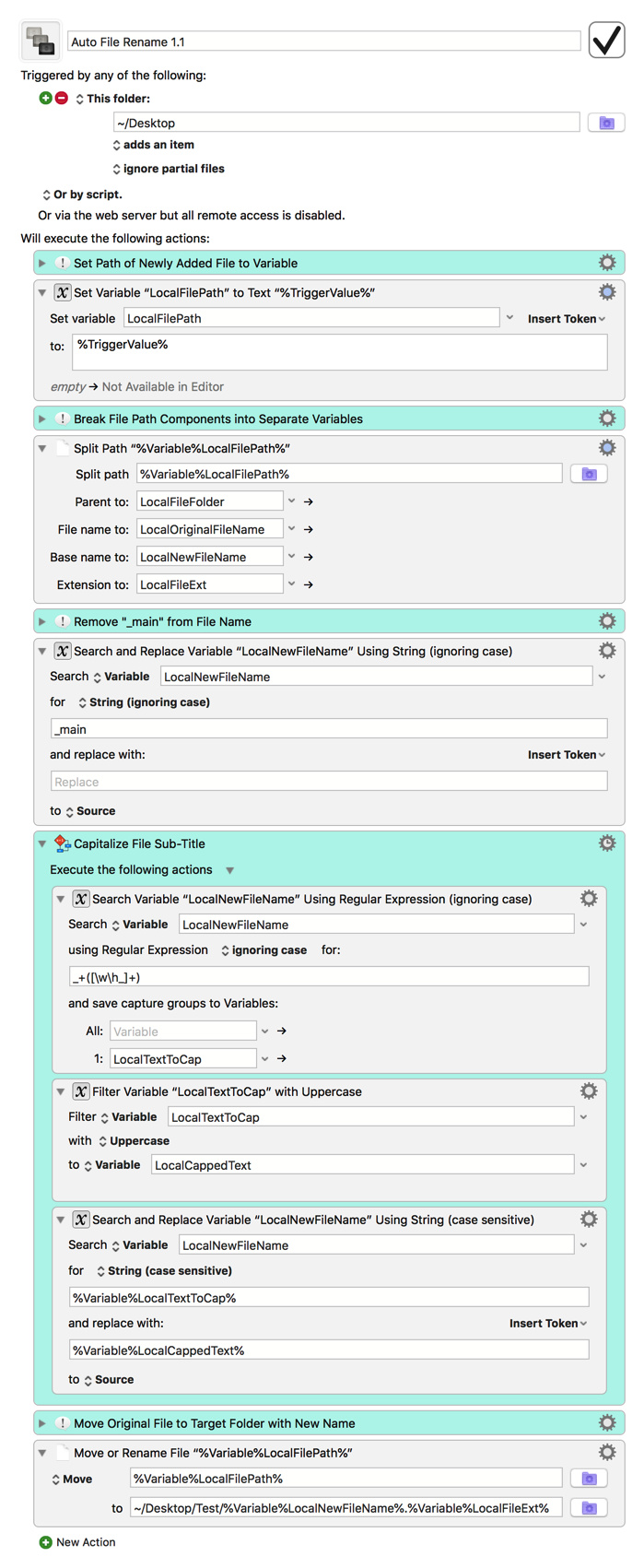
Sorry for the late response. The endless notifications were caused by the macro being triggered every time the newly renamed files were added to the folder it watches. I'm not sure why it didn't behave that way when I tested it before uploading it, but I can verify that I'm seeing the same problem you did now. As you surmised, the easiest way to fix it is to have the macro move the renamed files to a folder other than the one it watches, so if your workflow can work like that, I would certainly recommend it. Doing so also lets us remove the "Move to Desktop Temporarily" step, which was only in place to workaround an implementation in KM's "move file" action that prevents it from overwriting files with the same name (regardless of capitalization).
As for the regex errors, those weren't important, as they were only telling you that the current file name failed to match the regex pattern used to look for text to capitalize, which is not a big deal since not every file renamed in this macro falls under that pattern. The easiest way around this is to configure those actions to no longer show errors for failing to match that pattern, so that's what I've done in this newer version. Let me know how this one works, and if you run into issues with it as well, please be sure to post the modified macro so I can see what might be going wrong.
Auto File Rename 1.1.kmmacros (7.5 KB)