I can't answer that unless you tell me if you are talking about the copies in the Editor or the true copies in the Engine.
Again, you are looking at it from the perspective of someone with knowledge.
Less steps is NOT the same as less complex.
Me, as a new KM user: where do I find the Engine? Is there a menu item that takes me there? I don't see one.
Then if I get there, how do I add, delete, change variables?
Look at this from a newbie perspective. How is this simpler than having a preferences pane with the list of variables to manage?
You're the only one that used the word "simpler". I never did. I think I always said more accurate and more authoritative. I thought your original issue was accuracy of information. So are you changing your concern from "accurate information" to "simple for users"?
And I never would assume that going to the Engine would make things more complicated for the user. I think it's possible for the Engine to have a "pane" showing all its variables. But I wanted you to make that argument, because I don't see much benefit to it.
This is the same as saying "simpler" 
They are exactly the same thing... they are not the opposite.
If the information is accurate, it's simpler for users to use the app. It's that... simple to understand, no?
True, though I was talking about architectural complexity. 
User interface complexity is a separate issue. I think it's entirely possible to design a way for users to access the variables from the Engine in a simple manner. After all, even the editor forces you to go through a separate pane to see them. It wouldn't have to be much difference using the Engine.
Since I have no idea (and I shouldn't anyway) how things work under the wood, because the app is the editor. That's where the action happens, GUI wise, then I expect, as a user, to have a way to edit my variables. If it's the editor or the engine, etc, it doesn't matter to me as a user.
Just give me a window with a list of variables that is accurate, where I can add/delete/modify them without them disappearing.
Now, HOW that is achieved, it's not up to me as a user. If there are 2 places where variables are managed, then that's a design issue, not me not being able to understand "why" that works that way, you know what I mean?
I disagree. There's lots of action coming from the Engine's system tray icon. Don't you every use that? I use it 300 times per day.
Sure! Through the Engine! That's the only way to get accurate information. You could click on the Engine icon and it could pop up a list of global variables (and instance and local variables!)
I wouldn't object to that. So count that as a win for you.
This is what matters. I'm a user. I'm not the developer.
If you sell me an app, a product, a service, I care about how I use it. I don't care how it was created. It just needs to work the way I expect it to work. If I buy a hammer, I expect it to work like a hammer, not a saw. I don't even care how it was built or why it was built that way.
That's why I think KM lacks that "basic" level sometimes and maybe why some potential users tend to avoid it.
"YOU" use it. The average user (which seems that you ignoring completely) doesn't.
The preferences pane is available to all users, average and advanced.
The engine is not (at least not easily).
You don't need to know about the existence of the engine to have a simple macro that opens a URL, do you?
But variables can be used in the most basic macros.
So yeah, YOU may use it 300 times a day.
I, on the other hand, even with super complex macros, never use it.
I use variables a lot though. So that's what I mean.
But hey, this will not take any of us anywhere, because this is an "issue" only Peter can solve and no matter what we discuss here, it will not change anything.
I will keep using my workarounds, especially because I use more Local variables than Global anyway.
My only "concern" is that I wish KM was more user friendly to anyone with super basic skills and this kind of scenario makes it more complex. That's just my opinion.
Let's move on with our lives now or we will spend the whole day not being productive haha
I don't see any...
Maybe that's why it's a more advanced feature?
I think the only way to turn on the debugger is through the Engine. Are you saying average users doesn't use the debugger? I wouldn't know. Maybe you are right. So you don't use the debugger?
Actually, it's easy to start up the engine macro with a single click on the screen. It takes more effort to start the Editor because I have to activate the Launch Bar and then find the program icon and click on it, which also takes a lot longer.
You never use the debugger even with super complex macros? The debugger shows you the values of the global and local variables if you click on the "X" in it. I couldn't imagine KM without a debugger.
This was a complex issue? I've been using KM for probably over a decade and I've never noticed this issue. I've been testing variables for emptiness every day for ten years and never noticed this issue. I'm not even sure what the issue is, other than the Editor's list of variables doesn't perfectly match the Engine's list.
Maybe you don't know what the Engine's user interface is. It's the little KM icon in the system tray.
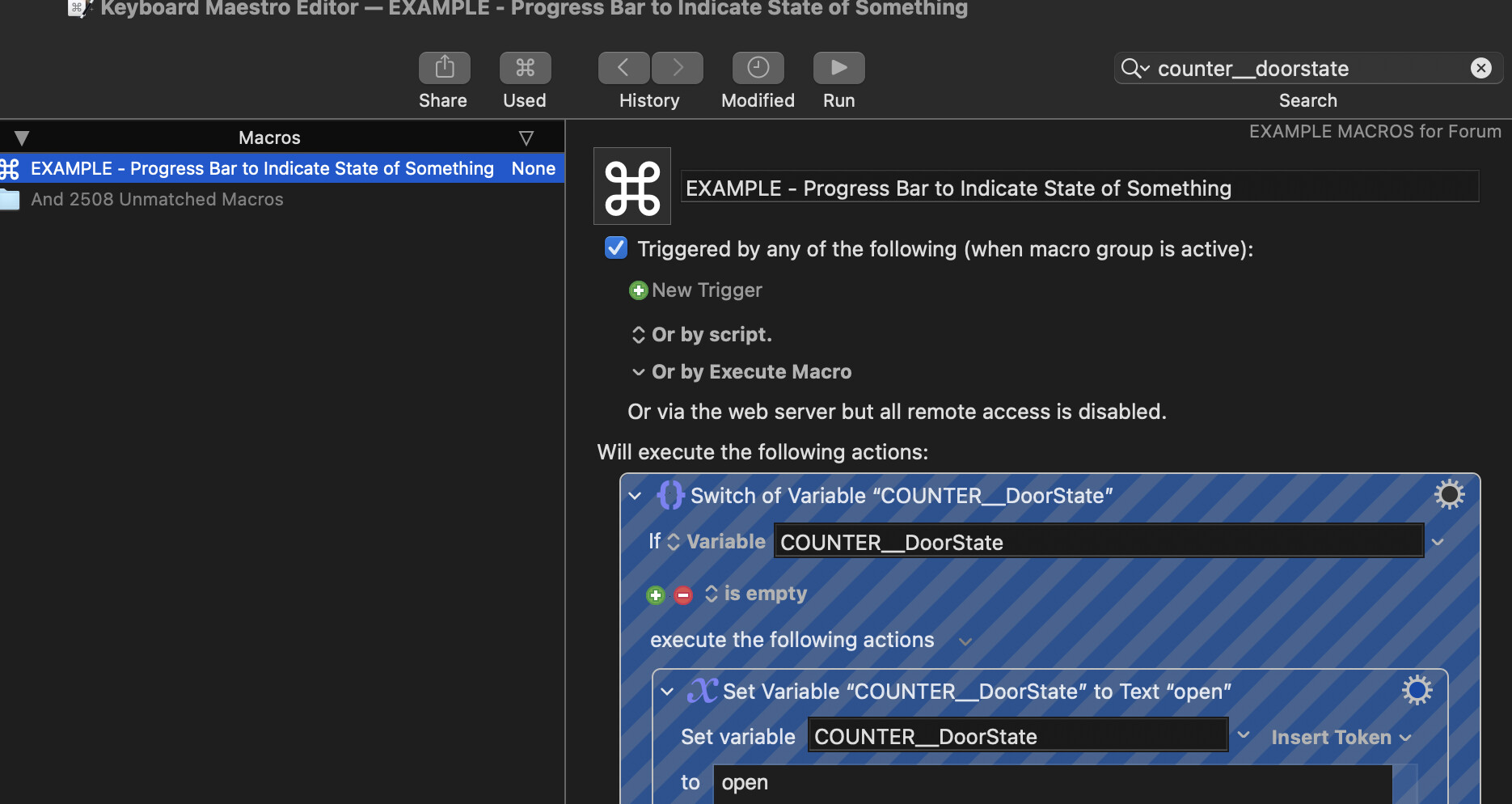
Leaving aside the discussion of how you can see the global variables you have in use I can give one bit of good advice - it's really worth having a naming system that gives your Global Variables predictable unique names to make accidentally using the same name less likely.
Local variables have to have "local" at the head of their name to work. Global Variables can be called anything but it makes sense to me to put some text at the head of their name to make their use clear.
I have some Global Variables that keep a tally of some form of counting (for example an incremental number added to scans). My system (and it's only my system, you could do it completely differently) is to name the Variable something like COUNTER__EpsonScan. Another Global Variable might be named COUNTER__DoorState.
One problem with Global Variables is that they can be called anything, like for example "Test" or "Result" which can quickly lead to a jumble of Variable names that are almost impossible to decypher at a later date.
EDIT - And if you want to check if you have used the name before in any existing Macros, in the editor you can press ⌥⌘F to search the whole library and type in the name of the Variable you are looking for. Another reason to give Global variables longer, unique names.
This looks like a long involved discussion which is frankly far more than I have any interest in reading at this time.
Empty variables are deleted because they are removed from the database.
Setting a variable to %Delete% does not delete them because then they would not exist and could not fulfil the purpose of the token, which is to hide the variables from editor lists. The “Delete” in “%Delete%” is not about deleting the variable itself, but instead is about deleting the variable from lists in the editor.
Variables included in editor lists are variables who exist, or variables that are used in any macro, except for variables that have a value of “%Delete%”.
Yes, but luck for you you can just pick “list” from the popup menu next to the variable, because “list” is used in a macro and there for exists for the editor.
Hopefully that is clear. This is a purpose to what the “%Delete%” value in the variable does.