Hey Anthony,
I show in post 2 exactly how to get an Internet Password from the Keychain using the 'security' shell command.
But let's try to clarify things a little bit.
* Note -- the values in the image are bogus, and I have a strong password.
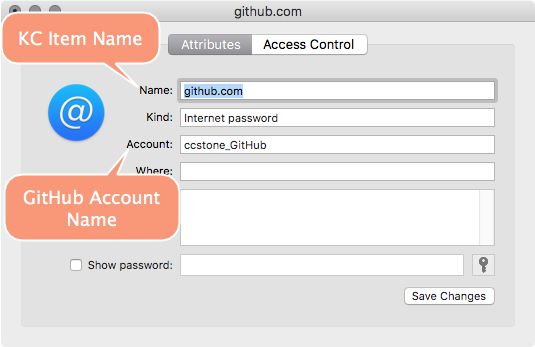
# Command Format:
# security find-internet-password -a Keychain_Item_Account_Name -l Keychain_Item_Name -w

# Working Command:

security find-internet-password -a ccstone_GitHub -l github.com -w
I just verified that this still works on macOS Sierra.
When you first run it the system will ask you to unlock the keychain item to get the password. If you select the always allow button you won't have to unlock it the next time you run your macro.
However -- when the keychain locks -- you'll have to grant Keyboard Maestro access again.
You can manually lock the keychain, or you can set it to auto-lock after a certain number of minutes. I also believe it is automatically locked when you log-out, shut down, or restart.
-Chris