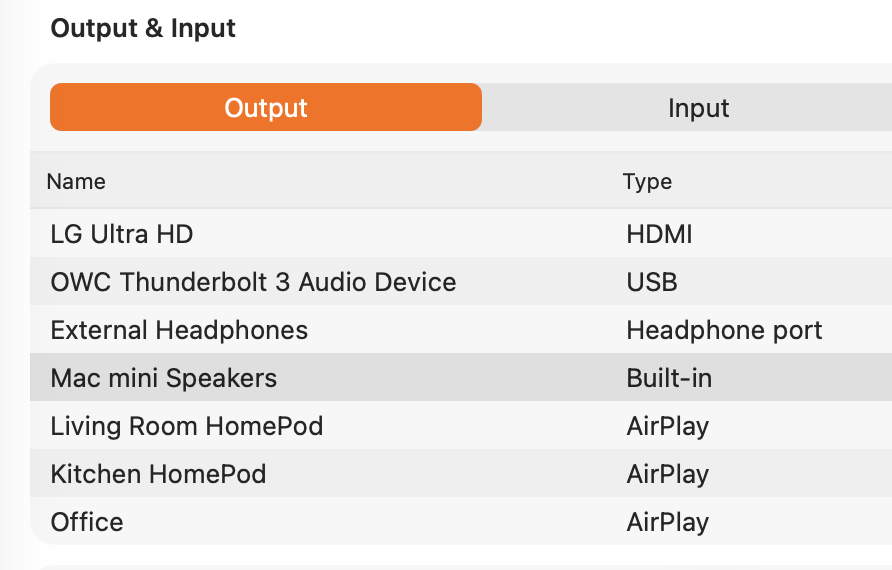
I'm surprised too. Perhaps someone can explain why, but as humans we can set the output device to a HomePod either by opening the System Settings app or the Control Center app. Since humans can use those two apps to change the default output, then so can a KM macro, using the mouse to click on the icons and buttons. Are you willing to use this method? If so, the method will be very specific to your Mac, your version of macOS, and how you've set up your control center. So I would not be able to write this for you, but I could give you tips on how to do it.
Unfortunately these methods cannot be done without taking control of the screen, which may not be what you had in mind.
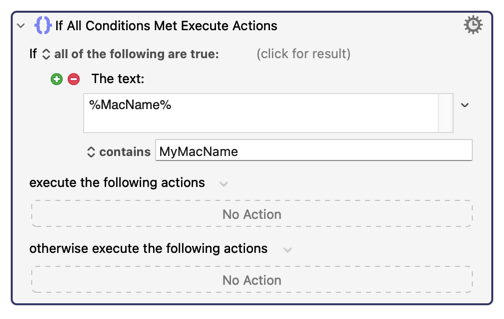
As for the problem about being Mac-specific, you can simply insert an action like this:
The fact that you want this to run "at login" is possible, but I don't know of a failsafe way to know when all apps are finished messing the screen during login, so you won't be happy with the fact that you (i.e., your macro) have to wait for a while after login before such a macro can do its work. It might just be better if you use a hotkey, since as a user you will know when your login process is really complete.
Now that I've had time to check the internet, there is possibly a way to do this using a command line approach, which will negate the need for the GUI. If you have downloaded brew you can install switchaudio-osx and see if that command works for you. It may or may not work.
SwitchAudioSource -a AirPlay where -a is supposed to switch to AirPlay doesn’t work when trying to switch. My sense of reading the issues is SwitchAudioSource can’t select a specific AirPlay device.
So now to look at taking control of screen or more manual approach with KM.
Thanks for your help. I may be back, but not today. Or I may return the HomePod and get wired speakers. That will probably be more robust.
When I read up on this, it says it can work if the Airplay device is already an active connection in Control Center. I'll let you investigate that, if you want to.
There's another brew utility called coreaudioctl which claims to solve this problem, but only if your version of macOS is exposing the device as a CoreAudio device. So you could test that one too.
In some ways I like my HomePods, but the main thing I hate about them is that switching to them results in about 5 seconds of audio being turned off while the data starts streaming to the device. I might tolerate 1 second, but 5 seconds is not tolerable.
I'm confused by trying to switch to AirPlay since AirPlay isn't a device, unless your Homepod is named AirPlay? If not, you should be able to use SwitchAudioSource -s 'NameOfYourHomePod'. I think you may have got a little mixed up because the -a argument shows all devices. The -s argument sets the device by name, and -i and -u set the device by ID and UID, respectively.
If the issue is that the HomePod becomes disconnected, I use blueutil (via Homebrew) to reconnect devices so they're accessible to SwitchAudioSource.
➜ blueutil --paired
``<seven items deleted> address: 14-14-7d-0b-20-06, not connected, not favourite, paired, name: "Office", recent access address: d4-a3-3d-61-d8-9b, not connected, not favourite, paired, name: "Living Room HomePod", recent access date: 2025-11-04 23:36:42 +0000date: 2025-11-04 23:36:42 +0000```
Office is the HomePod Mini I think. In mac Home, the name is “Office HomePod.” Maybe this is wrong since the Home name for HomePod (full size, version 1 [is there a version 2] is “Living Room HomePod”
Maybe to the point is how do I get the device_id or device_uid for the HomePod mini? Maybe SwitchAudioSource would work with that.
➜ brew install coreaudioctlWarning: No available formula with the name "coreaudioctl". Did you mean coreutils?
➜ SwitchAudioSource -cMac mini Speakers
even though I’m playing through the HomePod mini, but Airplay no longer shows up with SwitchAudioSource -a. Airplay showed up before (still there in iTerm).
Appreciate the help, but obviously I’m out of my element here.
Do you have another Homepod called Office? If not, then that first device is it, and you can see it says not connected. So first connect the paired device with blueutil, then switch output with SwitchAudioSource:
blueutil --connect 'Office'
If the above command doesn't work for some reason, use this one instead.
➜ SwitchAudioSource -c
Mac mini Speakers

~
➜ blueutil --connect 'Office'
Failed to connect "Office"

~ took 16s
➜ SwitchAudioSource -s 'Office'
Could not find an audio device named "Office" of type output.  Nothing was changed.
```
Below is not iTerm output

Only one device named Office AFAIK. I do have `Office Group Office` which toggles some devices/accesories.
Since blueutil failed to connect the device, SwitchAudioSource wouldn't be able to switch to it. Did you try the second command I included above in the event the first one failed?
➜ blueutil --connect 14-14-7d-0b-20-06
Failed to connect "14-14-7d-0b-20-06"

~ took 15s
➜

~
➜ SwitchAudioSource -s 14-14-7d-0b-20-06
Could not find an audio device named "14-14-7d-0b-20-06" of type output.  Nothing was changed.

``` end of iTerm output (haven't figured out formatting here.

I think I tried both in from your previous posting.

Thank you for trying
When you look in System Settings -> Sound, is the Office HomePod there? Even if it is, I would try re-pairing the HomePod in question, and then run blueutil --paired again. I would also test blueutil by trying to connect to a different device.
If blueutil fails, there's no reason to run the SwitchAudioSource command.
I think I repaired it yesterday. I am also trying to get Thread devices working and did a major network reset to get rid of some old remnants of old routers. But I just reset the HomePod mini. Now it is just named Office
address: 14-14-7d-0b-20-06, not connected, not favourite, paired, name: "Office", recent access date: 2025-11-05 05:30:15 +0000
address: d4-a3-3d-61-d8-9b, not connected, not favourite, paired, name: "Living Room HomePod", recent access date: 2025-11-05 05:30:15 +0000
~
➜ blueutil --connect 14-14-7d-0b-20-06
Failed to connect "14-14-7d-0b-20-06"
~ took 15s
➜ blueutil --connect 'Office'
Failed to connect "Office"
~ took 16s
➜ blueutil --connect 'Living Room HomePod"
➜
~
➜ blueutil --connect 'Living Room HomePod'
Failed to connect "Living Room HomePod"
~ took 16s
➜ blueutil --connect 'd4-a3-3d-61-d8-9b'
Failed to connect "d4-a3-3d-61-d8-9b"
Hm. The fact it won't connect any devices suggests the issue probably isn't with the HomePod. Whenever you come back to this, you could try running this command:
It looks like some other users have had a similar problem, and if this command can successfully connect your devices, you could use it as a workaround while you continue troubleshooting.
@KBM and @hemicyon, my testing is somewhat dated, but when I did try several months ago, I was unable to switch to AirPlay devices using SwitchAudioSource. (If I recall correctly other users had reported the same issue.)
This shortcoming is what originally motivated me to create and share: Set Sound Output
I’ll try Set Sound Output, although it’s not obvious to me how to use it. Also I’m going to have to figure out what all the pieces are. In other words I need to learn more about KM.
Ah, I didn't realise that. I don't typically AirPlay to HomePods from the Mac.
It was inconceivable to me that there isn't a way to do this without having to open System Settings, and I fell down a bit of a rabbit hole. There used to be a way, but for whatever reason Apple stripped any and all scripting access to AirPlay devices. I even checked Shortcuts because that sometimes gives access to functionality there's no API for, but no dice. So irksome.
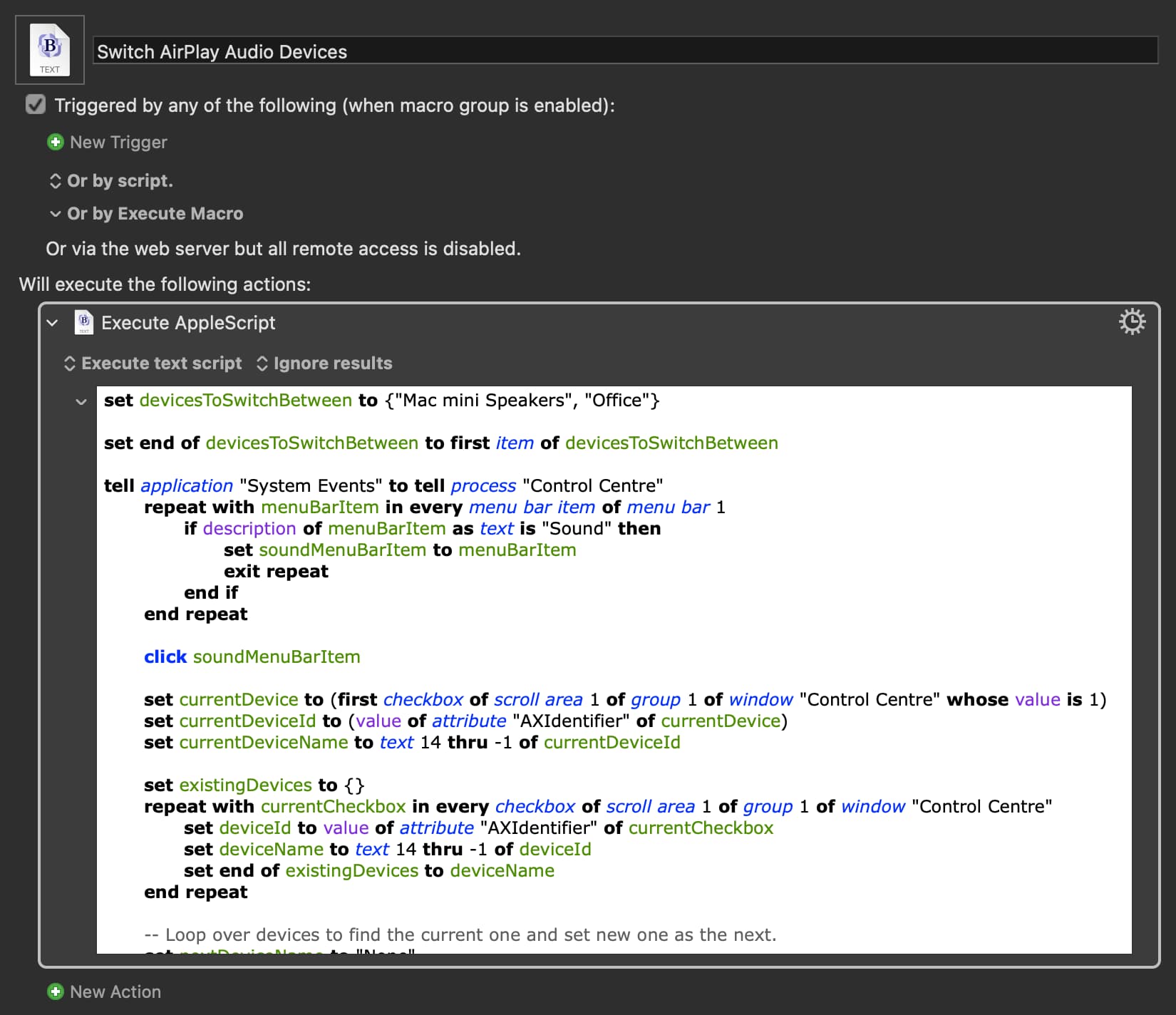
However, I kept digging and found this! Still requires a little bit of UI, but only the Control Centre instead of having to open System Settings every time.
@KBM give this a try. You can add more AirPlay devices in the top line, but it cycles through them. So if you're switching between more than one non-AirPlay output, you could instead have only the one Office HomePod (or whichever you use regularly), and use SwitchAudioSource for the others.
This looks promising, but even after changing Centre to Center (for localization), I couldn't get it to work with Tahoe.
2025-11-05 15:53:47 Action 100023835 failed: Execute an AppleScript failed with script error: text-script:422:438: execution error: The variable soundMenuBarItem is not defined. (-2753)