That's your problem! You set up your path in your current TERMINAL window but you did not set it up in your environment setup file.
I can help you fix that, I'm 99% sure that's your problem.
That's your problem! You set up your path in your current TERMINAL window but you did not set it up in your environment setup file.
I can help you fix that, I'm 99% sure that's your problem.
This is all foreign to me. I have no idea what that means, sorry...
So what should I use as my path? This?
/usr/bin
The problem is that you haven't set up the initialization file that sets up the path for your new terminal window. All you have is an open terminal window with the correct path. KM always creates new windows with a new environment that comes from a setup file. Now that we know the problem I can refresh my memoery where your setup file is. I need a couple of mintues to remember where it is. Some shells use different files, and zsh is a bit new to me.
I think the file for zsh path setup is ".zshrc" in your home folder, I think. Do you have one by that name? Do this in any Terminal window:
ls -la ~
Yes I see this
-rw-r--r-- 1 dannywyatt staff 446 Jun 15 2022 .zshrc
That's the file we have to edit. Do you know how to edit a text file using Terminal?
I have no clue... this whole shell scripting world is completely foreign to me.
What I just did was: I hit the shortcut to show all hidden files, double clicked it and TextEdit opened it. I can see a bunch of things there. Does it work like this?
That should be fine. What's in the file? Is there a line that sets up a PATH variable?
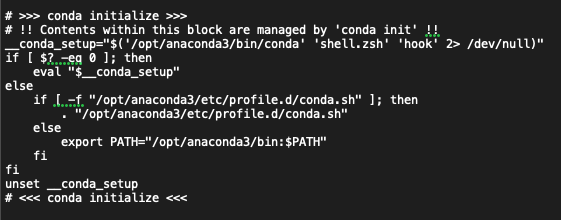
This is what I see
__conda_setup="$('/opt/anaconda3/bin/conda' 'shell.zsh' 'hook' 2> /dev/null)"
if [ $? -eq 0 ]; then
eval "$__conda_setup"
else
if [ -f "/opt/anaconda3/etc/profile.d/conda.sh" ]; then
. "/opt/anaconda3/etc/profile.d/conda.sh"
else
export PATH="/opt/anaconda3/bin:$PATH"
fi
fi
unset __conda_setup
That's slightly complicated. I need to read it for a minute.
You see, when that ran, it was probably supposed to add your anaconda path to your PATH variable. But it failed to do that, as you said the KM shell command returned "PATH=/usr/bin:/bin:/usr/sbin:/sbin" So there's a bug in that code, I imagine. Technically you should be contacting "anaconda" to find out what's wrong with their code. But I'm going to guess that if you backup that file and replace it with the following, it should work:
export PATH="/opt/anaconda3/bin:$PATH"
I'm 75% sure if you change that file to the contents above, your KM shell script will work.
If the indentation helps, here it is a screenshot
Kinda hard to suss it out from here, but how about...
/usr/local/bin/ffmpeg-normalize "$KMVAR_Local__FilePath" -f -c:a libmp3lame -b:a 320k -nt peak -t -1 --output "${KMVAR_Local__OutputPath}.mp3"
Just to make sure I understand:
You changed the original path to /usr/local/bin
And when you have "$KMVAR_Local__FilePath" that should be the FOR EACH variable, which in my case is "Local__mp3" so it would be $KMVAR_Local__mp3", right?
Also the last part you added "${KMVAR_Local__OutputPath}.mp3"
I'm confused about the extra .mp3 there?
And if FilePath is the FOREACH variable, what would be OutputPath? Where is that variable coming from?
I will try that in a second. Let me try @noisneil approach and see what happens
Sure! I'm at your service. Do whatever you want.
Ok to make it simpler for now, I tried the full path for both input and output, like this:
/usr/local/bin/ffmpeg-normalize "/Users/dannywyatt/My Files/Inbox Global/Danny Wyatt - Cookies.mp3" -f -c:a libmp3lame -b:a 320k -nt peak -t -1 --output "/Users/dannywyatt/My Files/Inbox Global/Danny Wyatt - Cookies - normalized.mp3"
No luck. So it seems that the path is not correct. The issue doesn't seem to be the variables
Ok I'm a bit confused...
Should I replace the whole code with
export PATH="/opt/anaconda3/bin:$PATH"
?
If not, that text is already there by default:
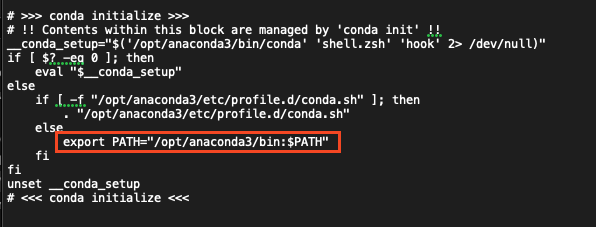
I wanted you to backup the whole file and replace the whole file with "export PATH="/opt/anaconda3/bin:$PATH""
As I read the file, it says that file is created/managed by a program called "conda init." I think you should run that program and see if it can fix the file. Or just try my idea. Your choice.
I wasn't sure if I was supposed to replace the whole code or just some section.
Let me try it then
Good call.
My idea will probably fix your problem temporarily. The permanent solution is to get the conda app to fix the problem, either by running the conda init program, or reading the conda docs, or contacting the conda company. I'm 80% sure the problem is that your setup file isn't working properly.
Ok so the file is now this:
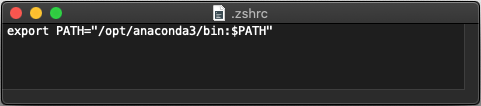
And my script is this:
/opt/anaconda3/bin/ffmpeg-normalize "$KMVAR_Local__mp3" -f -c:a libmp3lame -b:a 320k -nt peak -t -1 --output "$KMVAR_Local__mp3 - normalized"
It didn't work...