I stand corrected, at least half corrected.
Wish list: ability to export / backup named clipboards and question about App Support and Pref Files
It's my next project, hopefully for today which is a KM Support and Pref Backup Macro including
- quit KM Engine and Editor
-backup * ~/Library/Application Support/Keyboard Maestro folder and ~/Library/Preferences/com.stairways.keyboardmaestro.* files to a (in my case) non dropbox folder - ZIP backup files and add date time stamp
- reactivate KM Engine and Editor
There are EXCELLENT backups macros by @griffman and @_jims for example, which focus on macros, but nothing that I found to backup KM support and pref files, following the rules dictated by @peternlewis (quitting KM editor and engine)., so a user can have a nasty surprise after losing clipboard history, named clipboads, favorites and many other settings in case of a crash. In my case and I suspect most other users, KM pref and settings backups ( carbon copy cloner at night for example) are done with KM active which entails the risks described by @peternlewis
I can't just quit KM editor and engine before going to bed because I have important KM tasks running at night.
I think that this issue needs to be addressed. All I am missing is the brains to conceive the macro. My gut feeling is that a shell script could do it all.
The macro in the link I provided to you above shows you how to use a shell script to stop and restart KM (although you need to read the whole thread to take into account the problem with the pkill command.) That's 90% of the solution right there. The only other thing you need is intermediary commands to perform your backup/zip operations. I can't help you with that because I don't know how you do your backups. And then you need to decide on a trigger that will safely run it.
2 Likes
OK. I will look. Could you just give me an idea as to how you zip? thank you
I thought you already had software that did your backups. Now you are saying you don't?
Not only does macOS have four different backup utilities, but Keyboard Maestro also has one. Have you ever tried KM's utility, which you can access under File / Revert Macros?
And have you ever tried macOS's main backup utility called Time Machine?

If you need someone to explain the options for backing up your Mac, that's a huge response which probably merits its own thread.
Personally, I don't consciously back anything up because I enjoy rewriting all my code. Whenever I buy a new Mac I just rewrite all my KM macros on the new Mac because I actually enjoy doing that, and my macros get better each time I rewrite them.
1 Like
there is a misunderstanding:
1- the topic of the discussion is how to backup named clipboards. Nothing to do with macros.
2- the point of the macro is precisely to overcome the limitations of my backup app (carbon copy cloner) which I run while KM is active (I have no choice)
3- the native file restore is much too vast: an all or none (ie restore to xyz date)
thank you
1 - I didn't test if KM's Revert feature included clipboards. Maybe it doesn't. I didn't test, but you could be right. Sorry, if I was wrong.
2 - why don't you want to use CCC when KM has been stopped? There should be no problems with CCC now that you can stop KM.
3 - Time Capsule is capable of letting you restore specific files to specific dates. It is not an "all or none" backup service.
1 Like
You are right but KM is active during my time machine backups
My point was (I did not express myself correctly) that I do not want to restore the macros to a previous date. Only the ability to restore named clipboards
because CCC has difficulty backing up application support files to the primary drive.
thank you
That's why I showed you how to stop KM. If you stop KM, you can then trigger Time Machine manually so that it's guaranteed to backup all your kmchunked files correctly, which contain your named clipboards. You can then use Time Machine to restore your kmchunked file and voila, you've got your named clipboards back. You can use Time Machine to pick different kmchunked files until you have the one you want.
The reason we worked at stopping the KM Engine was so that any app including CCC wouldn't fail at backing up KM's support files. But if you just don't want to use CCC, you can switch to macOS's software. MacOS has backup utilities like "tar" which would also be able to backup KM's support files just like CCC. If you really want to use tar, someone could probably assist. As a bonus, you don't need to zip your files if you use tar, because tar supports zipping itself.
1 Like
yes, you are right on both points. thank you
1 Like
Do those important macros that you run overnight, in the period that CCC is backing up your Application Support folder, change any of your Named Clipboards? That's where the problem might be -- not that the Engine is running but that the Named Clipboard database is being changed at the same time as CCC is backing it up.
If you still think there might be a problem and you want to minimise the length of time that the Engine is shut down, take a look at CCC's pre- and post-flight script hooks. Exactly how you do it will depend on how you leave your Mac and whether those scripts can run in your user-space, but it might be as simple as setting the preflight scrip to
osascript -e 'tell app "Keyboard Maestro Engine" to quit'
...and the postflight to
osascript -e 'tell app "Keyboard Maestro Engine" to activate'
Edit to add...
Generally, backing up "live" databases is a no-no -- what you need to do is pause the database engine, flush any cached changes to disk, back up the files, unpause the database engine again.
While you could do that as part of your backup script, it might be easier to make a copy of the (paused) database files at a different time and let your software back up the copy rather than the originals. That way you can stop the KM Engine for just long enough to copy the Engine files and not for the entire duration of the backup process.
And, through the wonders of the "Execute AppleScript -- Asynchronously" option you can quit and relaunch the KM Engine using a KM macro!
This assumes you have a folder on your Desktop called "KM Backups". It copies the entire "Keyboard Maestro" folder inside your "Application Support" folder to ~/Desktop/KM Backups, appending a timestamp to the name -- quitting the Engine and (if necessary) the Editor before and relaunching the Engine and (if it was previously running) the Editor after.
KM Pause, Backup, Restart.kmmacros (2.5 KB)
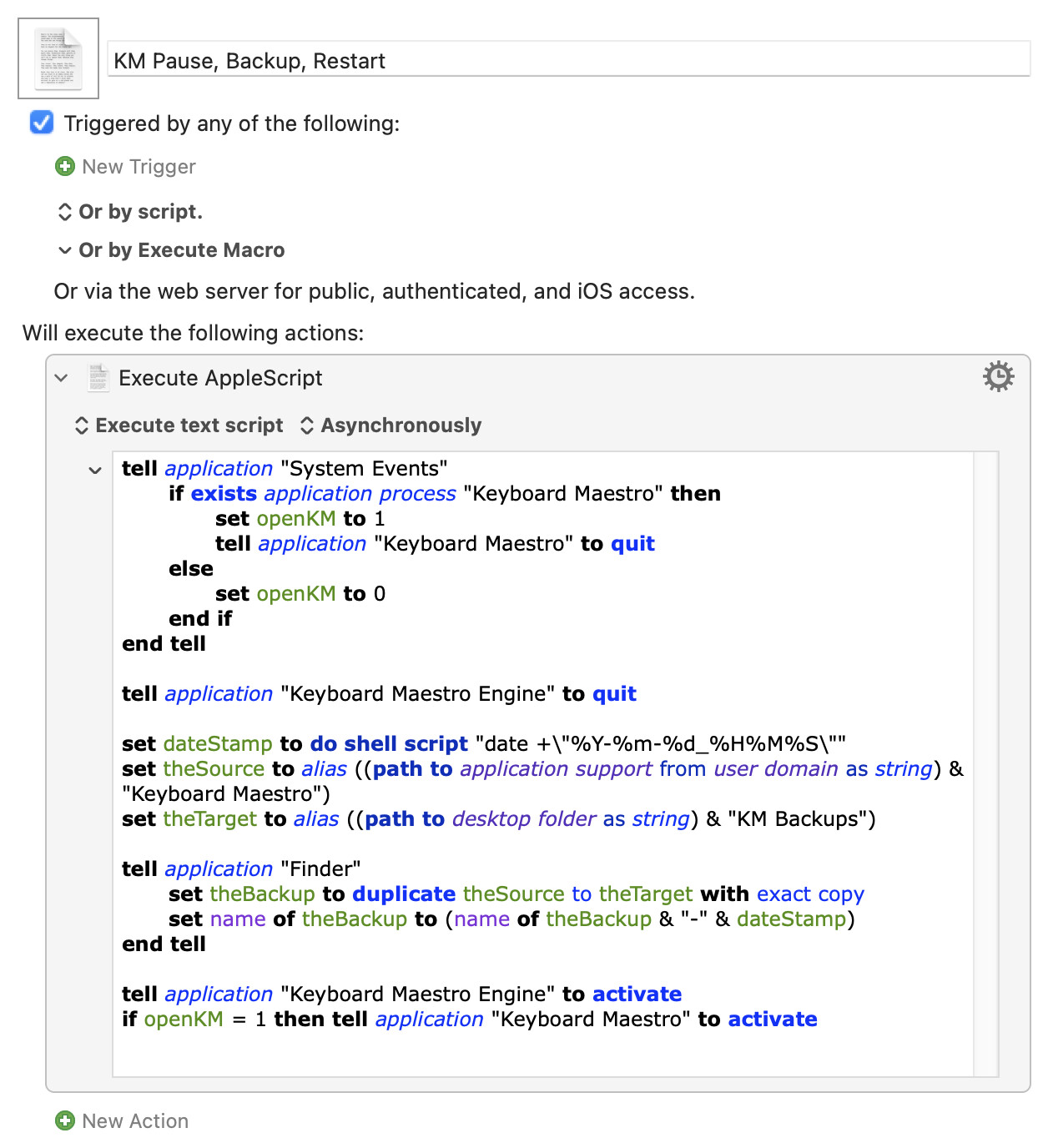
The Script
tell application "System Events"
	if exists application process "Keyboard Maestro" then
		set openKM to 1
		tell application "Keyboard Maestro" to quit
	else
		set openKM to 0
	end if
end tell

tell application "Keyboard Maestro Engine" to quit

set dateStamp to do shell script "date +\"%Y-%m-%d_%H%M%S\""
set theSource to alias ((path to application support from user domain as string) & "Keyboard Maestro")
set theTarget to alias ((path to desktop folder as string) & "KM Backups")

tell application "Finder"
	set theBackup to duplicate theSource to theTarget with exact copy
	set name of theBackup to (name of theBackup & "-" & dateStamp)
end tell

tell application "Keyboard Maestro Engine" to activate
if openKM = 1 then tell application "Keyboard Maestro" to activate
2 Likes
WOW!! Works perfectly. I added it to my KM backup palette which includes macros by @griffman , @_jims etc
1- I imagine that there is no problem replacing desktop with documents folder
2- at the end, I will open the destination folder: easy to do
3- would it be possible to add 2 modifications to the script if you have the time, patience and deem reasonable
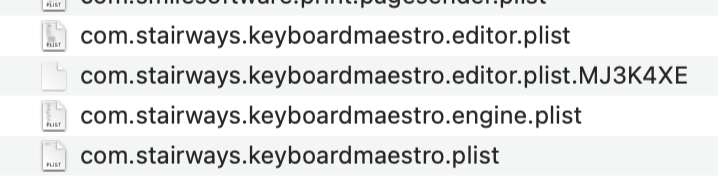
a- add ~/Library/Preferences/com.stairways.keyboardmaestro.* files
to the backup.
2- zip with date time stamp the end result ie the Keyboard Maestro-2025-05-27_204821 folder
thank you very much !
If you're going to zip it, it makes more sense to create the zip directly from the source files. No Finder copy, just a shell command.
This backs up the files you want to a date- and time-stamped zip in the folder "KM Backups" in your "Documents" folder:
KM Pause, Backup, Zip, Restart.kmmacros (2.7 KB)
The AppleScript:
tell application "System Events"
	if exists application process "Keyboard Maestro" then
		set openKM to 1
		tell application "Keyboard Maestro" to quit
	else
		set openKM to 0
	end if
end tell

tell application "Keyboard Maestro Engine" to quit

set dateStamp to do shell script "date +\"%Y-%m-%d_%H%M%S\""
set appSuppFolder to POSIX path of (path to application support from user domain) & "Keyboard Maestro"
set prefsFolder to POSIX path of (path to preferences folder from user domain)
set theTargetFolder to POSIX path of (path to documents folder as string) & "KM Backups/"

set theScript to "zip -r \"" & theTargetFolder & "KM_Backup_" & dateStamp & ".zip\" \"" & appSuppFolder & "\" \"" & prefsFolder & "com.stairways.keyboardmaestro.\"*"

do shell script theScript

tell application "Keyboard Maestro Engine" to activate
if openKM = 1 then tell application "Keyboard Maestro" to activate
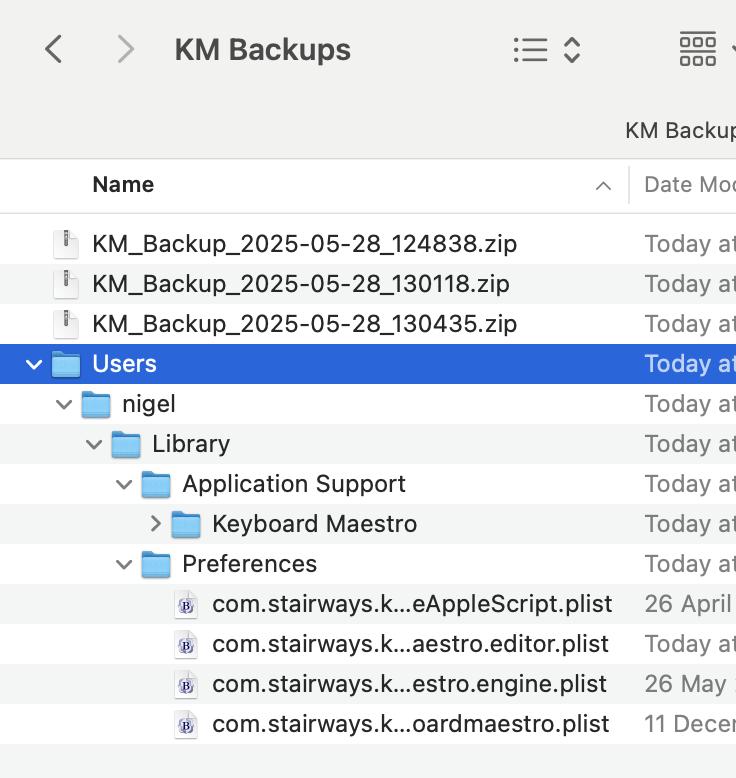
Here's the result, also showing what you get after unzipping a backup file (I've left the "Keyboard Maestro" folder closed):
1 Like
Profuse apologies for the delay. I was working on the macro group hotkey macro (thank you again for your comments), and today on this new version of this macro.
I created the KM Backups folder in documents (previous version was in Desktop).
Thank you for adding the preferences files (which possibly contain the favorite actions).
At first I thought that the macro did not work because KM would quit and not re-open.
KM always quits at the start, so that works.
After running the macro multiple times, I now have the impression that the script runs correctly but the time it takes is very variable from 10 seconds (rarely) to usually much longer which is surprising. It can take something like 3-5 minutes.
Sometimes when KM re-starts I see a spinning wheel for about 10-15 seconds. At first, i had palpitations thinking that my support or pref files were damaged which I know cannot happen from your lesson on scripts (passive script vs active script) .
thank you VERY MUCH and once again I am very sorry for the delay, which is unacceptable considering all the time you spend helping me.
To finalize this very helpful discussion, could I simply as you how add in the script below.
1-also backup the following preference files
2- to a separate folder, perhaps Keyboard Maestro Preferences-date/timestamp
The syntax is so cryptic ("path to application support" instead of a conventional unix path) that I am clueless. Searching the Internet did not help.
After the script has run and I am back in KBM, I can use KBM to zip, move etc the backup folders.
thank you very much !
Files to add
~/Library/Preferences/com.stairways.keyboardmaestro.* files
tell application "System Events"
	if exists application process "Keyboard Maestro" then
		set openKM to 1
		tell application "Keyboard Maestro" to quit
	else
		set openKM to 0
	end if
end tell

tell application "Keyboard Maestro Engine" to quit

set dateStamp to do shell script "date +\"%Y-%m-%d_%H%M%S\""
set theSource to alias ((path to application support from user domain as string) & "Keyboard Maestro")
set theTarget to alias ((path to desktop folder as string) & "KM Backups")

tell application "Finder"
	set theBackup to duplicate theSource to theTarget with exact copy
	set name of theBackup to (name of theBackup & "-" & dateStamp)
end tell

tell application "Keyboard Maestro Engine" to activate
if openKM = 1 then tell application "Keyboard Maestro" to activate
All that does is get the path to the "Application Support" folder of the current user (the user domain bit -- system domain would get the path to /Library/Application Support) So it's similar to ~/Library/Application Support.
You're better off using the macro above, that zips the original files to an archive in one operation.
If you want to copy the files first, from multiple locations to one place you can zip later, you are going to have to restate the problem to include the resulting folder structure along with any naming convention to use.
1 Like
OK, understood. Thank you VERY much !!
The reason I posted my question is that the latest version often (usually) causes KM to spinning wheel quit (or crash) and never create a backup and never re-activate, just as happened a few minutes ago after reading your post.
Version 1 was immediate (quick quit and re-start shortly thereafter) and the backup folder was 100% reliable.
Is the engine log helpful ?
thank you
2025-06-02 13:18:07 Execute macro “KBM Backup VER 2 Application Support and Preferences” from trigger Macro Set Palette
2025-06-02 13:18:07 Stop Watching HID Devices
2025-06-02 13:18:07 Stopping web server
2025-06-02 13:18:07 Engine Quitting
2025-06-02 13:20:24 Engine Starting 11.0.4
2025-06-02 13:20:24 Reset NSAttributedString cache
Last message repeated 1000 times
2025-06-02 13:20:25 Start Watching HID Devices
2025-06-02 13:20:25 Starting web server on ports 4993 and 4994
That could be my stupidity -- the way I was checking if the Editor is open is fine if it is, but times out then errors the script if it isn't. D'oh!
If it was only having a problem when the Editor wasn't open, simply replace the first 8 lines -- the tell application "System Events" block -- with
tell application "System Events"
	if (get name of every application process) contains "Keyboard Maestro" then
		set openKM to 1
		tell application "Keyboard Maestro" to quit
	else
		set openKM to 0
	end if
end tell
Otherwise the "zipper" version was 100% reliable for me. But you've many more macros and a much bigger Named Clipboard database than me, so there might be some timing issues (though each AS statement should wait for the previous one to complete -- plus I'd expect more problems with a Finder copy, not fewer...).
The problem with getting the prefs files is that telling Finder:
every item of theFolder whose name starts with "com.stairways.keyboardmaestro"
...is very slow when a folder contains a lot if items -- which Preferences invariably does. Much quicker to do a quick shell script copy.
So here's the adjusted version of the original script -- you still haven't said what you want for your "archive" folder structure, so I've had to guess:
tell application "System Events"
	if (get name of every application process) contains "Keyboard Maestro" then
		set openKM to 1
		tell application "Keyboard Maestro" to quit
	else
		set openKM to 0
	end if
end tell

tell application "Keyboard Maestro Engine" to quit

set dateStamp to do shell script "date +\"%Y-%m-%d_%H%M%S\""
tell application "Finder"
	set theSource to alias ((path to application support from user domain as string) & "Keyboard Maestro")
	set theTarget to make new folder at alias ((path to documents folder as string) & "KM Backups") with properties {name:"KM_Backup_" & dateStamp}
	duplicate theSource to theTarget with exact copy
	set theTarget to POSIX path of (theTarget as alias)
end tell
do shell script "cp -p ~/Library/Preferences/com.stairways.keyboardmaestro.* \"" & theTarget & "\""

tell application "Keyboard Maestro Engine" to activate
if openKM = 1 then tell application "Keyboard Maestro" to activate
1 Like
works perfectly. Very fast. Perfect results.
I have a copyright on using the term to describe oneself.
You are a genius. Using the term stupidity in reference to you is strictly forbidden in this forum !
thanks a million !!