A coding agent skill which helps me to create macros

I have been using Keyboard Maestro for about ten years. For the last six months or so I have been building most of my new macros with Claude Code, generating the .kmmacros file and importing it instead of clicking everything together in the editor.

Overall it worked really well, but Claude Code kept making stupid mistakes over and over. So I started collecting them in a skill.md file and have been refining it ever since.
keyboard-maestro-macros.zip (9.7 KB)

For me its even more fun now to be able to quickly create/adapt macros to do exactly what I want them to do.

Hope it helps some of you as well :nerd_face:

Some issues I ran into that are documented so things go smoothly:

  • Import leaves the macro disabled by design, and IsActive in the file is ignored. Enabling it takes a separate setMacroEnable call against the editor afterwards. There is a poll-then-enable snippet for this.
  • Put a new macro into the group its source macro lives in, rather than defaulting to Global Macro Group.
  • Test Execute AppleScript actions standalone with osascript before embedding them. A broken script inside a macro fails silently and the only trace is in Engine.log.
  • Locale trap: %Calculate% interpolates its result using the system decimal separator. On my German system 2220/2 becomes 1110,0 and the AppleScript then dies with error -2741. This affects any locale that does not use a period.
  • SCREEN(...) only works in Window Geometry fields, not in a Set Variable to Calculation action, where it fails quietly.
  • A reference file with copy-paste XML for the common actions and triggers.
  • The MacroGroup wrapper. A .kmmacros file needs the macro nested inside a group, otherwise KM just reports "no macros were imported" and gives no further hint.
  • UID rules. A reused UID is silently skipped on import, so every export needs a fresh UUID.

The attachment is plain Markdown. No macros, nothing executable. It is written for Claude Code, but the KM specific parts are just documentation, so they should be readable whatever you use.

1 Like

Have you got any examples?

I've no experience with Claude or its .md files, but it looks like you're limited to seven(?) of KM's many Actions and I can't see where Claude is getting Token or Function info from.

I'm probably missing something so I hope you'll show us what you've been able to do!

1 Like

Sure, happy to show some of my use-cases.
(quick note: of course, it doesn't matter if you use Claude Code, ChatGPT Codex etc. I personally just prefer Claude)

Firefox-style keyword bookmarks

I have used Firefox keyword bookmarks for years. In Brave I rebuilt them in KM: a Typed String trigger like cont# plus one Execute AppleScript action that sets the URL of the front tab to Google Contacts. Nothing clever, but I have around 50 of them.

Then I started using Safari next to Brave, and all 50 broke whenever Safari was in front.

I asked Claude Code to read my macro list, rewrite every one of those macros so it picks the browser by whatever is frontmost, and export the whole set as one .kmmacros file in a new group. One pass, about ten minutes including me checking the result. By hand that would have been an afternoon of clicking.

Before:

tell application "Brave Browser"
	set URL of (active tab of window 1) to "https://app.example.com/loginy"
end tell

After:

tell application "System Events"
	set frontApp to name of first process whose frontmost is true
end tell
if frontApp is "Safari" then
	tell application "Safari"
		set URL of (current tab of window 1) to "https://app.example.com/login"
	end tell
else
	tell application "Brave Browser"
		set URL of (active tab of window 1) to "https://app.example.com/login"
	end tell
end if

Note the small detail: Safari says current tab, Brave says active tab. Getting that consistently right across 50 macros is exactly the boring work I do not want to do by hand.

Something less trivial

My window management on a 49" ultrawide. A hotkey grabs every window of the front browser on the current Space, skips the minimized ones, moves them to the right third, and then re-raises the window that was on top before, so focus does not jump around.
Simple idea, but I wouldn't have known how to do it myself inn KM.

On the seven actions

That reference file is copy-paste boilerplate for the seven actions I happened to use most. It is not a whitelist, and Claude is not limited to it.
Claude seems to knows a decent amount from training, and the KM wiki is online so it can look things up.

So if you want to extend the file, the seven actions are just my starting point. Point Claude at your own plist and your own actions become the reference.

Why I like and use this approach

I like that now I can just describe what I want in plain words, no matter how exotic it is or how many conditions it has. "Only on the big display, only if the app is already running, and leave the front window on top." Before, that kind of thing was sometimes really exhausting to build myself, because KM is so powerful and the use cases are sometimes very specific. I feel before half the ideas I had never got built at all. With a coding agent like Claude that barrier is basically gone.

And when it does go wrong: every time I run into an error and figure out the fix, I tell Claude to write it down in the skill file. Next time it just works. That is the whole reason the file exists, it is nothing but the pile of mistakes I did not want to make twice. If you use it and hit something new, do the same and the file gets better for you too.

Those are AppleScripts. Yes, coding agents can help create AppleScripts. But you said you were building macros with Claude, and it's one/some of those I'd like to see.

I'm certainly not averse to using a KM macro as a simple wrapper to make triggering scripts easier. But I'm not sure what your first example is achieving over

image

...(which yes, works with Safari and Brave) beyond an unnecessary delay for AS instantiation every time you run the macro.

I tried to do this for a long time with different LLMs, the closest I got was to export a shortcut and use as a template. Now Codex can do this really well. In the beginning it was struggling with which files to modify, trying to use the UI slowly or the changes never showed up in KBM. But after some trial and errors it’s really good at making new macros now.

You shloud probably make a backup before using it.

I asked for a good prompt:

Keyboard Maestro Macro Work

For every request involving Keyboard Maestro macros, macro groups, triggers, actions, macro UUIDs, .kmmacros files, Keyboard Maestro Engine, or macro repair, follow this workflow.

Source of truth

  • Treat the live macro XML returned by the Keyboard Maestro application as the source of truth.
  • Do not treat exported macros, backup files, or plist contents as proof of the currently active configuration.
  • Use plist files only for discovery, snapshots, backups, and emergency comparison.
  • Never modify Keyboard Maestro plist files directly while Keyboard Maestro is open or syncing. The application can overwrite those changes or continue using its in-memory database.
  • Do not trust the editor UI alone. If live XML readback shows the correct configuration but the editor still looks unchanged, investigate it as a UI-refresh problem first.

Inspect before changing

  1. Identify the target macro and macro group.
  2. Prefer the macro UID over its name. If only a name is provided, resolve it to a UID before editing.
  3. Read the macro’s current live XML from Keyboard Maestro.
  4. Inspect a known-working macro when the required action or trigger XML format is uncertain.
  5. Record the current macro name, group, enabled state, triggers, actions, and action order.
  6. Preserve everything the user did not explicitly ask to change.

Use Keyboard Maestro’s editor scripting interface:

tell application "Keyboard Maestro"

Do not use Keyboard Maestro Engine as the editor target. Do not make activate a required first step. Test API access with a harmless read command such as:

osascript -e 'tell application "Keyboard Maestro" to count every macro group'

When reading macro XML, prefer a nested tell statement such as:

tell application "Keyboard Maestro" to tell macro id "MACRO-UID" to get xml

Back up before every write

Before modifying a macro, save:

  • The macro’s current live XML.
  • ~/Library/Application Support/Keyboard Maestro/Keyboard Maestro Macros.plist
  • ~/Library/Application Support/Keyboard Maestro/Keyboard Maestro Macros From Shared.plist, if it exists.

Store the backups in a clearly named, timestamped directory. Report where they were saved.

Apply live changes through Keyboard Maestro

Use Keyboard Maestro’s AppleScript editor API to add or remove actions and triggers. Do not perform plist-only edits.

For an existing macro:

  • Remove only the actions or triggers that must be replaced.
  • Add actions and triggers from valid Keyboard Maestro XML fragments using make new action or make new trigger.
  • Preserve the macro name, group, enabled state, trigger configuration, and unrelated actions unless the user requested otherwise.
  • Preserve the intended action order.

For a new macro:

  1. Confirm or identify the target macro group.
  2. Create a minimal seed macro by name inside that group.
  3. Read back its newly assigned UID.
  4. Add its actions and triggers through the live API using XML fragments.
  5. Do not begin by attempting to import an entire arbitrary macro XML document if creating a seed macro and adding objects separately is possible.

A reliable pattern for adding an action is:

tell application "Keyboard Maestro" to tell macro id "MACRO-UID" to make new action with properties {xml:(read POSIX file "/absolute/path/action.xml")}

Use the equivalent make new trigger command for triggers.

If macOS permissions or the execution sandbox blocks the live API, report the exact error and request the necessary permission. Do not silently fall back to direct plist editing.

Prefer maintainable payloads

  • For complicated automation, keep most logic in a readable external script and let Keyboard Maestro invoke it.
  • Use absolute paths where appropriate.
  • Quote every shell path and Keyboard Maestro variable that may contain spaces or special characters.
  • Keyboard Maestro shell variables use names such as $KMVAR_Variable_Name.
  • Prefer local variables such as Local__Paths when persistence is unnecessary.
  • Capture information such as the frontmost application or file selection before opening Terminal or another application that would change the frontmost-app state.
  • Inspect the target application’s actual scripting dictionary or API instead of assuming Finder-specific tokens work in other file managers.

Mandatory verification

After every live edit:

  1. Read the macro XML back from Keyboard Maestro.
  2. Verify the macro UID, name, group, enabled state, action order, trigger count and types, variable names, script paths, and important payload text.
  3. Confirm that unrelated actions and triggers were preserved.
  4. Run syntax checks on embedded shell, AppleScript, JavaScript, or Python where applicable.
  5. If safe, perform a harmless real-world smoke test with the required application and macro group active.
  6. For context-sensitive macros, ensure the required application is frontmost during the runtime test.
  7. Distinguish clearly between:
    • Structural verification: Keyboard Maestro accepted the correct XML.
    • Runtime verification: the macro was actually executed successfully.
    • End-to-end verification: the complete workflow produced the intended final result.

Never claim runtime or end-to-end success when only XML readback or syntax checks were completed.

Safety and scope

  • If the user asks only for investigation or explanation, perform read-only inspection and do not modify the live macro.
  • If the user asks to create or modify a macro, make the smallest scoped change that satisfies the request.
  • Never add a hotkey, trigger, group restriction, destructive action, or unrelated cleanup unless requested.
  • Back up first, apply through the live API, read back, and report exactly what was verified.
1 Like

Is this a set of instructions for an Agentic AI to create macros in KM? That's impressive, but I wouldn't dare try something like that. But thanks for showing it to me here.

Again, could you upload a new macro it's made so we can see what it outputs?

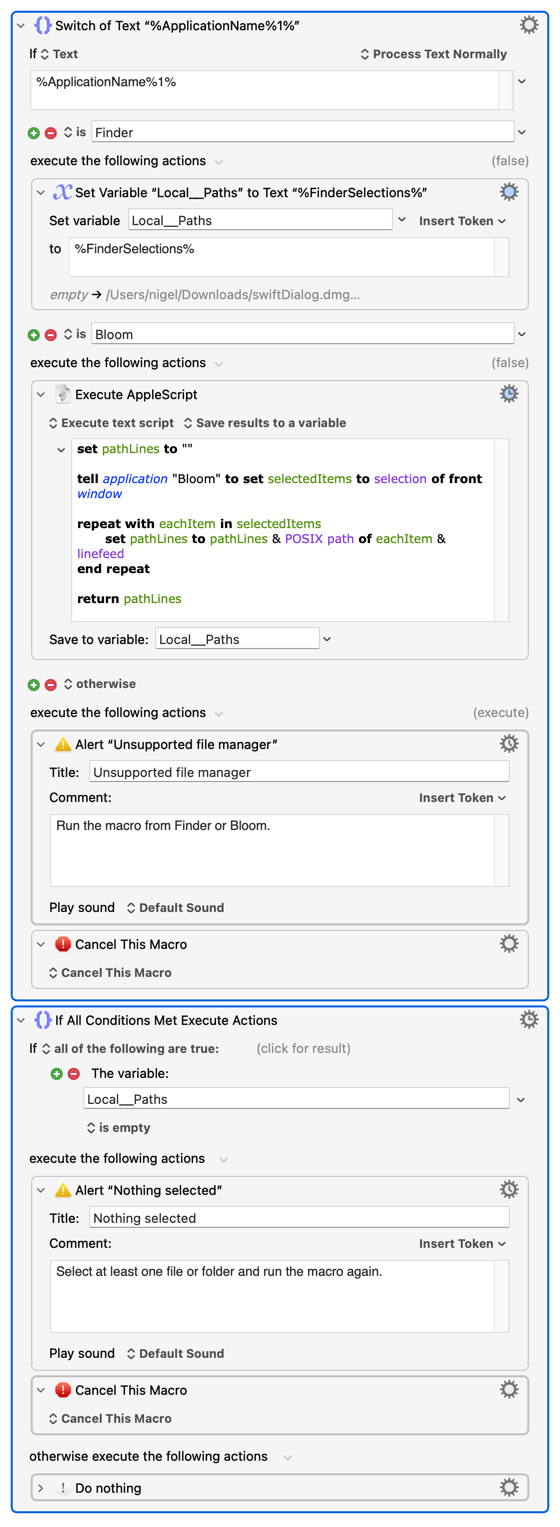
Ive made hundreds of macros with it. Heres one example, this was made before by codex, and i wanted the macro to be edited so it could get selection from both Finder and Bloom apps.

Check bitrate ffprobe.kmmacros (10.4 KB)

I would sincerely be interested in seeing if it can create KM macros using a variety of KM actions, rather than three simple KM actions.

Are you saying the "For Each" Action and its contents was added, whole, by Codex? What prompt did you give for that? Is it finding template XML by looking at your other macros or have you had to create special examples?

Your AS will be faster if you get the selection list from the Finder as aliases -- I'm assuming that's what Bloom returns. So you can probably cut a fair few lines to get the same result:

set pathLines to ""
tell application "System Events" to set frontAppID to bundle identifier of first application process whose frontmost is true

if frontAppID is "com.apple.finder" then
	tell application "Finder" to set selectedItems to (selection as alias list)
else if frontAppID is "com.asiafu.Bloom" then
	tell application "Bloom" to set selectedItems to selection of front window
else
	display alert "Unsupported file manager" message "Run the macro from Finder or Bloom."
	error number -128
end if

if selectedItems is {} then
	display alert "Nothing selected" message "Select at least one file or folder and run the macro again."
	error number -128
end if

repeat with eachItem in selectedItems
	set pathLines to pathLines & POSIX path of eachItem & linefeed
end repeat

return pathLines

Of course, you can do much of that within KM anyway:

...and if there's a way to get the selection paths by menu from Bloom you wouldn't need AppleScript at all!

I'm not knocking what you achieved -- but I do worry about people enshifitying their macros by relying on LLMs creating scripts rather than using the "normal" Actions KM provides.

Its been a bit of trial and error, but it has learned really well. Some times macros would work and when they finally did it remembers how to do it next time.

I started using bloom now and had 20 different macros involving finder including external script that I launch with Keyboard Maestro. And codex could just go thru all macros to find the ones that needed changes.

But I think the text from codex explains it better than I can.

Another nice thing is that you can just paste the UUID and ask about a macro.

1 Like

LLM-built macros with native KM actions -- a working example, and the method that makes it reliable

I've been encouraging this community to take LLM-assisted macro building seriously for a while, and I think the pushback in this thread is fair on one point: most of what gets shown is an LLM writing an AppleScript and a one-action macro wrapping it. That's useful, but it isn't what @Nige_S and @DocOck are asking to see. So here is the other thing -- a macro built from native KM actions, generated by an LLM (Claude, in my case), with the method that makes it come out right.

The attached example

Back At My Desk.kmmacros -- when I come back to my Mac after time away, one hotkey (⌃⌥⌘B) asks what the time held and logs it. Six native action types, no scripts anywhere:

  • Prompt With List (choices, free-typing allowed) → Local__What

  • If/Then/Else gating on a Variable condition (Local__What is not empty)

  • Set Variable to Text composing a timestamped line with %ICUDateTime%

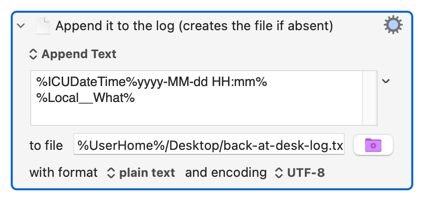
  • Write File appending to a log

  • Notification confirming, and Play Sound (Tink)

  • Cancel path: the Else branch notifies that nothing was logged

Small on purpose -- it's a demonstration that the structure comes out right: nested actions inside Then/Else branches, a Variable condition with the correct keys, a hotkey trigger with the right modifier math. Import note, learned the embarrassing way while writing this post: the imported macro group arrives disabled, and the macro inside it can show as enabled while the group checkbox -- over in the Groups column -- is off. The hotkey then does nothing and Engine.log stays empty, which looks exactly like a broken macro. Enable the GROUP, then the macro. Two more first-run notes: Prompt With List takes Return or a double-click to accept (a single click only highlights), and the Write File append action creates the log file on first run -- no need to pre-create it.

This isn't a toy category for me. My daily setup runs about 25 generated macros across 5 palettes -- window management, folder-listing pipelines, clipboard workflows. Some of those do carry AppleScript or shell payloads where a script is honestly the right tool, and I won't pretend otherwise. But the skeleton -- groups, triggers, prompts, conditions, branching -- is native actions, generated, and editable in the KM editor like anything built by hand, which is my personal test for whether it's really a macro.

The method: never let the LLM guess plist keys

@Nige_S asked the right question earlier: where does the model get the action format from? The answer that works is: from your own library. KM's plist format isn't fully documented, and an LLM that guesses keys produces files KM rejects or half-imports. So the standing rule I use is: every action type gets its keys from a real specimen before it's ever generated.

Your own Keyboard Maestro Macros.plist is the best specimen file there is -- mine is 51 MB of ground truth. This is the extractor I have the LLM run first (read-only):

import plistlib
with open("/tmp/km.xml", "rb") as f:          # plutil -convert xml1 -o /tmp/km.xml "~/Library/Application Support/Keyboard Maestro/Keyboard Maestro Macros.plist"
    data = plistlib.load(f)
found = {}
def walk(x):
    if isinstance(x, dict):
        t = x.get("MacroActionType")
        if isinstance(t, str) and t not in found:
            found[t] = x
        for v in x.values(): walk(v)
    elif isinstance(x, list):
        for v in x: walk(v)
walk(data)
print(sorted(found))                           # every action type you have ever used
# then print found["IfThenElse"] etc. and hand THOSE keys to the LLM as the template

Point the model at the specimens it needs and the "unknown format" problem essentially disappears. (Work on a copy; never write the live plist.)

Tips, extending what's already in this thread

Ben's list above is good and matches my experience -- especially the MacroGroup wrapper and fresh UUIDs. Adding what my mistakes file has accumulated:

  1. Generate with plistlib (or any real plist serializer), never hand-written XML. Round-trip read the file back before importing; a file that won't round-trip won't import.

  2. Specimen-first, as above. When an action type has never been used in your library, build it once by hand in KM, then Edit > Copy as XML -- that's your template forever.

  3. Modifier math is addition on the Carbon masks (⌘256 ⇧512 ⌥2048 ⌃4096); ⌃⌥⌘ = 6400. Wrong math fails silently as the wrong hotkey.

  4. Test any embedded AppleScript standalone with osascript before it goes inside an action -- inside a macro it fails silently and only Engine.log knows.

  5. After import, verify from the outside: osascript -e 'tell application "Keyboard Maestro" to count every macro group' and read the macro's XML back. Structural verification (KM accepted it) and runtime verification (it actually ran) are different claims; keep them separate.

  6. Keep the mistakes file. Every failure gets written down where the LLM reads it next time. Mine started as three lines; it's now the difference between "mostly works" and "works."

The barrier this removes isn't knowledge of KM -- everyone here has that. It's the half-hour of clicking between "I know exactly what I want" and having it. The ideas that never got built because of that half-hour are the real cost, and that's what's changed for me.

(Attachment: Back At My Desk.kmmacros, 4 KB. Import lands disabled by design.)

Back At My Desk.kmmacros (5.5 KB)

1 Like

That's a really good example -- thank you for taking the time to post it, and also for the detailed explanation. Love the way you're using your own macros to show the LLM what's available!

I won't even complain about the unnecessary variable, avoidable by creating the text in the "Append" Action:

...since the LLM would come up with far worse if it was basing its knowledge off my macros :wink:

You've obviously done a ton of work to get to where you are now -- congratulations!

Thanks for the acknowledgement. I agree that it is a ton of work, and not as patting myself on the back but rather to recognize the early stage the tech is in. The weight comes from both the learning curve to getting the LLM to do what you want to do and that the tool itself is still in its infancy even though from some perspectives it's already amazingly good.

Getting decent results from an LLM is easy at the surface but as soon as you go deeper it gets a whole lot more difficult. It's thin to the point of seeming like a movie set facade which looks great until you walk around to the back.

As an aside, I listened to a CEO of a company that spends 10s of millions of dollars for subject matter experts to train their LLMs on cutting edge subject matter that is not available for scraping off the internet. Of course the areas they focus on are get the highest value returns like finance and business. Without that kind of training, the LLM is not going be of much use when you are at the cutting edge of your field. The point is that the LLM aren't intelligent in the least and can't create new knowledge. It's just endlessly running variations of what is already known. Good variations in some cases, but not actual new knowledge. Change is not creation as the saying goes, the more things change...

been using codex here for building and editing macros as well with KM this year. Really hoping that Keyboard Maestro eventually creates a real working official MCP server/plugin.. It's really the future for managing/creating/editing macros and we as users are already using it, but it comes with hiccups and unnecessary difficulties because there isn't an official mcp/plugin yet for it. This is all we need for Keyboard Maestro to evolve. I really don't care for it to be built into the program itself, I would be just fine and better even if I can just keep on using Codex itself for all the work. Like I said, I'm already using it, but just like OP I have been refining a skill for it, because it comes with a few hurtles to cross first.

1 Like

Thanks for sharing this. It looks like it took a lot of time and effort so thanks for sharing.

Are you saying this is a "prompt" or a "skill" that the AI refers to whenever you ask it to create a new macro? It read like a skill rather than a prompt.

Thanks again.

Create a new project in codex and tell it to save it as a skill.