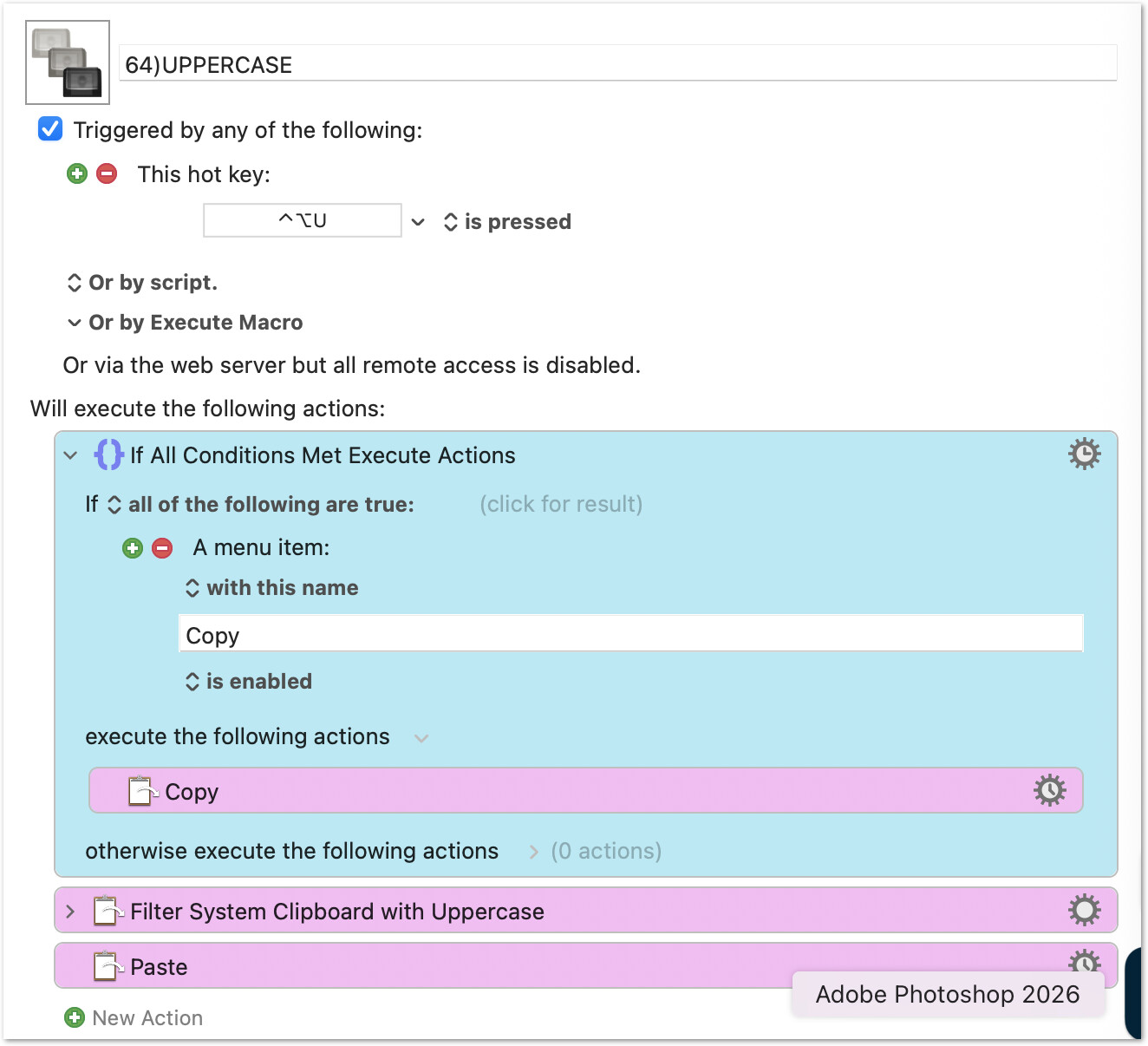
I wanted my text manipulation macros to work in two modes.
First of all, I want them to work on a selection, which is how I originally wrote them. So the first action was Copy, then the manipulation (like Uppercase) and then a paste. That converts an existing selection.
But I also wanted to be able to copy text to the clipboard and apply the manipulation before pasting, saving a step.
The first case needs no explanation. But the second saves a step when, for example, you take some phrase from the body of a paragraph and paste it as a head or subhead, where you want the lowercase text to be, say, uppercase.
The same macro can do both.
It just needs to check for the Copy menu item's state. If Copy is enabled, it works on the selected text. If disabled, it works on the clipboard.
Hi, @mrpasini. I have several macros that process selected text as input and fall back to the clipboard if nothing is selected. While building them, I found that reliably detecting whether text is actually selected is surprisingly tricky.
For example, the approach in your macro runs into trouble with apps like Drafts, which has a Copy command under both the File and Edit menus. Even when specifying the exact menu path (Edit > Copy), checking the menu state can still behave unpredictably in certain apps.
Here is the method I’ve found to be the most reliable across many applications:
For fun, I adapted your macro to use this approach: