How do I do this. I have tried activating safari, pausing .5 seconds, then Move and resize front window to coordinates loaded from the "Get" button. Does not work. Safari continues to open on the last monitor used at the last coordinates it launched in on the monitor it last launched on. How can I get Safari to open on monitor 2 at my coordinates every time or even at all ?
Can you please attach your macro, so we can see exactly what you're doing? Edit: Select the macro, click the Share icon in the toolbar, select Keyboard Maestro Forum. That will open a new post. Select all the text there, copy it, close the new post, then post it in this topic.
-rob.
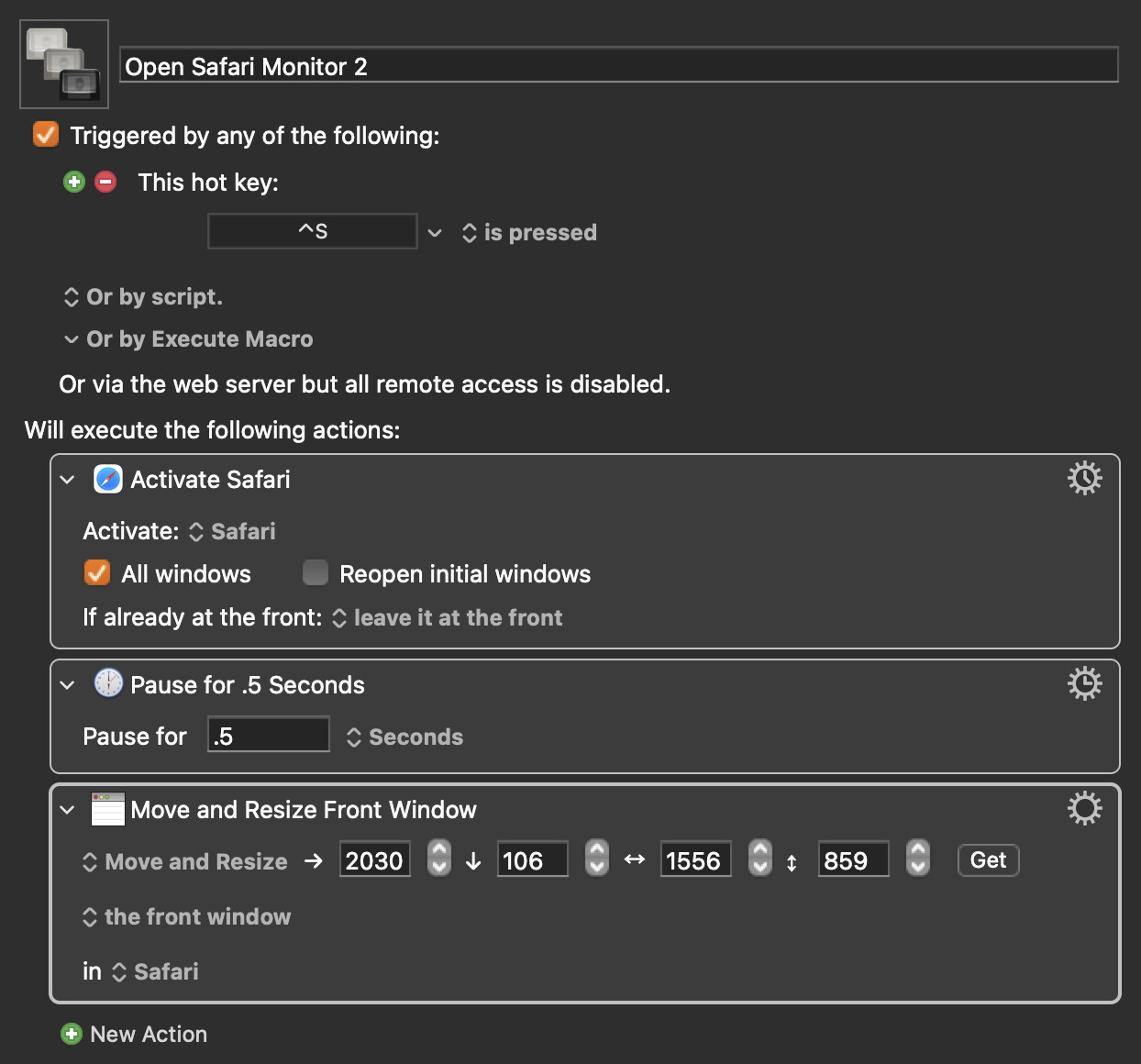
Your macro looks fine. If Safari is launching, then it might take longer than 0.5 seconds to open the new page. Try a longer pause.
If that doesn't work, try pressing Control-S again and see if that works (since the macro should be idempotent).
Changed pause to .6 and that worked. Thanks for the look-see and help !
Using pauses in this way can be.."fragile".
I often wait until a particular menu item is enabled. But there is also the SAFARIISCOMPLETE function (that I've never used myself)
Agreed orthe Pause Until waiting until a specific menu item is available such as File > New Tab.