Hey Jeff,
Firstly – Let me put my Moderator hat on for a minute.
When posting macros to the Keyboard Maestro forum please use these guidelines:
- Always post a Macro File.
- Always post an image.
This means people won't have to reinvent the wheel to test your macro, and that significantly improves the likelihood that someone will help you.
Testing not guessing produces the best result.
Folks generally won't download something they haven't eyeballed first, so an image of the macro is crucial.
How to Post Your Macro to the Forum
If you haven't read this it's worth a couple of minutes of your time.
Tip: How Do I Get The Best Answer in the Shortest Time?
On to your problem.
Since you didn't post the complete macro, we have no idea where %Variable%Path or %Variable%Comment are coming from or their content.
That first action is the only thing in the given macro that can set a comment.
Your For-Each is completely meaningless.
Comment is not a good variable name – particularly for a variable representing a Path. It has nothing whatsoever to do with a file comment.
In the loop you're setting the variable Comment to the %Variable%Comment%
Once again Comment in this context has nothing at all to do with Finder Comments.
Add Comments to Items Selected in the Finder v1.00.kmmacros (6.6 KB)
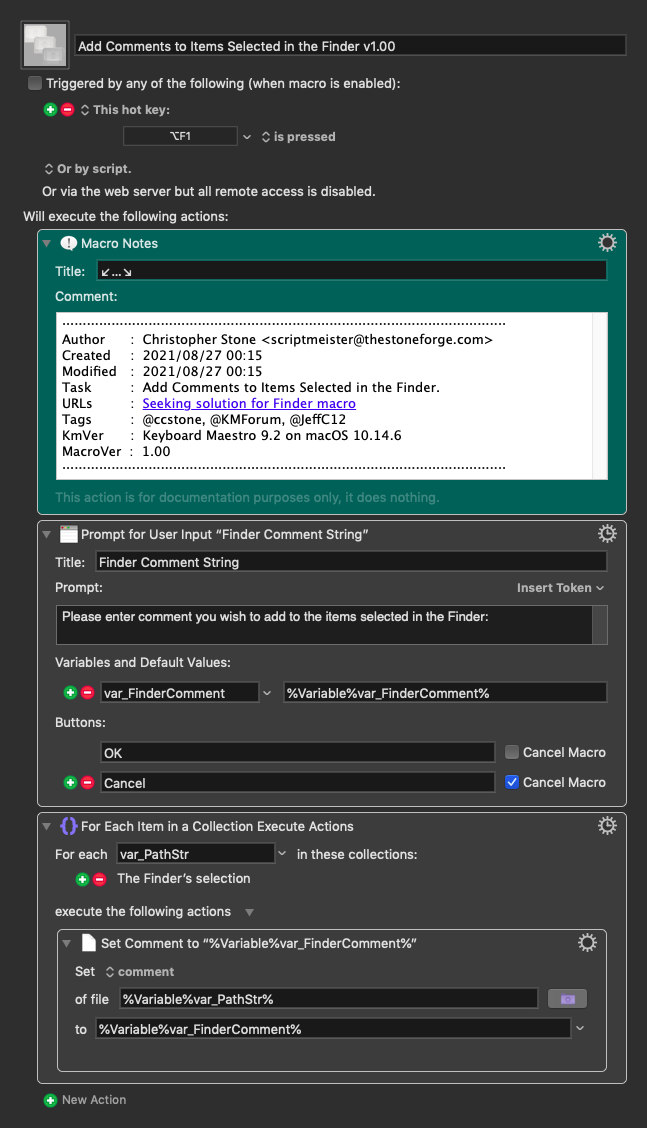
Take a peek at these if you haven't aready:
Set File Attribute action.
Finders Selection collection.
-Chris