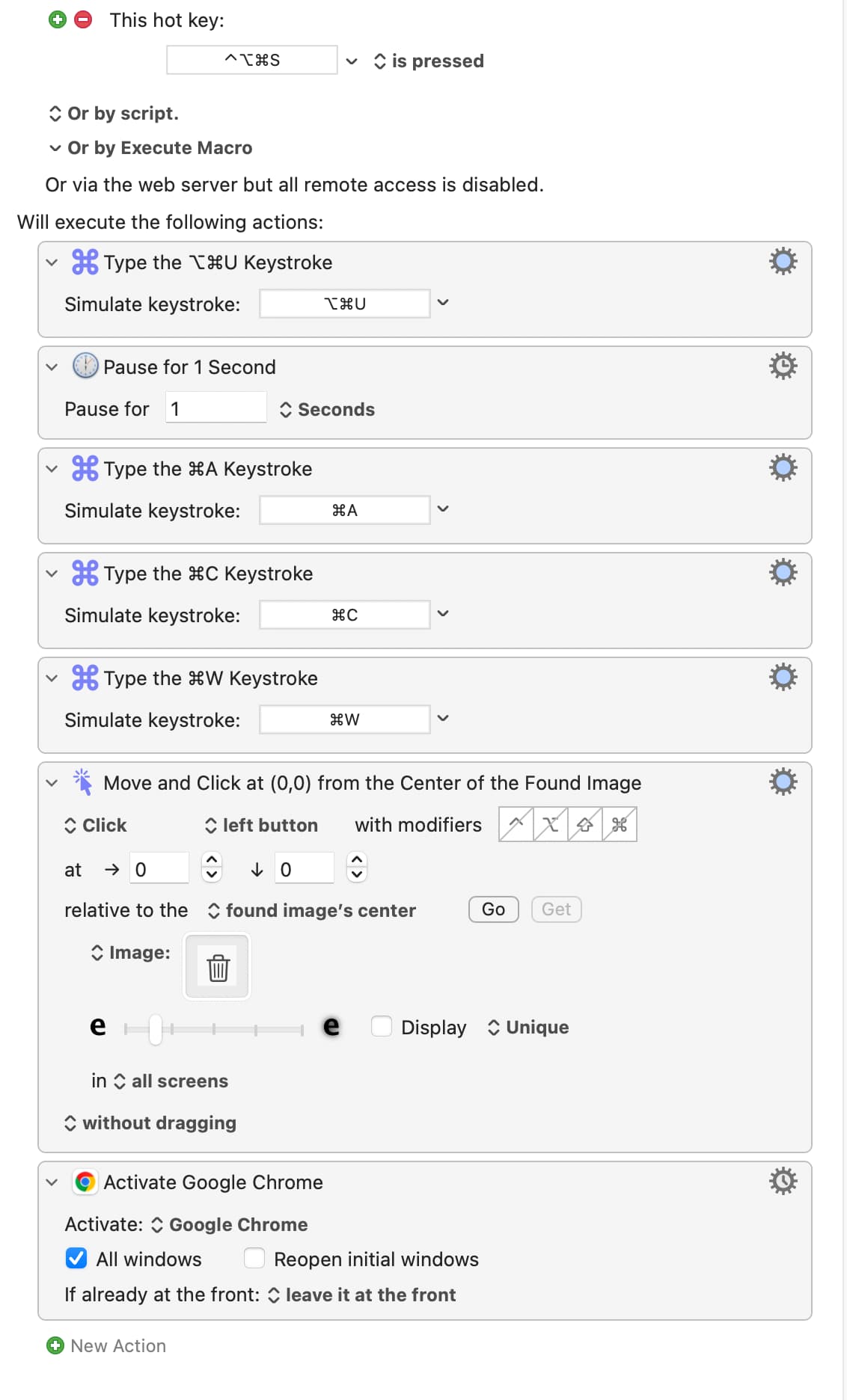
I report email spam to SpamCop. To do this, I hit option-cmd-u to pop up a window showing the email source code, then select all, copy to the clipboard then close the window, find the delete icon (trash can), press it to delete the spam email, and switch to Chrome.
Really cool feature by the way, being able to click by identifying an image on the screen! I heard about that on Mac Power Users, sweet!
This has been working fine for a while (a week or two).
Today when I run it, when takes me to Chrome, cmd-v will not paste, but right-click shows paste is there, but I can’t left-click. cmd-space (Alfred) instead brings up a KBM app picker in a coverflow-like display. ctrl-up does not show Expose. Many hotkeys seem disabled?
I nearly lose control of my Mac, so the only solution I’ve seen so far is to reboot.
The rest of KBM seems fine. But once I run this macro, I’m toast.
I’m on KBM 11.0.4 on macOS 26.3 beta 1 on a MBA with 16GB RAM and 200GB of 1TB free space.
I presume that is in Mail.app rather than any other email client.
Yes, but it can often be more reliable and quicker to use a Select or Show a Menu Item action or else a Type a Keystroke to type one of the application’s keyboard shortcut. That said, if clicking on a found image works well for you here, that’s fine!
I gather that that is a manual press of ⌘-V (rather than a Type a Keystroke action inside the macro).
See the last paragraph of the Application Switcher page of the Wiki to find out how to either disable that Application Switcher or to change the keystroke that activates it. From what you write, it seems that you have inadvertently set it to be triggered by ⌘-space.
Check whether you have set any of your macros to use that key combination, and also check the hotkey in your Mac’s System Settings.
I presume you mean hotkeys that you have set, or which are standard, beyond the confines of Keyboard Maestro. One quick way to check whether KM is responsible for that would be to open the KM Editor and select File > Quit Engine before trying the hotkeys again. Remember to turn the Engine back on (from the same menu) when you want KM to work again.
Yes, or the interaction of the two. I wonder if the simulated keystrokes in the macro are triggering keystrokes that have been set up in Alfred or another automation application!
There is a lot more checking that can be done, but I hope you have enough to start with! We will get there! This situation is very odd and KM will not be causing the problems from its default settings; it will however run your macro(s) in ignorance of any side-effects that may be caused due to factors outside its control.