Hi,
I know that this type of macros has been discussed multiple times in the past, but as we approached 2026, I just wanted to be sure that I didn’t miss something about this kind of feature…
I know that Apple doesn’t publish its API for this, that BTT is able to do it (sorry I don’t like this software), that itsabhishekolkha/AlwaysOnTop has a focus issue making it unusable, AfloatX is deprecated, that KeepTop app exist (but sorry as a cybersecurity analyst, I don’t trust chinese close code)… but it’s sad that this kind of feature is still lacking on MacOs.
Since some of us aren't familiar with the apps you refer to, we would need an explanation of what you want. When you just mention the other software, without telling us what the other software does, that puts the burden on us to do research to figure out what you want.
But I did some research myself, and it appears that AlwaysOnTop is a small app that runs in a loop that always puts an app back on top of other windows, every 0.5 seconds. That's easy to write in KM. But why would you want that? Is the purpose to prevent a user from switching to another app? And do you want MULTIPLE windows on top at the same time? What would that even mean (e.g., what if two windows that are marked to be always on top suddenly overlap?)
Here's a short piece of KM code that seems to do the job, as I interpret your requirements:
Obviously, I can't speak for the OP, but I have several use cases for floating windows. Floating in the sense that the window/app stays on top while you're active in other apps. I think the only way to do this in KM is with Display Text in a Window or Custom HTML Prompt, but the limitations for this purpose are vast. Primarily I work on a 13" MacBook and prefer almost all windows to be fullsize (not fullscreen), so very often it's useful to have a small floating window to save constantly having to ⌘Tab or ⌘` back and forth between a reference and what I'm actually working in.
For example, sometimes when writing or troubleshooting macros, I need to reference the engine log a lot. It's much easier to have a floating terminal window running tail -f /Users/hemi/Library/Logs/Keyboard\ Maestro/Engine.log in order to monitor what's happening while I'm making changes and testing.
Some other examples include:
having the iPhone Mirroring app on top while working in several other apps simultaneously;
having a hyper-specific to-do list floating unobtrusively in a corner that I can quickly glance at to check what still needs doing without needing to switch to another app or open the notification centre or show the whole desktop, because even these seemingly insignificant actions can be enough to derail my focus and/or flow;
having a small floating dictionary so I can see definitions and/or translations while working in other apps (remember the old Dashboard? I so miss the limitless floating widgets, most especially the Dictionary because I could have one or more open for translations or synonyms or definitions in one or more languages all at the same time);
having a floating calculator to see calculations while working in other apps.
There are even more, but these are some of the biggest for me. I use BTT for a few, but it can be temperamental, and there are some for which it just isn't practical due to the app being too big since it wasn't designed for that (looking at you, OmniFocus). The ability to pin windows and apps would be extremely useful, but I do also really, really want floating widgets again. Alas.
While you're active? You mean, using the mouse and keyboard in the other apps? What else could "white you're active" mean?
You don't need floating windows to have multiple windows. You can simply use multiple windows in different positions on the screen. If, instead, you want an inactive window to sit in front of an active window, then you definitely need a custom app. I don't think the Custom HTML Window action allows for pass-thru of all keys. I asked for that feature a few weeks ago.
Based on my research, even AlwaysOnTop doesn't achieve the goal of having any app in front of the focussed app. And I don't see that being specified by the OP in this thread as a requirement.
I guess the real problem is that we don't know what he really wants. He needs to be specific. And he needs to set small goals, not "can we copy all the features of App X?"
Sadly, no, I can't. I need and use almost all apps full size. The windows/apps I need floating are smaller but variable, and I can't afford to sacrifice any screen real estate to accomodate them simultaneously with other apps that I need full size.
Yes, I conceded the limitations are vast. There is also no way at all to make other apps float on top with any action that I know of in KM. Those were just the only actions I could think of that have always-on-top floating windows.
Yes, I use BetterTouchTool, which OP said they don't like.
Yes, OP said that AlwaysOnTop is unusable due to it having a focus issue.
I wasn't trying to speak for OP, but, since they mentioned that BTT has the functionality they want and I'm familiar with it myself, my guess was that their needs might not be too dissimilar from mine, which is why I detailed some of my specific use cases in answer to your question.
To be fair, I don't think that's what they asked for. Unfortunately, I don't have any better ideas for them because BTT is the only software I know of currently that has this functionality.
Being able to pin windows is essential for me. What BTT does isn't perfect. But it's good enough, and I'm willing to accept the minor imperfections in order to have the functionality.
Nevertheless, I'm not familiar with the KeepTop app. Aside from the security concerns, does it solve the problem better than BTT? Does anyone have any experience with it?
Hi, and thanks for taking the time to replay to my request.
First of all, I want to apologize for my first unclear message. It was too obvious to me because it exists in Linux xfce for years and Windows too with Powertoys (I’m a cross-platform guy).
The need : having a floating inactive window in front of all others. You can see that as a “Picture-in-Picture” but for every windows.
Other plugin I didn’t mention that doesn’t fill the gap : amitv87/PiP
Example1 :
Inactive (front) : vlc for video
Active (back) : obsidian for notetaking
Example2 :
Inative (front) : zoom for conference
Active (back) : discord to interact during the talk
I hope that it will be more clear for you now and once again I’m feeling sorry for that
Just let me know if you need more information. Thanks a lot for your help and once again
Regarding Keeptop, I didn’t install it for security concerns (I’m picky about it). But if I recall right, there is a youtube video about Keeptop where you can see the functionality in action.
Yes, I found a video. However, it doesn't make it clear how well the app works. You'd have to try it out for yourself to find that out.
As for your security concerns, I share them, by the way, but I haven't found anything online that supports these concerns. Maybe we're being unfair with the developer?
That specific need is easy to address. I do it every hour of every day using the Display Progress Bar window, and I put custom messages into that window. And when that small window is not big enough, sometimes I use Custom HTML action or the Display Text Large windows which provide more capability.
For every window? That's no longer a specific problem. That's changing the entire GUI for macOS, which I'm not capable of doing.
Actually, I did try tackling a very similar problem about 15 years ago. I tried installing XQuartz on macOS (which is some sort of GUI replacement that I can't explain) so that a window on one Mac (or the entire screen) could be displayed on another Mac. I can't recall if "picture in picture" is a feature of that GUI or not. But it may be, so perhaps you should check it out.
No worry. I'm sorry that I was a little argumentative. It's hard being 100% polite all the time. I'm not perfect. There are other people on this site who are better than me at being polite all the time.
I don't see why you need VLC or ZOOM to be the front window, since, if they were, you couldn't see certain parts of your back windows. In my mind, that makes the back windows impossible to use (unless maybe the front window was 50% transparent? Is that what you want? I think XQuartz does have support for transparent windows.) Using separate windows is what Apple intends people to use to solve your problem. I don't think I would ever want to have a large window that's not active in front of a window that is active. That's why Display Progress Bar seems to meet all my needs for that.
I'm probably twice as picky. Not only do I worry about who writes the software that I use, but I also worry about who wrote the libraries that are used by the software. The last time I checked, one of the software items that you said that you use uses a library that was written in one of the countries that you are probably worried about. I won't say which one because that was a long time ago and things may have changed.
I think you're being too specific in trying to define what the user is looking for. "Float" or "pin" or "always on top" refers to the ability to set any application's window to be in front of all other windows. Keyboard Maestro alternatives with HTML windows or progress meters won't work, because the users want their little movie window or little definitions window (or whatever) to live on top of their much-bigger background windows.
That way, you can edit in a window-filling BBEdit screen while watching a small video in VLC. Sure, it covers a portion of the BBEdit window, but if you put the window at top right, the odds are low that you're editing there—and if you are, you can scroll a bit.
This is much better than positioning the two windows side by side, where you'd give up all of the right-hand side of the display for your info window.
So the only feasible solutions are ones that work macOS-wide, and as of today, I believe BetterTouchTool is the only app that does this reliably—I assume by using private APIs, because if it were a public API, we'd have a ton of apps to choose from.
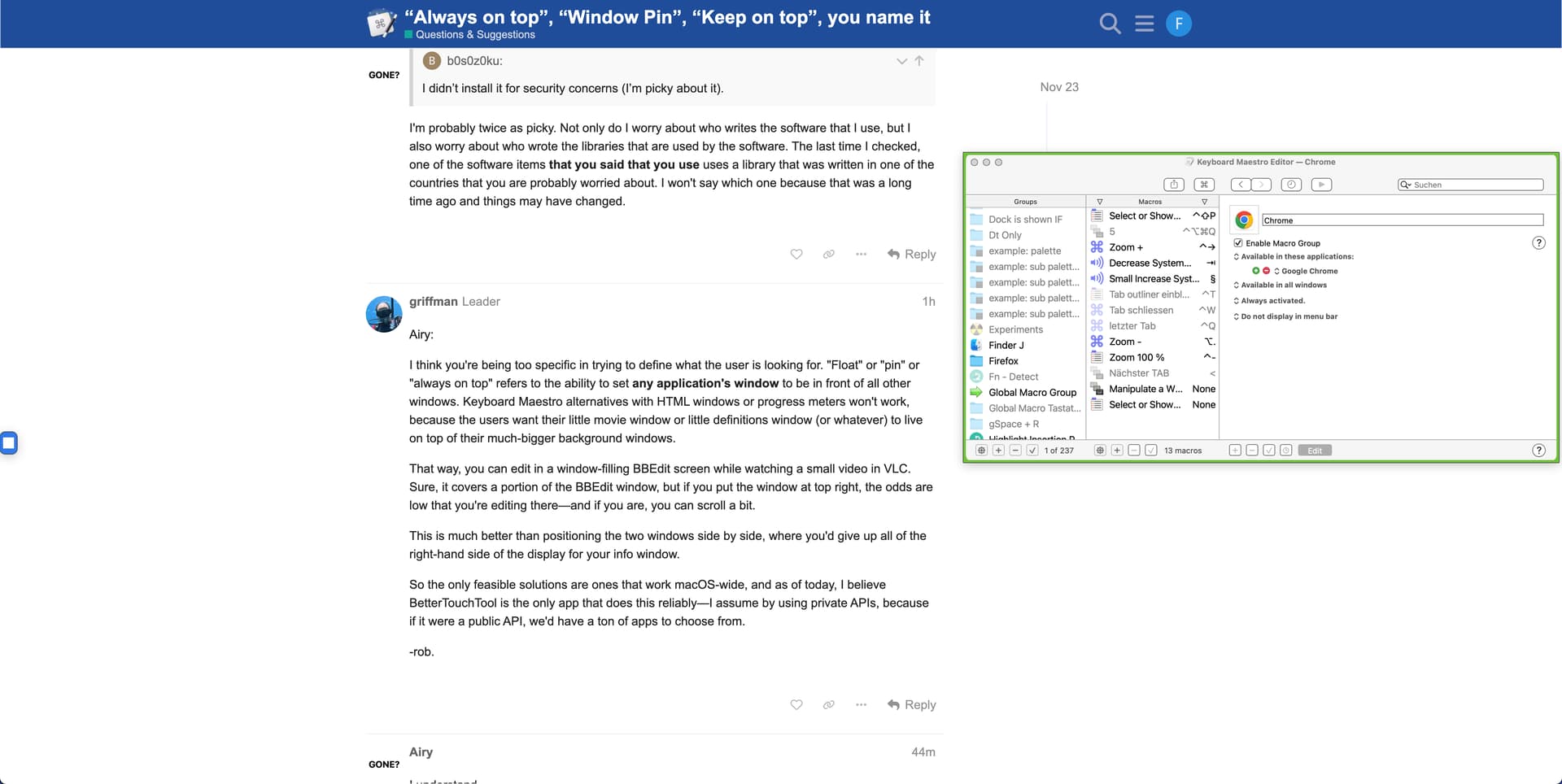
The large window is the browser with the KM Forum. The small window is the KM editor. The green border indicates that the window is pinned.
Whatever I do in the KM Forum (copy text, write a comment, etc.), the KM editor always remains visible. The small window is never covered by the large one.
Well, actually... I was looking up the other software you mentioned, and an issue posted in the AfloatX repo mentioned another software: yabai. When I looked that up, I found I already had it bookmarked despite having no recollection of it – yet another webpage lost to my bookmark graveyard.
I've not tried or even installed this yet myself, but it looks like it can make floating windows. That could be why I bookmarked it, whenever that was. The only catch is that System Integrity Protection needs to be disabled for most of its functionality, including floating windows. That could be why I forgot about it. But since you don't want to use BTT, this is now the only other software I know of that can (presumably) make floating windows, and it's open source as well. And because it's a command line utility, it should be very scripting-friendly, and thus very easy to automate with KM.
@hemicyon Yes, disable SIP. I wouldn't do that either.
@b0s0z0ku Have you tried the latest version of BTT? The pin function has been improved several times. There are now significantly more settings options. Are there really none that you like?
It will never be perfect. The point is to pin the windows of a third-party app.
And the developer of BetterTouchTool also has a wide-ranging window-management app called BetterSnapTool that offers a Float on Top feature (which does require the use of macOS Screen Recording).