Wow. This looks incredible. I think you are on a roll with this one! (So, many interesting techniques in here.)  I think I'll nominate this for this year's Keyboard Maestro Academy Award.
5 Likes
You’re right Aurio (@Zabobon) …
Rob (@griffman) I must say it, too - this looks stunning…
Too bad it now requires KM v11 and some great stuff like download tracking will get thrown out … even though the dropped support for Arc & Firefox ….
But I think I understand these concerns even though the download tracking would play nicely with Dan‘s Macro Import Manager.
You wouldn’t not just have the download you would also have the ability to find out quickly whether you’ve already installed the Macro(s) or not …
Thanks for putting in all the effort.
But now I have bad news … I‘m currently dictating this reply and will have to do it like this for some time now … due to the current weather conditions where I live I had a horrible night in the hospital last night after I hit the ground due to a frozen ground.
My right shoulder is dislucent and cracked in parts - but fortunately not broken... So I’m out as a tester for this project.
I’m not able to do anything for quite some time now …
I‘ll try of course giving feedback if I can but anything else will have to wait.
This year’s Christmas is not under a good star for me….
Greetings from Germany 
Tobias
2 Likes
First breakdown 
Completed Macro setup.
At first run, got the following error:
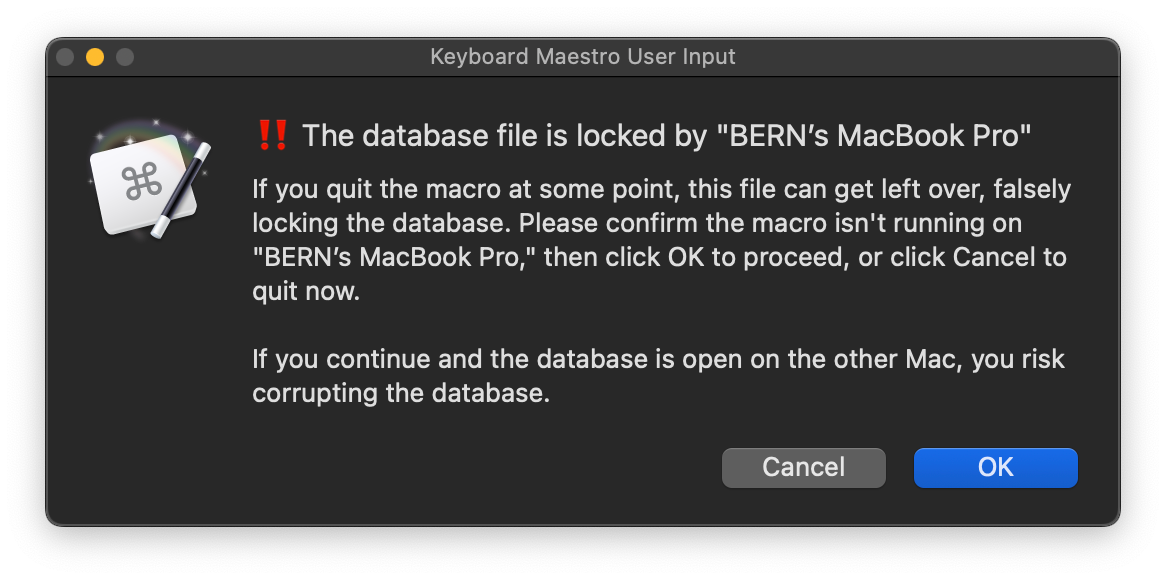
A file named " -KMFArchiveDB.db←[BERN’s MacBook Pro]" is in the "rg_KMFacts_Library" folder, which I've named "Downloaded Macros."
Neither Canceling or OKing the warning does anything.
Now what?
I had this happen a couple times, and I'm trying to track down what causes this, but the fix should be easy: Just delete the lock file in Finder and it should be good to go.
If it happens every time you run the macro, please let me know.
-rob.
The problem with the download tracking is that it just wouldn't ever be right, except immediately after it'd been done. If you modified things in Finder, if you changed categories, if you downloaded manually, etc. Trying to keep it correct would become a macro on its own, and one more complicated than this, I fear. I don't even want to try to tackle that task.
Ouch! Take care of yourself and get better!
-rob.
Yes, it happens every time.
With the Finder folder window open on the left side of the screen and the keyboard shortcut triggered on the right side, I see that the first trigger creates the lock file, and the second trigger creates the message display dialog box.
OK, will look into it this morning—I have a full-day commitment, so if I can't fix it ASAP, it'll be an issue for a bit this weekend :).
-rob.
1 Like
If you installed 0.7, please replace the "zsub - SQL runner" macro with this one:
zsub - SQL runner.kmmacros (6.7 KB)
It had a very bad and stupid error: The "otherwise" case wasn't set to "otherwise," so it wouldn't run. Yikes!
I'm not sure this will fix the lock issue, but I hope so.
-rob.
Wellll, it doesn't throw the error or create the lock file.
However, it doesn't appear to do anything now.
Here's the log output from the trigger forward:
2024-12-14 10:13:59 Execute macro “01 - Add new macro to collection” from trigger The Hot Key ⌃⌥E is pressed
2024-12-14 10:13:59 Action 16566171 failed: Execute a Subroutine action failed to find the macro to execute
2024-12-14 10:13:59 Execute a Subroutine action failed to find the macro to execute. Macro “01 - Add new macro to collection” cancelled (while executing Execute a Subroutine).
2024-12-14 10:14:04 Execute macro “01 - Add new macro to collection” from trigger The Hot Key ⌃⌥E is pressed
2024-12-14 10:14:04 Action 16566171 failed: Execute a Subroutine action failed to find the macro to execute
2024-12-14 10:14:04 Execute a Subroutine action failed to find the macro to execute. Macro “01 - Add new macro to collection” cancelled (while executing Execute a Subroutine).
2024-12-14 10:15:36 Execute macro “17)LF Command Key Tap 2X - PopClip” from trigger The Apple Internal Keyboard / Trackpad Left Command key is tapped twice
2024-12-14 10:15:46 Failed to monitor folder /Users/bernshanfield/Documents/E/Existence for Items/Not Now/MCA TS/MCA 1 TS
2024-12-14 10:15:48 Execute macro “01 - Add new macro to collection” from trigger The Hot Key ⌃⌥E is pressed
2024-12-14 10:15:48 Action 16566171 failed: Execute a Subroutine action failed to find the macro to execute
2024-12-14 10:15:48 Execute a Subroutine action failed to find the macro to execute. Macro “01 - Add new macro to collection” cancelled (while executing Execute a Subroutine).
2024-12-14 10:15:51 Execute macro “01 - Add new macro to collection” from trigger The Hot Key ⌃⌥E is pressed
2024-12-14 10:15:51 Action 16566171 failed: Execute a Subroutine action failed to find the macro to execute
2024-12-14 10:15:51 Execute a Subroutine action failed to find the macro to execute. Macro “01 - Add new macro to collection” cancelled (while executing Execute a Subroutine).
2024-12-14 10:15:51 Execute macro “01 - Add new macro to collection” from trigger The Hot Key ⌃⌥E is pressed
2024-12-14 10:15:51 Action 16566171 failed: Execute a Subroutine action failed to find the macro to execute
2024-12-14 10:15:51 Execute a Subroutine action failed to find the macro to execute. Macro “01 - Add new macro to collection” cancelled (while executing Execute a Subroutine).
2024-12-14 10:15:51 Execute macro “01 - Add new macro to collection” from trigger The Hot Key ⌃⌥E is pressed
2024-12-14 10:15:51 Action 16566171 failed: Execute a Subroutine action failed to find the macro to execute
2024-12-14 10:15:51 Execute a Subroutine action failed to find the macro to execute. Macro “01 - Add new macro to collection” cancelled (while executing Execute a Subroutine).
2024-12-14 10:15:52 Execute macro “01 - Add new macro to collection” from trigger The Hot Key ⌃⌥E is pressed
2024-12-14 10:15:52 Action 16566171 failed: Execute a Subroutine action failed to find the macro to execute
2024-12-14 10:15:52 Execute a Subroutine action failed to find the macro to execute. Macro “01 - Add new macro to collection” cancelled (while executing Execute a Subroutine).
2024-12-14 10:15:54 Execute macro “01 - Add new macro to collection” from trigger The Hot Key ⌃⌥E is pressed
2024-12-14 10:15:54 Action 16566171 failed: Execute a Subroutine action failed to find the macro to execute
2024-12-14 10:15:54 Execute a Subroutine action failed to find the macro to execute. Macro “01 - Add new macro to collection” cancelled (while executing Execute a Subroutine).
2024-12-14 10:15:54 Execute macro “01 - Add new macro to collection” from trigger The Hot Key ⌃⌥E is pressed
2024-12-14 10:15:54 Action 16566171 failed: Execute a Subroutine action failed to find the macro to execute
2024-12-14 10:15:54 Execute a Subroutine action failed to find the macro to execute. Macro “01 - Add new macro to collection” cancelled (while executing Execute a Subroutine).
2024-12-14 10:15:55 Execute macro “01 - Add new macro to collection” from trigger The Hot Key ⌃⌥E is pressed
2024-12-14 10:15:55 Action 16566171 failed: Execute a Subroutine action failed to find the macro to execute
2024-12-14 10:15:55 Execute a Subroutine action failed to find the macro to execute. Macro “01 - Add new macro to collection” cancelled (while executing Execute a Subroutine).
2024-12-14 10:16:06 Failed to monitor folder /Users/bernshanfield/Documents/E/Existence for Items/Not Now/MCA TS/MCA 1 TS
2024-12-14 10:17:12 Execute macro “01 - Add new macro to collection” from trigger The Hot Key ⌃⌥E is pressed
2024-12-14 10:17:12 Action 16566171 failed: Execute a Subroutine action failed to find the macro to execute
2024-12-14 10:17:12 Execute a Subroutine action failed to find the macro to execute. Macro “01 - Add new macro to collection” cancelled (while executing Execute a Subroutine).
2024-12-14 10:17:13 Execute macro “01 - Add new macro to collection” from trigger The Hot Key ⌃⌥E is pressed
2024-12-14 10:17:13 Action 16566171 failed: Execute a Subroutine action failed to find the macro to execute
2024-12-14 10:17:13 Execute a Subroutine action failed to find the macro to execute. Macro “01 - Add new macro to collection” cancelled (while executing Execute a Subroutine).
2024-12-14 10:17:14 Execute macro “01 - Add new macro to collection” from trigger The Hot Key ⌃⌥E is pressed
2024-12-14 10:17:14 Action 16566171 failed: Execute a Subroutine action failed to find the macro to execute
2024-12-14 10:17:14 Execute a Subroutine action failed to find the macro to execute. Macro “01 - Add new macro to collection” cancelled (while executing Execute a Subroutine).
2024-12-14 10:17:14 Execute macro “01 - Add new macro to collection” from trigger The Hot Key ⌃⌥E is pressed
2024-12-14 10:17:14 Action 16566171 failed: Execute a Subroutine action failed to find the macro to execute
2024-12-14 10:17:14 Execute a Subroutine action failed to find the macro to execute. Macro “01 - Add new macro to collection” cancelled (while executing Execute a Subroutine).
2024-12-14 10:17:25 Failed to monitor folder /Users/bernshanfield/Documents/E/Existence for Items/Not Now/MCA TS/MCA 1 TS
2024-12-14 10:17:34 Invalid Plug In Action with Name Read the position of a named KM palette
Last message repeated 66 times
2024-12-14 10:17:34 Failed to monitor folder /Users/bernshanfield/Documents/E/Existence for Items/Not Now/MCA TS/MCA 1 TS
2024-12-14 10:17:36 Invalid Plug In Action with Name Read the position of a named KM palette
Last message repeated 66 times
2024-12-14 10:17:37 Failed to monitor folder /Users/bernshanfield/Documents/E/Existence for Items/Not Now/MCA TS/MCA 1 TS
2024-12-14 10:17:39 Invalid Plug In Action with Name Read the position of a named KM palette
Last message repeated 66 times
2024-12-14 10:17:39 Failed to monitor folder /Users/bernshanfield/Documents/E/Existence for Items/Not Now/MCA TS/MCA 1 TS
2024-12-14 10:17:41 Invalid Plug In Action with Name Read the position of a named KM palette
Last message repeated 66 times
2024-12-14 10:17:42 Failed to monitor folder /Users/bernshanfield/Documents/E/Existence for Items/Not Now/MCA TS/MCA 1 TS
2024-12-14 10:17:46 Invalid Plug In Action with Name Read the position of a named KM palette
Last message repeated 66 times
2024-12-14 10:17:47 Failed to monitor folder /Users/bernshanfield/Documents/E/Existence for Items/Not Now/MCA TS/MCA 1 TS
2024-12-14 10:17:49 Invalid Plug In Action with Name Read the position of a named KM palette
Last message repeated 66 times
2024-12-14 10:17:49 Failed to monitor folder /Users/bernshanfield/Documents/E/Existence for Items/Not Now/MCA TS/MCA 1 TS
2024-12-14 10:17:52 Invalid Plug In Action with Name Read the position of a named KM palette
Last message repeated 66 times
2024-12-14 10:17:52 Failed to monitor folder /Users/bernshanfield/Documents/E/Existence for Items/Not Now/MCA TS/MCA 1 TS
2024-12-14 10:17:55 Invalid Plug In Action with Name Read the position of a named KM palette
Last message repeated 66 times
2024-12-14 10:17:56 Failed to monitor folder /Users/bernshanfield/Documents/E/Existence for Items/Not Now/MCA TS/MCA 1 TS
2024-12-14 10:21:30 Stop Watching HID Devices
2024-12-14 10:21:30 Engine Quitting
2024-12-14 10:21:34 Engine Starting 11.0.3
2024-12-14 10:21:35 Invalid Plug In Action with Name Read the position of a named KM palette
Last message repeated 66 times
2024-12-14 10:21:35 Start Watching HID Devices
2024-12-14 10:21:35 Failed to monitor folder /Users/bernshanfield/Documents/E/Existence for Items/Not Now/MCA TS/MCA 1 TS
2024-12-14 10:21:36 Invalid Plug In Action with Name Read the position of a named KM palette
Last message repeated 66 times
2024-12-14 10:21:36 Failed to monitor folder /Users/bernshanfield/Documents/E/Existence for Items/Not Now/MCA TS/MCA 1 TS
2024-12-14 10:21:59 Execute macro “17)LF Command Key Tap 2X - PopClip” from trigger The Apple Internal Keyboard / Trackpad Left Command key is tapped twice
2024-12-14 10:22:20 Execute macro “01 - Add new macro to collection” from trigger The Hot Key ⌃⌥E is pressed
2024-12-14 10:22:22 Execute macro “01 - Add new macro to collection” from trigger The Hot Key ⌃⌥E is pressed
2024-12-14 10:22:38 Failed to monitor folder /Users/bernshanfield/Documents/E/Existence for Items/Not Now/MCA TS/MCA 1 TS
2024-12-14 10:22:48 Execute macro “08)Open the Keyboard Maestro Engine Log in Console or BBEdit” from trigger Macro Set Palette
2024-12-14 10:23:50 Execute macro “01 - Add new macro to collection” from trigger The Hot Key ⌃⌥E is pressed
2024-12-14 10:23:50 Action 16566171 failed: Execute a Subroutine action failed to find the macro to execute
2024-12-14 10:23:50 Execute a Subroutine action failed to find the macro to execute. Macro “01 - Add new macro to collection” cancelled (while executing Execute a Subroutine).
I think that's because replacing the SQL running didn't work right, for some reason. I'm about to upload a new version, hopefully that'll help.
-rob.
2 Likes
Please rest. And heal. Sorry to hear about that shoulder.
P.S. I'm guessing you meant "dislocated".
3 Likes
I've got some nice changes coming, but ran out of timeㅤ…consider the current version broken for the day, unfortunately. Sorry about that, but that's why it's not released :).
I think I can finish up the fixes this evening, we'll see.
-rob.
It took most of the evening :), but here's version 0.8:
— KMFᴀᴄᴛs - v0.8 Macros.kmmacros (343 KB)
The big news here is (a) hopefully the database lock stuff works now, and (b) a new variable (instance_dataMode), which can be either SUMMARY or DETAILED. In Summary mode, the collector panel looks like this:
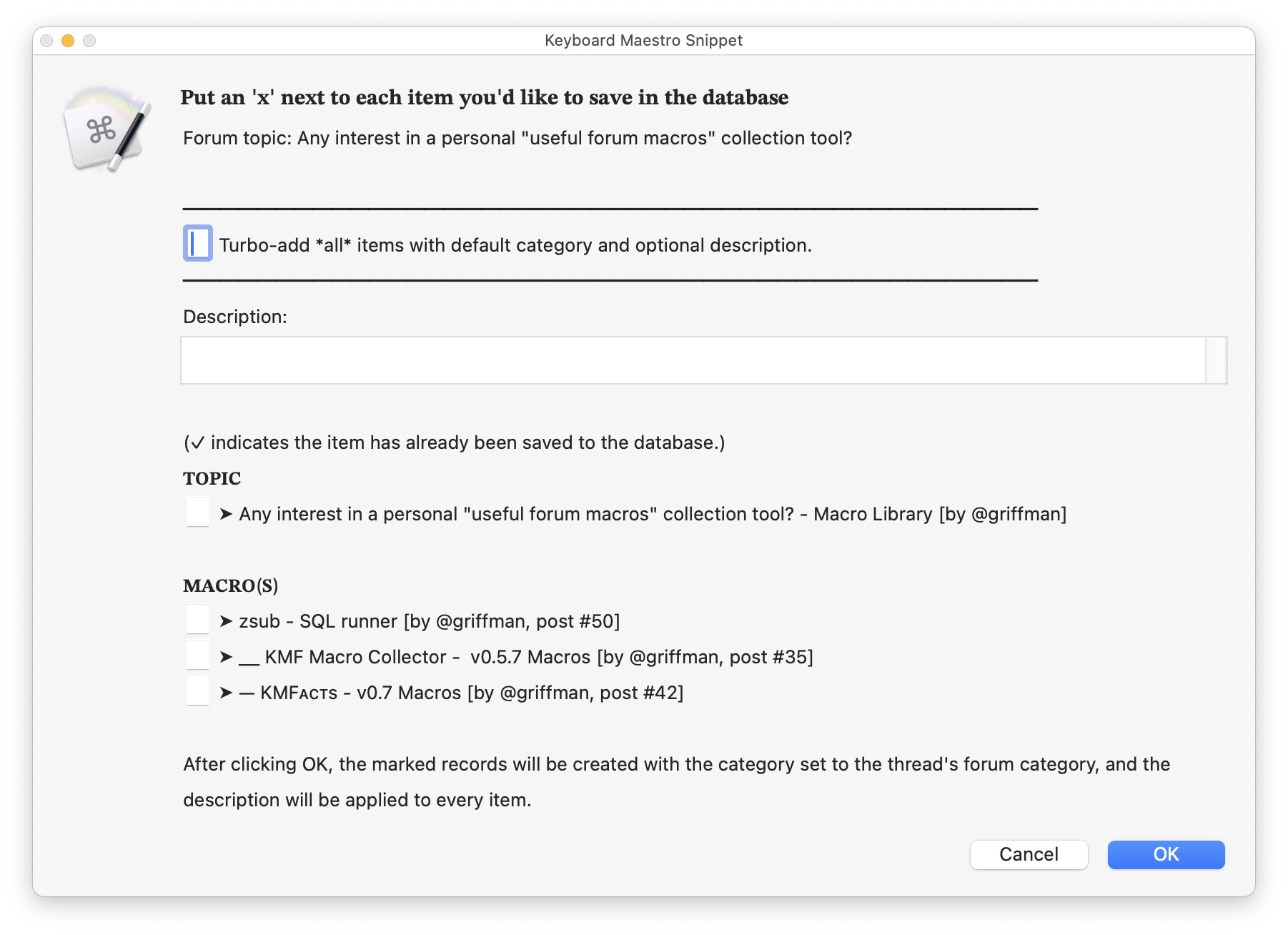
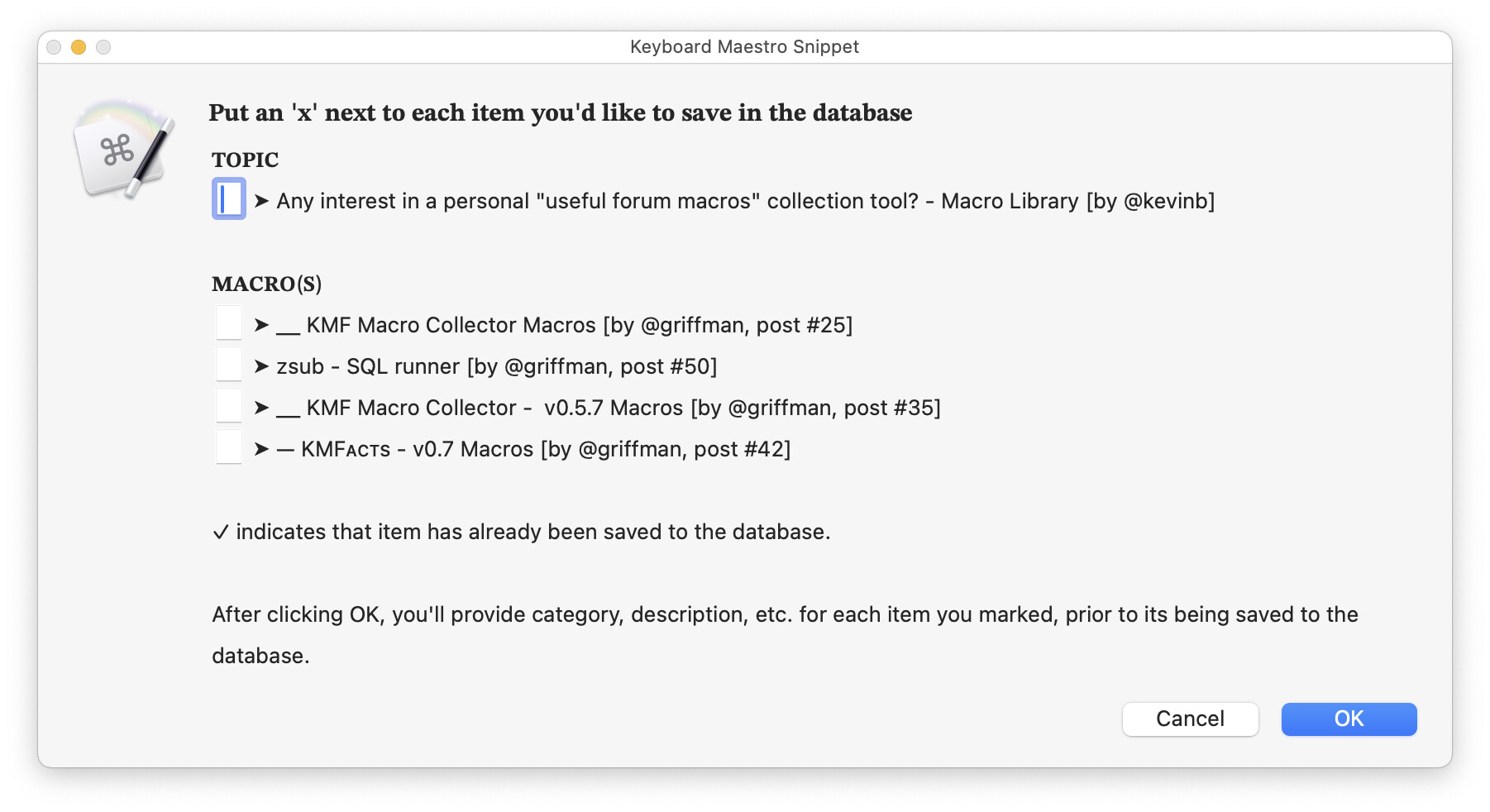
And in Detailed mode, it looks like this:
Summary mode is basically yesterday's Turbo mode with enhancements: It auto-categorizes things based on the forum's categories, and the description (optional) you enter will be applied to all saved items, whether that's via the Turbo box to get everything, or by checking individual items.
Detailed mode works as before, where you enter metadata for each item you add to the database.
I think Summary mode will be the best one to use, as you can collect items quickly yet still have basic categorization and comments.
Testing
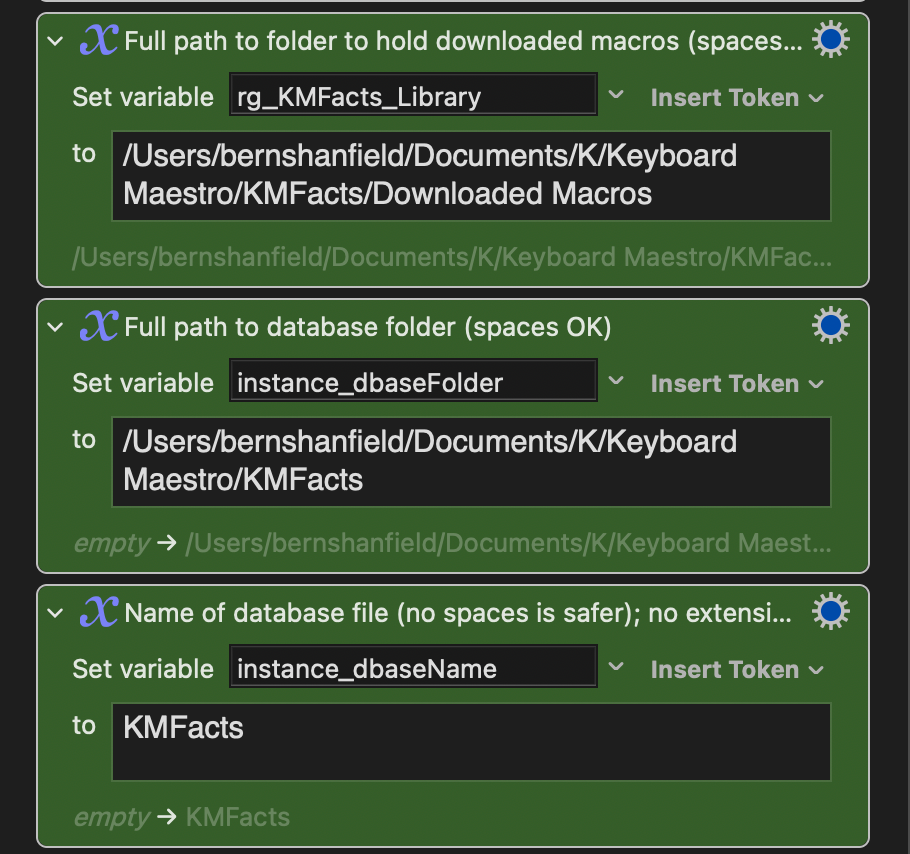
For hopefully the final time (ha!), please delete your database, and re-enter your path variables. The next release will be smart and check for the globals before it overwrites everything, so hopefully the last time for doing that, too.
Please let me know if you're still seeing the database lock issue. If you are, please post the paths you're using in the three green boxes in the settings macro.
Once again, no time has been spent on the output side; it works, but that's about all I can say for it. I think, though, that the data collection side is now pretty much done, assuming no major issues are found.
-rob.
1 Like
Hello Folks 
Thanks to all for your kind words about my accident… I’ll give my very best to ensure my shoulder heals the way it needs.
I have some good news in times of this situation I’m currently suffering from.
When it happens to be the case of rehabilitation I’ll not have to go to a rehabilitation center far away from home. I can go to a specialist in my area for two hours dayly where I only have to take a walk for about half an hour to get to.
And my bones are in a very good state no plates and crews to hold everything up in place …
Now back to the topic …
Rob (@griffman) as my last version I was able to test was 0.5.7 - there was this situation, where I needed to change the UUID‘s in the AppleScript Actions of your Installation Helper which you have to execute in KM because the UUID‘s were not equal to the ones from the Macros after installing them.
If you still have these UUID‘s hardcoded into the Macro - here is a tip to ensure nothing is breaking … use KMs tokens and Scripting and hardcode only the appropriate Macro‘s Names and the Group‘s Name to verify nothing was changed while returning the UUID‘s needed with AppleScript … it’s not very complex to do this since you’re having to deal with the Editor anyway and you are working with only one Group of Macros.
Maybe you could reduce the amount of AppleScript by calling a Branch of the relevant Macros via Subroutine Trigger to return their UUID‘s. I’ve done this a few times in My Macros.
Maybe Aurio (@Zabobon) or Nige (@Nige_S) could help you with the AppleScript code if you struggle.
Another thing what I wanted to mention, was the closing of the Text Window.
This was not able to be closed by the Macros. Therefor you should save the position for a mouse click that occurs to bring back the focus of this window, so it maybe could be closed automatically via Macro.
Now to your current version … I’ve seen this Version in action on a friends Mac via Video and he said it’s really great what you’ve done so far. He also hasn’t been able to detect any kind of clashes, so many thanks for all the hard work you’ve put into this project until now.
Thank you 
Happy coding and stay safe…
Greetings from Germany
Tobias
1 Like
@Nr.5-need_input Tobias, wishing you a good recovery!
Oh my goodness! It is only when these things happen that we get to appreciate the simple things that make our lives work - like the ability to even type something on a keyboard.
2 Likes
It's back to getting the lock file on each run. The difference is that it is now in the top-level folder instead of the subfolder.
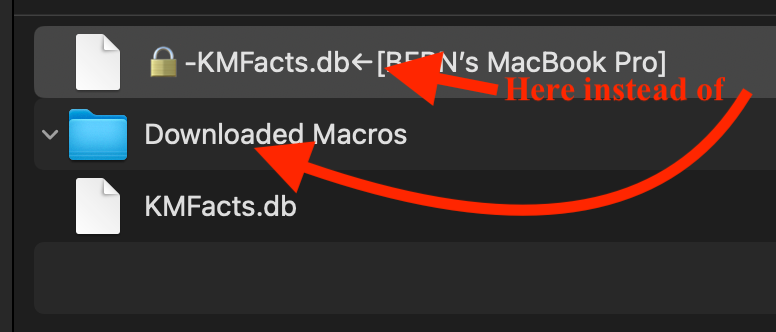
So weird. Can you please send me the three path values you're using? Feel free to send via message if you don't want that info in the forums.
-rob.
As I'm using those only for the setup bit, which was experimental anyway, I'll just go back to the usual setup routines I use for other shared macros that don't rely on UUIDs—it's not worth the effort to keep that in place :).
-rob.
Which text window? Do you mean the one in setup with instructions? It should close itself when setup completes, which is the only time I want it to close. If you mean some other text box, I'm not sure which one you mean?
-rob.