Assigning macro to non-standard key (Kinesis Freestyle Edge)

I’ve had a Freestyle Edge keyboard for years now and I have to admit I severely underutilize its macro capabilities, partly because its programming language is so clunky.

KM has supplanted that, but I’m wondering how I can assign macros to the 9 “game bank” keys on the left that are doing nothing? The only way I can think of (which I’d like to avoid) is programming those keys in the SmarSet app to be standard key combos, then assigning the KM macro to that key. Any other ways to identify these keys for KM?

Do they work as USB Device Triggers?

-rob.

1 Like

I assume you mean USB device key as a trigger (since USB device trigger would activate when the keyboard is plugged in, right?). Nope, they don’t seem to register.

1 Like

Yea, sorry, USB Device Key Trigger. If they don't show there, then I'm out of ideas—one was my limit :).

-rob.

I guess you would only need to do that once. But do you want to use those keys because they would be genuinely worth using or because it seems a pity that they are sitting there unused?

You say the keyboard’s programming language is clunky, and I must say that the provision of “macro keys” over on the left of the keyboard also seems a bit clunky to me. Work on getting those extra keys to output key combinations (or codes for otherwise unused single keys) and yes, you will end up with 9 keys that could trigger KM macros, but you will have to keep moving your hand across to use them and you will need to look each time to make sure your fingers have landed on the correct keys—so they will only be useful for situations in which you don’t mind your typing “flow” being broken.

Maybe that would be fine for your intended use of those macro keys. Otherwise, might it be worth thinking about replacing the Edge with a split keyboard that supports an easier and more flexible system such as QMK? That would allow you to get more use out of standard keys that are right beneath your fingers. I write as someone who did look into buying a Freestyle Edge years ago, before taking the QMK path.

Alternatively, you could just add a keypad to your setup (not necessarily even a programmable one!). That would be less work and would give you more keys if you definitely want them.

I’ve always been oriented toward using the keyboard over the mouse, but I’m at the age where it’s starting to get harder to learn new key combos. It can also be challenging to find key combos in Word that aren’t already used for something else. That bank of 9 keys is easily accessible, but more importantly, easy to remember. I wasn’t familiar with QMK, but looking at it makes me think it’s going to be a heck of a lot to figure out. Maybe I’m wrong.

The other thing is that the Kinesis is not only split, but it is tented as well, with palm rests. I took a quick look and I don’t really see any QMK- and Mac-compatible keyboards that are split and can tent.

A nominee for understatement of the year :).

-rob.

1 Like

If the keys are not spotted by either the Hot Key trigger or the USB Device Key trigger, then the only remaining options is to program the keys to simulate keys that can be detected or for something else to detect them and then trigger corresponding macros.

I’m no spring chicken and I cope! :grinning_face_with_smiling_eyes: It helps if one tries to be consistent about which modifier combinations are used for specific contexts. For example (and simplifying a bit) I will often choose ⇧⌃ for actions specific to an application, ⇧⌃⌥⌘ for something that would work anywhere and ⇧⌥⌘ for activating a frequently used application.

I then keep a note of those combinations. Yes, I know most people won’t want that sort of admin, but it helps me to keep things in order.

That said, if a key combination does not quickly become something that one can use through “muscle memory”, then a key combination is probably not the best kind of trigger to use! We don’t have to use hotkeys for everything.

That’s a good example, perhaps. What proportion of actions in Word are used very frequently? For functionality that is needed no more than once per document, it’s probably going to be more practical to call up a list of options than to remember a key for something that is rarely used.

That’s provided you don’t need them very often. Please excuse me repeating myself on this point!

I don’t see how. For example, let’s pretend that one wants to use “Grow Font” constantly. What’s easiest to remember, [combo]+G or button 5? Which is easy to reach, won’t need you to look and won’t cause any significant interruption to your typing?

But what if all modifier combinations are already in use for G (that’s 15 permutations) or if it is just more convenient to use another key to stand in for a modifier? That’s where, in QMK, one might use an easy workaround that involves layers, but I won’t burden your attention further by going into details now. :sweat_smile:

The initial setting up of QMK for a keyboard is a geeky process but if one follows the instructions carefully, I think it’s mostly all unfamiliar rather than inherently difficult. There is a learning curve, but it’s not rocket science, and how complicated it can become depends upon how ambitious one’s aims are—much as with Keyboard Maestro!

All QMK-programmable keyboards are compatible with Mac, Windows and Linux.

Tenting is built into a number of split keyboards, including the ZSA Ergodox EZ and the Dygma Raise. Some models, such as the Keychron Q11, offer optional tenting kits. For other keyboards, you can provide your own solution, from simply adding stick-on rubber feet to fancier DIY methods.

I’m puzzled that you should think so! Maybe it all just clicks with some people and not others, or maybe I was just especially motivated. Again I would draw a comparison with Keyboard Maestro; it’s beyond most people why anyone would want to bother with such an application, but those who have invested time and effort would agree that it pays off in the long term. :wink:

Well, if a keyboard requires a build environment and C programming, that seems complex to me. (I know many support Via and Vial, so there are options, but still, the root is at a very geeky level!)

-rob.

I then keep a note of those combinations. Yes, I know most people won’t want that sort of admin, but it helps me to keep things in order.

I do this as well; it does get a bit cumbersome, especially when I’m doing it across at least 6 different applications that I use regulary.

That said, if a key combination does not quickly become something that one can use through “muscle memory”, then a key combination is probably not the best kind of trigger to use! We don’t have to use hotkeys for everything.

Actually, the reason I asked this question in the first place wasn’t for “everyday” actions; it was for complicated, rare-use-case macros, usually for cleaning up text. Sometimes I need a complicated macro copying and pasting text between two documents, for example. I probably won’t need it for anything else ever, but when I do need it, I have to hit the button like 200 times. It would be handy to have a dedicated key for that.

There is a learning curve, but it’s not rocket science, and how complicated it can become depends upon how ambitious one’s aims are—much as with Keyboard Maestro!

That’s a good example. I severly underutilize KM (and also Alfred) just because I have a lot to do and not much time to spend learning. I understand that putting in a little time can pay off a lot, but I just have limits. Every day I spend time learning things, and that leaves less brainpower to learn software.

Tenting is built into a number of split keyboards, including the ZSA Ergodox EZ and the Dygma Raise. Some models, such as the Keychron Q11, offer optional tenting kits.

Thanks for this, but also no thanks LOL. Before you even posted this, you sent me down a rabbit hole and I came across Dygma, and started dreaming of the Defy, something that will have even more of a learning curve. Maybe the Raise is a better idea, but they’re pricey!

1 Like

For times like that I pick an easy hot key combo that'll override an already existing application shortcut for something I won't be using during this job -- ⌘P is a favourite, since I rarely print mid-edit. Disable the macro when the job is finished and the shortcut will work as normal again.

I think @kevinb has a lot of experience with programmable keyboards. He's the expert. And I would have followed his advice if I weren't stuck with the built-in keyboard ... although, to be honest, I'm not entirely convinced that it really works when you're typing fast. The way this is supposed to work just isn’t logical. He's not going to like hearing that.:sweat_smile: Forgive me, kevinb.:innocent: Maybe that’s just my ignorance.

Back to the actual topic, @kongjie I’m not entirely sure if I really understand what you’re getting at. But if it’s about not wanting to memorize all the shortcuts, KM offers many solutions. Palettes are probably the easiest. You don’t need a mouse for them. And the shortcut is displayed. And there are also ways to trigger something without moving your fingers from their starting position. That’s how I do it.

1 Like

Thanks for the compliment but I would humbly say only that I am in a surprisingly tiny minority of KM users that use QMK. :grinning_face_with_smiling_eyes:

On the day that you start using a programmable keyboard, I hope you won’t be doing so because of anything that I have written. You will soon be kicking yourself and I really wouldn’t to feel at all responsible for self-inflicted injuries!

I guess that you alluding to the recent discussion in which I mentioned “home row mods”. Those are a technique that is made possible with QMK but most QMK users do not use them. It’s rather like confusing a KM macro with Keyboard Maestro itself.

You are forgiven, my son. :baby_angel: I think though that I have always made it clear that home row mods—not QMK—take a lot of tweaking of settings to get right, a lot of practice and a slightly different typing technique. They are far from being universally popular among QMK users!

I don’t know why you say that “the way this is suppose to work just isn’t logical” as if it’s a con… or… one of your KM macros that try to do similar things… Forgive me now… :winking_face_with_tongue: Anyway, again, please don’t confuse such optional tricks with QMK as a whole.
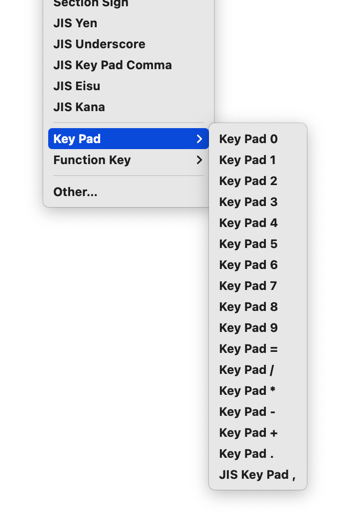
Yes indeed. If OP really wants to use key combinations though, and doesn’t mind having to reach for keys, I would again float the idea of adding a numeric keypad as an alternative to having to program those 9 macro buttons on the Freestyle Edge. Remember that the keys on those produce unique keycodes, so for example, keypad 3 is not the same as the top row 3.

That’s potentially a source of a lot of extra triggers for KM macros, especially if used with modifiers!

Basic numpads are inexpensive—and if OP or anyone else here did ever want to experiment with QMK, programmable keypads are cheaper than full keyboards! Anyhow, yes, there are all sorts of options for triggering macros in Keyboard Maestro. :wink:

1 Like

Yes, that is a little daunting at first. In practice though, every time one wants to update the keyboard, the old school (non-Vial) way is essentially:

  1. Edit the plain text keymap.c file as you wish.
  2. Run a one-line command in the terminal to compile.
  3. Run the QMK Toolbox utility and start the flashing of the firmware.

You’re right! It is C programming of sorts. I never think of it as being that though! Most of the time it's a case of opening the keymap file in a text editor and, with reference to the ASCII representation of the keyboard, doing something like, say, changing the text KC_TAB for a certain key to KC_BSPC in order to turn a tab key into a backspace key. Very easy.

For more “intermediate level” use with more complicated aims, it’s a case of searching the Web and copying and pasting lines and changing the bits that you need too—much like in the previous example.

So it’s not necessary for anyone but the most ingenious users to know any C. It’s more like being able to colour inside the lines! :grinning_face_with_smiling_eyes: You make a good point though. And yes, Via and Vial are alternatives if one is really worried!

1 Like

I keep the data in a table, with one column for the key combination and the other for what it does in a particular application. It’s handy to be able to sort incrementally in either column.

Woah! You need a macro for your macro! :upside_down_face:

Step this way, sir!

Yes, it’s often a question of priorities and best use of resources.

Yes, a comparatively inexpensive open-source model is fine for me. These also provide more customisation options but yes, that means there are suddenly a lot more rabbit holes to explore in order to get things just right..!

Don't worry, I'm a masochist.:slightly_smiling_face:

That's true. But if I want one thing, I want the other too.:man_shrugging:

I have to admit (with a heavy heart) that my KM macros aren't working. It's like the Olympics: taking part is what matters, not winning, my mother said :woman_feeding_baby:

Yes, you made that clear. But … I'm afraid it's like a perpetual motion machine. It's always just a little bit off from working perfectly... a little more fine-tuning, and then just a bit more, but in the end..

I think the downside of both is that you have to look at the keys. In any case, that's what bothers me the most. I prefer solutions that use the keyboard—or rather, keys that I can press quickly and blindly.

1 Like

Yes, that’s why using layers on a tiny keyboard is more ergonomic than having many keys spread over two or three USB devices—or indeed over one oversized keyboard!

Yes, and there's already a Keyboard Maestro solution to using them, which works with a separate keypad or a built-in one on an extended keyboard:

1 Like