I like changing my desktop’s wallpaper every day, so I’ve created a folder of jpegs I want to use. To make it easier to switch, I’ve created a KM macro using “Set Desktop Image” for each one, and I’ve assigned the same Hot Key trigger for all of them. So now, when I start my day, I hit the Hot Key trigger and it opens a Conflict Palette showing me all my choices.
My question is: is there I can automate this final step of choosing the day’s wallpaper so that each day the system chooses the next choice in the Conflict Palette without my having to do it manually?
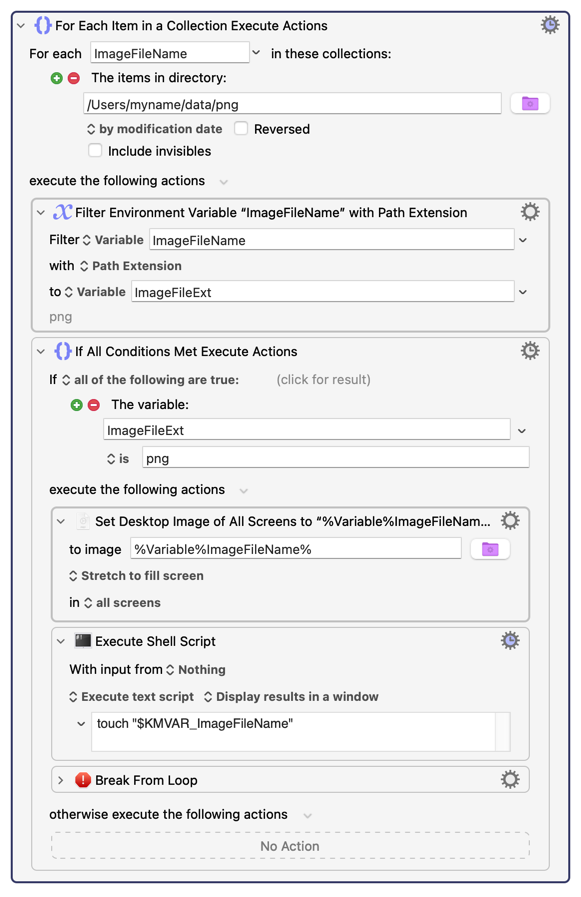
The goal is to change the wallpaper every day. That's easy. Using palettes to do that is a huge complication you don’t need, so I’m not going to use palettes. I’m going to do the job in the simplest way possible.
Step 1. Create a folder where you store your images. I will assume your images are “png” files.
Step 2. The following macro will set your desktop image to the file (in that folder) with the oldest date, then it will change the time of that file to the current time, in order to push it to the bottom of the list.
Step 3. Choose a trigger to get this macro to re-occur. I would recommend the cron trigger. You seem to want it to run daily.
Thanks. I could have made it simpler by using “true random” selection, but the way you worded the problem, you seemed to want to “rotate" the images in a “sequence”.