Not a coder, but hoping someone could think of a way I could have KM scan the current text selection or document and search for specific words (about 5 different terms, words) and then bound them with a special character (asterisk).
Example: I would want ipsum and sit bound with asterisks.
This: Lorem ipsum dolor sit amet, consectetur adipiscing elit, sed do eiusmod tempor incididunt ut labore et dolore magna aliqua.
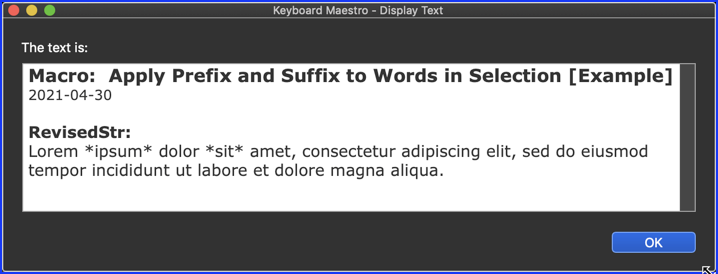
Would become this: Lorem *ipsum* dolor *sit* amet, consectetur adipiscing elit, sed do eiusmod tempor incididunt ut labore et dolore magna aliqua.
Below is just an example written in response to your request. You will need to use as an example and/or change to meet your workflow automation needs.
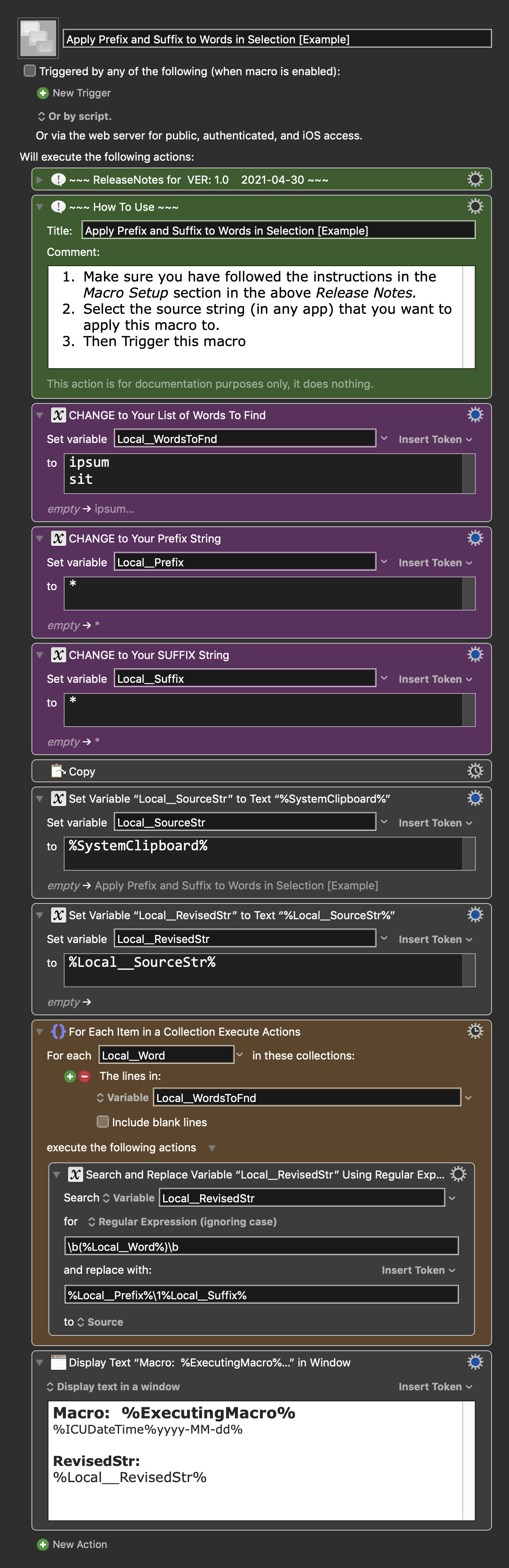
Note that you asked to "search for specific words", and this macro does that using the Regex definition of a "word" based on Regex Word Boundaries.
Also while you asked for bound the found words with an "*", this macro allows a separate setting for the prefix and suffix to be added to the found word.
First, make sure you have followed instructions in the Macro Setup below.
See the below "How to Use" Comment Action
This macro is just an example written in response to your request. You will need to use as an example and/or change to meet your workflow automation needs.
MACRO SETUP
Carefully review the Release Notes and the Macro Actions
Make sure you understand what the Macro will do.
You are responsible for running the Macro, not me. ??
. Make These Changes to this Macro
Assign a Trigger to this Macro .
Move this macro to a Macro Group that is only Active when you need this Macro.
ENABLE this Macro, and the Macro Group it is in.
For more info, see KM Wiki article on Macro Activation
.
REVIEW/CHANGE THE FOLLOWING MACRO ACTIONS:
(all shown in the magenta color)
CHANGE to Your List of Words To Find
One word per line
CHANGE to Your Prefix String
One or or more characters on one line
CHANGE to Your SUFFIX String
One or or more characters on one line
REQUIRES:
KM 9.0+ (may work in KM 8.2+ in some cases)
macOS 10.12.6 (Sierra)+
TAGS: @Example
==USE AT YOUR OWN RISK==
While I have given this a modest amount of testing, and to the best of my knowledge will do no harm, I cannot guarantee it.
If you have any doubts or questions:
Ask first
Turn on the KM Macro Debugger from the KM Status Menu, and step through the macro, making sure you understand what it is doing with each Action.