I’ve been using the shift-control-B shortcut to launch BBedit for at least 10 years, even predating my use of Keyboard Maestro. The latest version BBedit now throws up a message “The shift key was held down…” every time I start up the app, because it’s part of my launch shortcut. It’s really annoying, but I don’t want to change my keyboard shortcut since I’ve been using it so long.
Is there a way that I can keep my shift-control-B shortcut for launching BBedit, but “hide” the shift key being held while the app is launching?
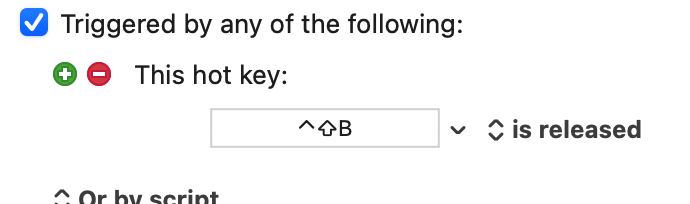
Try changing the hot key trigger method to “is released”.
BBEdit will then only be launched when the hot key has been released—so this won’t do exactly what you asked for, but it should do what you basically need, in that BBEdit will not change into a different mode when it is launched by your hotkey.
I'm pondering his question too. He said he was using this shortcut even before he had Keyboard Maestro! That means his Shift-Control-B shortcut is not a KM hotkey. I'm trying to read the BBEdit docs online to find out what hotkey mechanism he is using. I can't find it. Maybe he needs to explain what shortcut he is referring to if he was using it before KM.
Problem solved! And pretty cool that there are multiple ways to solve the problem (either @peternlewis ‘s Pause Until or @kevinb ‘s Is Released in the trigger). I tried Pause Until first, and it worked, and I’m all set.
ps I used to use QuicKeys going all the way back to v0.87 beta on my Mac Plus. A good bit down the road I got BBedit, and assigned my control-shift-B launcher shortcut. When one of the OS X releases killed QuicKeys (I forget which one that was) I switched to Keyboard Maestro and never looked back. Of course my control-shift-B shortcut came along for the ride.
This probably wont work in this situation, because most people will release the key (B) first, and the modifiers later. So the macro will still trigger while the modifiers are down.
It’s very much a human factors and timing thing. Maybe you release the modifiers first or at the same time or even just fast enough and so it works fine for you.
Yes, that’s it. I just tested myself and I do indeed release all keys at the same time with such keystrokes.
Such simultaneity is perhaps partly due, in two ways, to my use of “home row mods” on a programmable keyboard (yes, here he goes again… … Look, I’m sorry; I am using small text to discourage you from reading!). Releasing ⇧ and ⌃ is the same as releasing A and S, so it is exactly as convenient as releasing B. Also, with home row mods, you have to get used to being consistent with your timings, or you end up Aing when you should be ⇧ing, and so on!
It did cross my mind to dig out a “normal” Mac keyboard for testing and I shall be sure to do that in future if I reply to such questions! I shall also tie one hand behind my back and wear a blindfold.
And yes, <kbd class="__keyboard"> does in fact still work since the last Discourse update. When I mentioned that it was no longer available, I almost certainly had not realised that Markdown mode was no longer the default in the forum editor (the button in the top left above the editing field toggles the setting).
OP I arrived at this exact problem this week. I used skhd to launch BBEdit and it would also invoke the shift key feature. After trials I find that using karabiner will solve this because you can specify the mandatory modifier and they will be removed in the output.

 … Look, I’m sorry; I am using small text to discourage you from reading!). Releasing ⇧ and ⌃ is the same as releasing A and S, so it is exactly as convenient as releasing B. Also, with home row mods, you have to get used to being consistent with your timings, or you end up Aing when you should be ⇧ing, and so on!