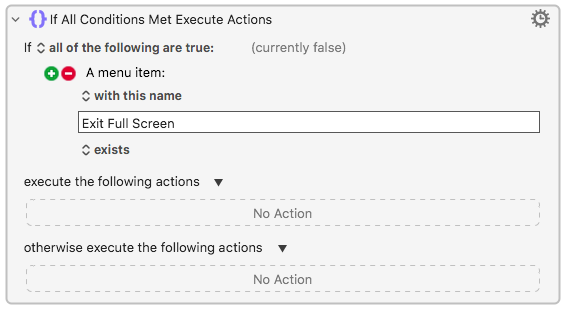
True, and if the goal is to determine if Full Screen mode is enabled, we can check the Menu Condition to determine if the Exit Full Screen menu item is enabled (or exists), whether or not it then gets selected. From the If Then Else action:
I did try that, but no. Besides, you can't OCR a single character. It takes two characters before OCR can return ANYTHING. (Although I didn't test the Tesseract OCR. Hmmm.)
That only works in apps with significant amounts of menu items. I'm sure you are aware many apps are not well-behaved.
Now there's an idea that never occurred to me. I will test it, and if it works, I will write a message in all caps that you are a genius.
That was the ONLY context that I knew where the system menu could disappear, so why would I mention it? As I said earlier, I didn't know there was any other way to make the menu bar disappear.
You and I may have to share credit for that genius assertion. I found one problem with your idea, which is that your idea only works if you know the vertical resolution of the screen, which is something that the user can change in System Settings. (And apps can change it too.)
But with your idea (and my 7 hour sleep) triggered a thought. What if I used the following Keyboard Maestro expression:

That seems to correctly detect (and display a 1 or 0) if the Menu Bar is visible. Even with full screen apps. Even when the resolution changes.
EXCEPTION: (except for the condition when the Menu Bar is using autohide, which is something I didn't even know existed until yesterday. So I haven't really tested for that yet.)
YOU (AND I) ARE GENIUS. There, I said it. Even Nige didn't get that solution! Even Nige!!!
Partly because I was working on "Is the menu bar visible" for Tahoe, partly because I don't think your solution is generally applicable -- I can break it by having the frontmost app's front window be full screen height on my second display yet still have the menu showing on my main.
So we're back to "What are you trying to do?"
The most generally correct test (not counting image detection) for "is an app in full screen mode" might be "is the top-left corner of the frontmost window at 0,0". But I don't know if that will work in all situations -- if you have "displays as separate Spaces", for example.
1 Like
Sorry, I made a bad assumption that everyone knew you could hide the menu bar all the time if you wanted to. My apologies.
-rob.
1 Like
I was just giving a funny compliment when I said, "Even Nige!"
Yes, and there may be other ways to break it, but a little extra code might be able to solve these problems, if they are indeed problems for the user, which is me, and in my case, these aren't problems. It's a good starting point, and it's done with nothing more than a KM calculation, which is pretty sweet, and fast.
Perhaps testing for fullscreen directly in your Applescript?
tell application "System Events"
	set frontPr to (get name of first process whose frontmost is true and visible is true)
	tell process frontPr to set isFullscreen to value of attribute "AXFullScreen" of window 1
end tell

return {frontPr, isFullscreen}
Although, this could fail if the frontmost app does fullscreen in an unconventional way.
One would think Accessibility scripting should be able to detect the menu bar and one would be right, especially considering UI Element Inspectors can do it with Objective-C or Swift using the Accessibility API. It's just that AppleScript cannot because it can't make C calls and deal with pointers.
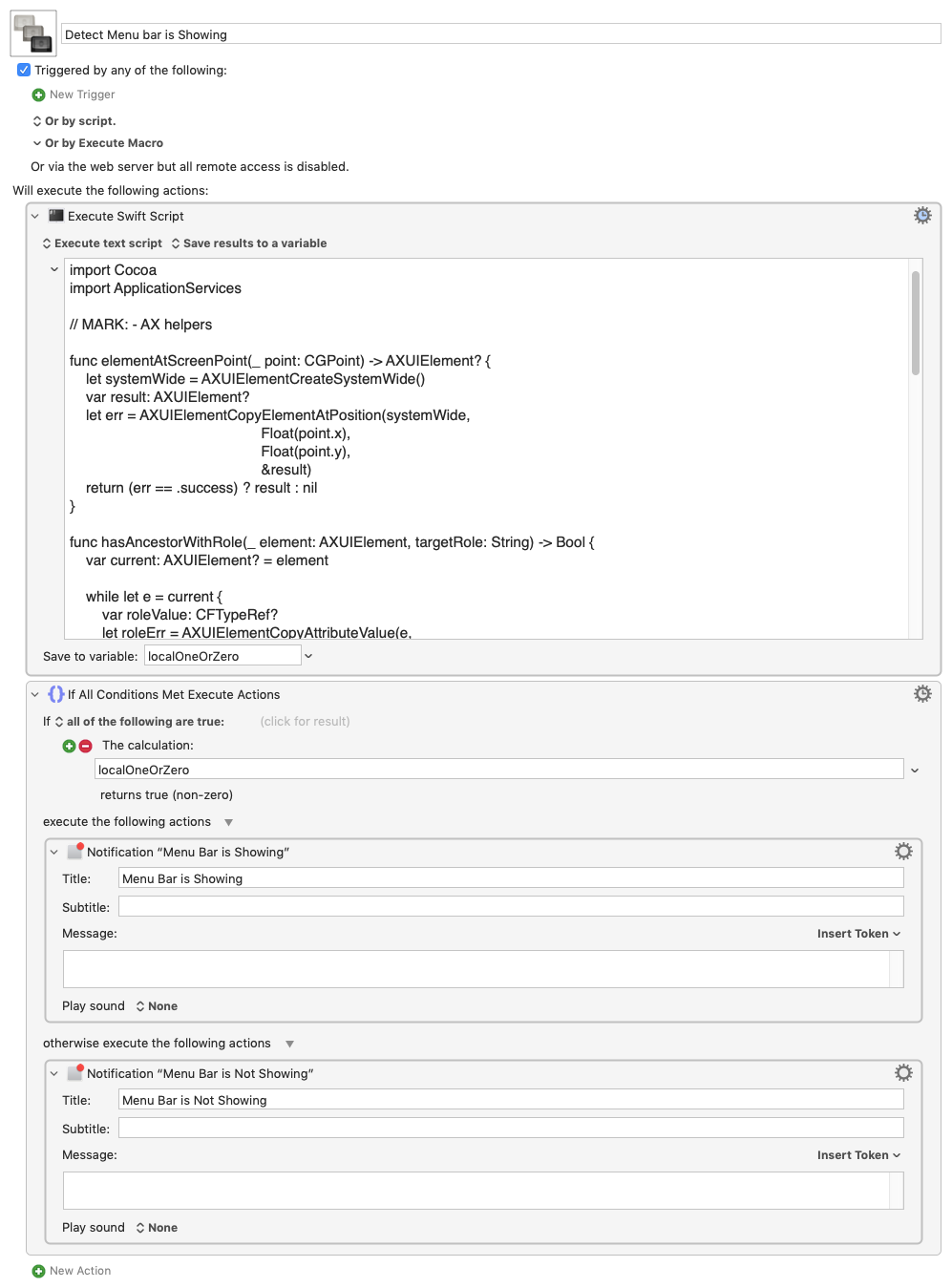
Here is a Swift script that queries the top left of the screen for the UI Element under that position and then checks if it or any of its ancestors contains the menu bar UI Element.
This is something I worked out with AI, so I don't pretend to really understand the C calls to the Accessibility API. It is, I think, pretty well-established code and should work--I hope.
If the menu bar is showing it returns 1, if not 0.
Swift
#!/usr/bin/swift

import Cocoa
import ApplicationServices

// MARK: - AX helpers

func elementAtScreenPoint(_ point: CGPoint) -> AXUIElement? {
    let systemWide = AXUIElementCreateSystemWide()
    var result: AXUIElement?
    let err = AXUIElementCopyElementAtPosition(systemWide,
                                               Float(point.x),
                                               Float(point.y),
                                               &result)
    return (err == .success) ? result : nil
}

func hasAncestorWithRole(_ element: AXUIElement, targetRole: String) -> Bool {
    var current: AXUIElement? = element

    while let e = current {
        var roleValue: CFTypeRef?
        let roleErr = AXUIElementCopyAttributeValue(e,
                                                    kAXRoleAttribute as CFString,
                                                    &roleValue)
        if roleErr == .success,
           let roleStr = roleValue as? String,
           roleStr == targetRole {
            return true
        }

        var parentValue: CFTypeRef?
        let parentErr = AXUIElementCopyAttributeValue(e,
                                                      kAXParentAttribute as CFString,
                                                      &parentValue)
        if parentErr != .success {
            break
        }

        // kAXParentAttribute always returns an AXUIElementRef when successful.
        current = (parentValue as! AXUIElement)
    }

    return false
}

// MARK: - Menu bar detection

func isMenuBarShowing() -> Bool {
    // Not exactly position (0,0).
    // AX uses global screen coords; origin is top-left of the main display setup.
    // To avoid edge weirdness, nudge slightly inward.
    let probe = CGPoint(x: 5, y: 5)

    guard let elem = elementAtScreenPoint(probe) else {
        return false
    }

    // If any ancestor has role AXMenuBar, we treat the menu bar as showing.
    return hasAncestorWithRole(elem, targetRole: kAXMenuBarRole as String)
}

// MARK: - Accessibility trust check (optional but helpful)

if !AXIsProcessTrustedWithOptions(nil) {
    fputs("This tool needs Accessibility permission in System Preferences > Security & Privacy > Privacy > Accessibility.\n", stderr)
    // You can exit(1) here if you want strict behaviour; for now, just continue.
}

// Run and print 1 (visible) or 0 (not visible)
let visible = isMenuBarShowing()
print(visible ? "1" : "0")
Detect Menu bar is Showing.kmmacros (5.5 KB)
1 Like
Wow. YOU ARE AN ULTRA GENIUS. It seems to work for my use cases.
Is there any reason you used Execute Shell Script instead of Execute Swift Script? Is one faster than the other?
 I'm glad it works!
I think mistakenly pasted the Swift snippet with the shebang line. I don't think it should make much difference if running from Execute Swift or Execute a Shell.
ADDENDUM: Unless, of course, the script is compiled, in which case the Execute a Shell should be faster.
The macro doesn't have the shebang and runs in Execute Swift.
I can hardly take any credit for this as I mainly got AI to generate the code and AI most likely scavenged it from web snippets that scavenged it from:
which, I now see, received an honorable mention--later rebestowed on XCode's version-- on KM's forum:
(FWIW, I still use it and never use the one bundled in XCode)
In other words, it's a long ways from original.
(Besides, in my neck of the woods, that designation is not necessarily a good thing. )
)