Hi there, I have a macro that works in ProTools, its a repetative function that loops until it runs out of commands.The problem I have is that I can't cancel it,I have the 'Kill al Macros' macro in Global Macro Group, but it just won't stop the macro.is it possibly because my macro has no pauses in it ? Not sure what to try next.Thanks
No that wouldn't make any difference. The Cancel All Macros Action will cancel all running Macros.
Is it possible that whatever triggers the Macro keeps triggering multiple instances of it? In other words if it is automatically being triggered that will keep happening so each time you Cancel All Macros you will be cancelling the running Macros and then a new instance of your Macro might be triggered?
Posting your macro is always a good start -- see the instructions at How to Post/Upload your Macros and Scripts.
It may be, for example, that you have an asynchronous AppleScript in there -- the macro will cancel but the script will continue. Or, as @Zabobon suggests, you are killing it but it is auto-respawning -- checking the most recent entries in the Engine.log file (~/Library/Logs/Keyboard\ Maestro/Engine.log) may give you some clues.
1 Like
Thanks for the reply , I've looked at the logs and to be honest doesn't mean much to me !e.g.0x600001633980 (com.apple.quicklook.QuickLookUIService - 53223) LSASN:{hi=0x0;lo=0x13a13a}>) took a while (1490 us)
2024-05-03 17:32:45 Running application query took a while (3730 us)
2024-05-03 17:33:01 Running application query took a while (7054 us)
2024-05-03 22:23:11 Editor Quitting
2024-05-06 16:28:31 Editor Starting 10.2
2024-05-06 16:28:32 Engine is already running
2024-05-06 16:29:07 Failed to find any 1Password metadata folder or bookmarks-default.json file
2024-05-06 16:31:34 Editor Quitting
2024-05-06 18:53:41 Editor Starting 10.2
2024-05-06 18:53:41 Engine is already running
2024-05-06 22:14:44 Editor Quitting
2024-05-08 11:08:44 Editor Starting 10.2
2024-05-08 11:08:44 Engine is already running
2024-05-08 11:13:19 Failed to find any 1Password metadata folder or bookmarks-default.json file
2024-05-08 14:38:44 Editor Quitting
2024-05-08 14:53:33 Editor Starting 10.2
2024-05-08 14:53:34 Engine is already running
2024-05-08 14:55:12 Running application query took a while (110129 us)
2024-05-08 14:56:06 Editor Quitting
2024-05-08 14:56:12 Editor Starting 10.2
2024-05-08 14:56:12 Running application query took a while (5165 us)
2024-05-08 14:56:12 Launch Engine
2024-05-08 14:56:12 Running application query took a while (3963 us)
2024-05-08 18:47:45 Running application query took a while (3387 us)
2024-05-08 19:39:33 Running application query took a while (3022 us)
2024-05-08 22:36:01 Editor Quitting
2024-05-10 10:24:15 Editor Starting 10.2
2024-05-10 10:24:15 Running application query took a while (3279 us)
2024-05-10 10:24:15 Engine is already running
2024-05-10 10:31:23 Running application query took a while (9809 us)
2024-05-10 11:56:14 Running application query took a while (6038 us)
2024-05-10 12:11:14 Running application query took a while (5586 us)
2024-05-10 23:04:54 Editor Quitting
2024-05-15 09:58:53 Editor Starting 10.2
2024-05-15 09:58:53 Engine is already running
2024-05-15 10:15:55 Failed to find any 1Password metadata folder or bookmarks-default.json file
2024-05-15 10:44:20 Running application query took a while (4009 us)
I'd really like to find a way of pausing/stopping or quitting the macro.
Strip and Name copy.kmmacros (251.7 KB)
Thanks for your indulgence.
Rich
That looks like the Editor log -- you need to look at the Engine log, which will show you when macros are executed.
That macro looks a bit off -- you've hundreds of "Type the ' Keystroke" and "Type the Enter Keystroke" actions. If you really do need those actions you'd do better to replace them all with
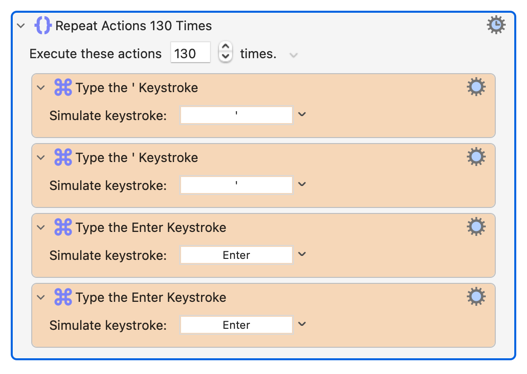
(Select the first four actions, right- or Control-click, select "Engroup" then "Repeat".) Your KM Editor will thank you for reducing its burden!
Thanks, I don't have the greatest of computer skills.Does this help ?
025-09-17 15:39:44 Execute macro “Strip and Name copy” from trigger Do Script
2025-09-17 15:39:54 Execute macro “CANCEL RUNNING MACRO” from trigger The Hot Key ⌥⌘Clear is pressed
2025-09-17 15:40:46 Execute macro “CANCEL RUNNING MACRO” from trigger Editor
2025-09-17 15:49:06 Execute macro “Strip and Name copy” from trigger Do Script
2025-09-17 15:49:18 Execute macro “CANCEL RUNNING MACRO” from trigger Duplicate Macro Palette
2025-09-17 15:49:24 Execute macro “Cancel All Macros” from trigger Duplicate Macro Palette
2025-09-17 15:51:58 Execute macro “Strip and Name copy” from trigger Do Script
2025-09-17 15:52:05 Execute macro “CANCEL RUNNING MACRO” from trigger The Hot Key ⌥⌘Clear is pressed
2025-09-17 15:52:11 Execute macro “CANCEL RUNNING MACRO” from trigger The Hot Key ⌥⌘Clear is pressed
2025-09-17 15:52:12 Execute macro “CANCEL RUNNING MACRO” from trigger The Hot Key ⌥⌘Clear is pressed
2025-09-17 15:52:13 Execute macro “CANCEL RUNNING MACRO” from trigger The Hot Key ⌥⌘Clear is pressed
2025-09-17 15:53:30 Execute macro “CANCEL RUNNING MACRO” from trigger The Hot Key ⌥⌘Clear is pressed
2025-09-17 15:54:09 Execute macro “CANCEL RUNNING MACRO” from trigger The Hot Key ⌥⌘Clear is pressed
2025-09-17 15:55:44 Execute macro “Strip and Name copy” from trigger Do Script
2025-09-17 15:55:57 Execute macro “Kill All Macros” from trigger Duplicate Macro Palette
2025-09-17 15:57:28 Execute macro “CANCEL RUNNING MACRO” from trigger Duplicate Macro Palette
2025-09-17 15:57:33 Execute macro “Kill All Macros” from trigger Duplicate Macro Palette
2025-09-17 15:59:17 Execute macro “Strip and Name copy” from trigger Do Script
2025-09-17 16:15:34 Running application query took a while (4930 us)
2025-09-17 16:15:34 Running application query took a while (4754 us)
2025-09-17 16:18:19 Start Watching HID Devices
2025-09-17 16:18:22 Execute macro “VisLM” from trigger The Hot Key ⌃⇧V is pressed
2025-09-17 16:18:25 Execute macro “X ANALYZE” from trigger Do Script
2025-09-17 16:18:52 Execute macro “X PREVIEW” from trigger Do Script
2025-09-17 16:18:58 Execute macro “X PREVIEW” from trigger Do Script
2025-09-17 16:19:17 Stop Watching HID Devices
2025-09-17 16:19:19 Execute macro “Edit Focus” from trigger The Hot Key ⌥⌘1 is pressed
2025-09-17 16:19:21 Execute macro “Edit Focus” from trigger The Hot Key ⌥⌘1 is pressed
2025-09-17 16:19:27 Start Watching HID Devices
2025-09-17 16:19:35 Stop Watching HID Devices
2025-09-17 16:21:59 Start Watching HID Devices
2025-09-17 16:22:08 Execute macro “X DEESS OPEN” from trigger Do Script
2025-09-17 16:22:21 Execute macro “X RENDER” from trigger Do Script
2025-09-17 16:22:57 Running application query took a while (4531 us)
2025-09-17 16:22:57 Running application query took a while (4003 us)
2025-09-17 16:23:02 Stop Watching HID Devices
2025-09-17 16:27:45 Start Watching HID Devices
2025-09-17 16:28:05 Stop Watching HID Devices
2025-09-17 16:29:05 Engine Quitting
2025-09-17 16:33:12 Engine Starting 10.2
2025-09-17 16:33:12 Old engine details remains a running process Running Engine Details/583
2025-09-17 16:33:12 Daemon launched by login window. Initiating login actions.
2025-09-17 16:48:24 Running application query took a while (4454 us)
2025-09-17 17:53:08 Engine Quitting
2025-09-17 18:00:41 Engine Starting 10.2
2025-09-17 18:00:41 Old engine details remains a running process Running Engine Details/583
So it's triggered with a script. Is this via Stream Deck, or have you got something else that might be automatically triggering it?
Are you sure it isn't being cancelled? As mentioned above, your macro does an awful lot of simulated keystrokes. It may be that the Event Queue and/or Pro Tools is buffering those -- even though you've killed the macro the buffer will continue to empty, sending those keystrokes to the frontmost app so it looks like the macro is still running...
1 Like
Thanks, yes I’m using a Streamdeck. Is there anyway at all that I could interrupt the macro ? I find it really useful but can’t wait for it to finish its cycle. Thanks again.
Again -- are you sure you aren't cancelling it? How do you know it is still running?
If it is a buffering issue and the macro has been cancelled but ProTools is still processing the already sent keystrokes you could try slowing things down so there isn't such a build-up -- for example, by Pausing before each set of 4 keystrokes:
Strip and Name copy (Repeat).kmmacros (10.6 KB)
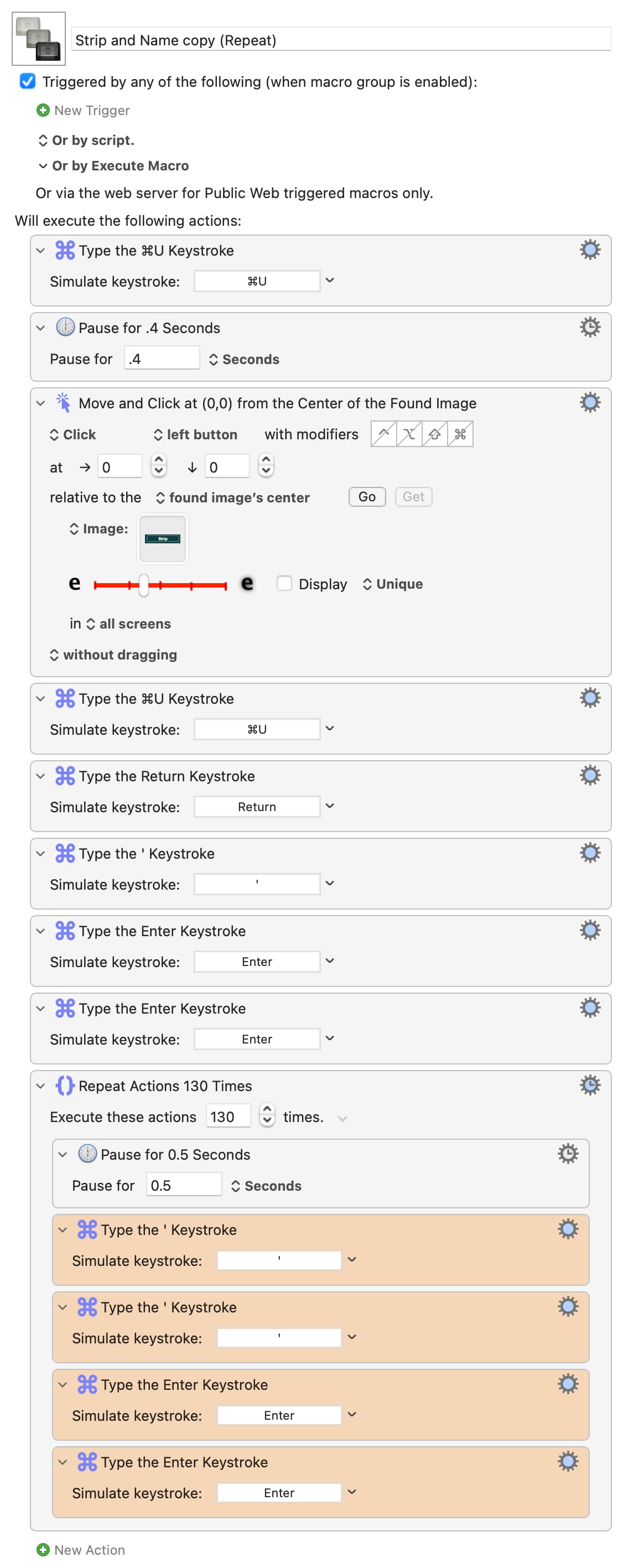
I don't use ProTools, but I'm sure there's a better way of knowing when you've finished the commands, rather than pointlessly repeating until you manually cancel. Hopefully someone else will chip in with some ideas.
When I want to do a repeating action on clips in Pro Tools, I first let the user select all clips on a track. Then I let the macro give them all a rating (who uses this ratings…? Nobody I think. So it won’t mess up I presume). Then I select the first clip, and start the loop: If it has the rating, do the action and jump to the next clip. else: cancel the loop.
1 Like
This was a great suggestion , and worked well. Thanks