
You have a lot of encoded characters there but I notice %2F, which equates to a slash (/). Slash characters cannot be used in the names of notes, so when using &file=, be sure to use just the name of the note and not a file path.
If you wish to pass the full file path to Obsidian, you will need to use this format: obsidian://open?vault=yjcaaaaa&path= (see Obsidian URI - Obsidian Help). However, I do not think you will find it necessary to provide the path rather than the note, provided that all the notes in your vault have unique names.
The other problem is that, unless you've changed the defaults for that action, %2F% will be processed as a KM token, E5 will then be normal text, %A4% is another KM token, A7 will be normal text, etc. See the "Convert Text to Unicode Characters" section of the manual for more.
Put that string into a "Display Text" action and you'll see what I mean:
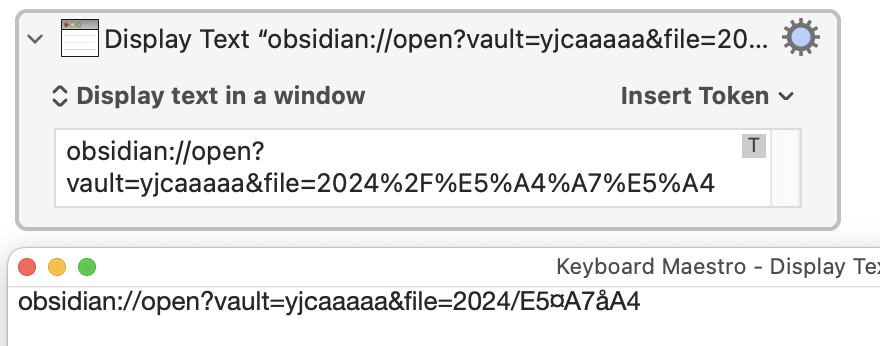
Note: It really helps if you upload the action itself, not a screen shot, so we can see the actual text along with any options you have set.
Something else looks wrong too -- I think %E5 is valid encoding for the Windows character set, but the equivalent for UTF-8 is %c3%a5. What is the actual file name?
So you could try setting the action to "Process Nothing":

...but check that URL carefully.
and the key question is – how are you obtaining and encoding that URL ?
( something seems to be amiss in that process )
I wonder if this topic may be helpful: Open URL: URL Including Chinese Characters Failed.